Enterprise visitor security: know exactly who is in every building, in real time.
Visitor screening for corporate and physical security teams: screen visitors before arrival, verify ID at the door, and stop anyone on your watchlist at every site.
.png)



Know who is on site right now, at every location.
A live roster replaces the paper log at every front desk.
Live roster at every site
Visitors, contractors and employees on site, updated as people check in and out.
Real-time presence dashboard
See who is in each building from one admin view, across every location.
Expected before they arrive
Hosts pre-register visitors, so you can screen them before arrival.
Stop a barred or flagged person at the door, at any site.
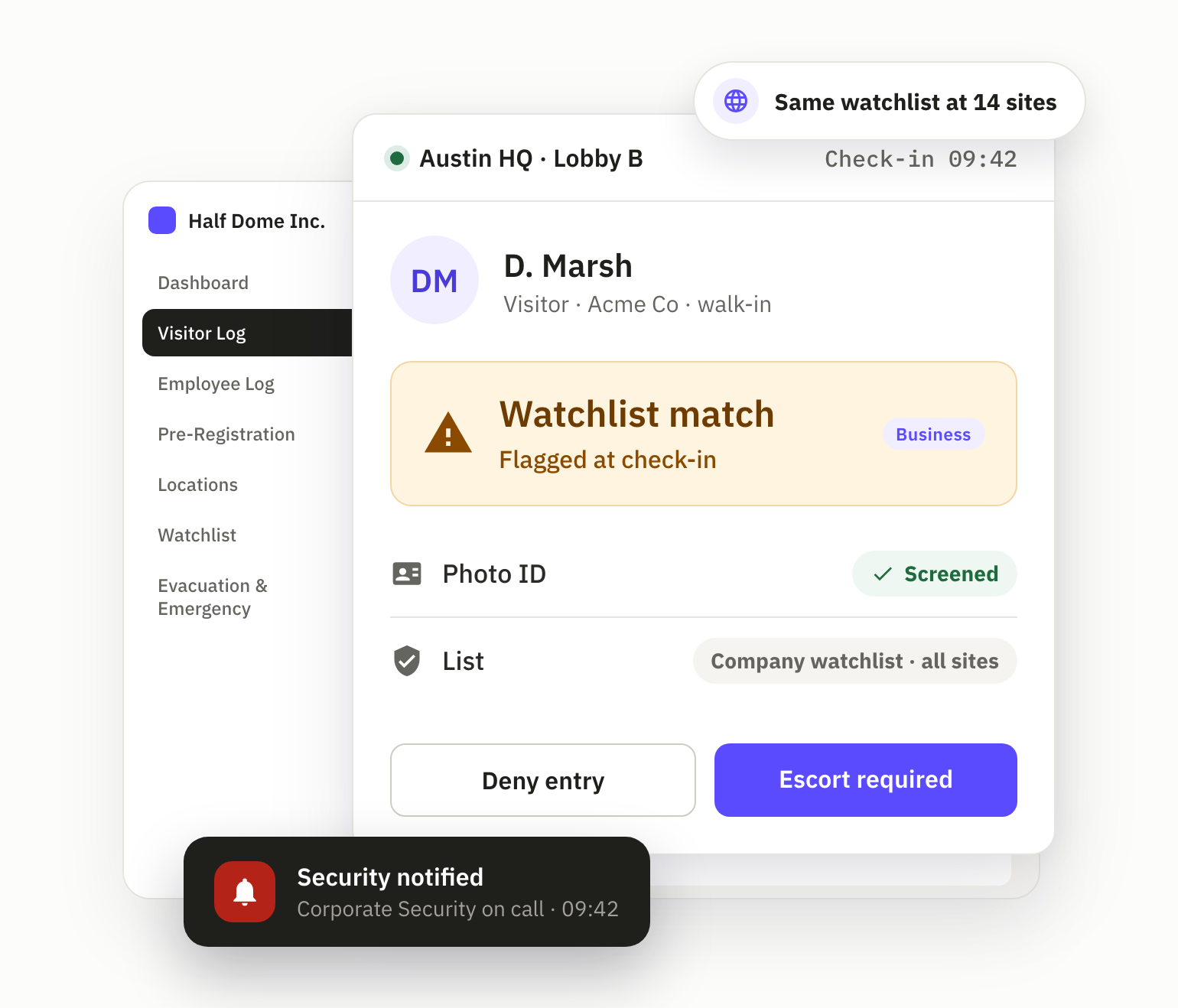
Keep the people you have barred, banned or flagged in one watchlist. It is checked at every check-in, at every location. On a match:
1 · HOLD
The check-in is held
A watchlist match is blocked or flagged automatically at check-in.
2 · ALERT
Security is notified
Your security team is notified of the match.
3 · DECIDE
Deny entry or require an escort
The front desk or host gets the decision: Deny entry or Escort required.
Verify every visitor's ID at the door.
Choose the depth each site needs. Every check is saved with the visit record.
Photo at every check-in
Every visitor is photographed, and the photo prints on the badge.
Photo ID screening
Photo ID screening at the kiosk, and recognition of returning visitors.
Smart ID verification
Liveness, forgery and expiry checks on government-issued ID.
Registry and denied-party screening
Offender registry screening at the kiosk, and Denied-Party Screening through the Visual Compliance (Descartes) integration.
Escorts and restricted areas, enforced at check-in.
Set the rules once, and every site applies them the same way.
Host approval and escort
Visitors wait for host approval. Escort-required visits follow your escort workflow.
Badges that show where they can go
Printed badges carry the photo, host, authorized areas and expiry.
Citizenship gating by area
ITAR-aware citizenship gating verifies nationality and blocks entry to controlled areas.
Real-time alerts to your security team, from the site desk to the GSOC.
Security hears about the exceptions. Hosts hear about arrivals.
Watchlist and registry matches
Security is notified when a visitor matches your watchlist or an offender registry.
After-hours attempts
Limit visitor check-in to authorized hours. Security is alerted to out-of-policy attempts.
Host notifications
Hosts are told the moment their visitor arrives, by Teams, Slack, email or SMS.
Account for everyone in an evacuation.
Live roster, no paper log
A real-time roster of visitors, contractors and employees at each location.
Muster point check-in
Track who has checked in at each muster point, with a headcount per location.
Evacuation alerts
Alerts go out by email and on the kiosk. SMS alerts are available.
Visitor access control that connects to your doors and your alerting.
Visitly is not an access control system. It screens, approves and badges each visitor, then hands that record to the systems you already run.
Access control
Genetec Security Center · Brivo · LenelS2 NetBox · Kisi · C•CURE 9000
Emergency notification
AlertMedia · Everbridge · InformaCast · Omnilert · Rave Mobile Safety
Start with a pilot. Then put every site on the same standard.
STEP 1
Pilot at 1–5 sites
Set your visitor policy, watchlist and badges at the sites you choose, on your own iPads or our kiosk bundles.
STEP 2
Prove it at the door
First sites typically go live in about 14 days, including SSO cutover. Your team sees every check-in, flag and badge from day one.
STEP 3
Roll out to every site
Apply the same policy everywhere from one admin view, with local settings where a site needs them. Multi-region rollouts take 30–60 days.
After an incident, the record is already there.
Every entry, timestamped
Check-in, check-out, host, purpose, photo and signed documents, in an immutable audit log.
Search and export
Search the audit log and export visitor records as evidence for an investigation or an audit.
Retention you control
Set data retention periods to match your policy.
"Visitly is incredibly easy to implement — our teams were up and running in less than a week. It streamlined how we track visitors and maintain compliance across our facilities."
.png)
replaced the iLobby module stack
ITAR audit findings reported in their last cycle
"We reported zero ITAR audit findings in our last cycle. Visitly's citizenship gating and evidence tooling support our ITAR program. We replaced the iLobby module stack with one Visitly contract, on hardware we already owned."

Built for sites where visitor security isn't optional.
Every plant and substation, one standard.
Evacuation roll call by building, per-zone PPE attestation and OSHA evidence export, with visitor entry records that support your NERC CIP program.
Screening built for clinical environments.
Visitor screening and watchlist checks at every clinical and administrative entry point, with a HIPAA BAA available.
One dashboard, every building.
Consistent check-in policy, one watchlist and host notifications across every building, from one admin view.
Built for the strictest programs.
ITAR-aware citizenship gating, escort workflow and evidence export that support your ITAR and CMMC Level 2 programs.
One visitor security standard at every site. Priced per location.
Core security features: SSO, MFA and the immutable audit log. Visitly holds SOC 2 Type II and ISO 27001 certifications.
$1,000
/location/yr
Your front desk with core security features. Up to 5 sites.
SSO + MFA · Immutable audit log · iPad kiosk + web check-in
$2,000
/location/yr
Multi-site with security screening and advanced badges. Up to 15 sites.
Watchlist screening · Facial recognition · Advanced Badge Designer · HIPAA BAA
Custom
Strategic vendor for regulated multi-site enterprises. Unlimited sites.
ITAR-aware citizenship gating · SCIM 2.0 · Named CSM, 99.9% SLA
Questions security teams ask before a pilot.
What happens when someone on our watchlist or BOLO list tries to check in at another site?
The same watchlist is checked at every check-in, at every location. A match is blocked or flagged, security is notified, and the front desk or host gets a deny-entry or escort-required decision.
How does visitor ID verification work?
Every visitor is photographed at check-in. You can add photo ID screening at the kiosk, or Smart ID verification with liveness, forgery and expiry checks on government-issued ID. Each check is saved with the visit record.
Is Visitly an access control system?
No. Visitly manages visitor access at the entrance: screening, approvals, badges and the record of who is on site. It connects to your access control system, including Genetec Security Center, Brivo, LenelS2 NetBox, Kisi and C•CURE 9000.
What happens after hours?
You can restrict visitor check-in to authorized hours. Visitly alerts security to out-of-policy attempts.
What happens in an evacuation?
Visitly sends evacuation alerts by email and on the kiosk, keeps a live roster of who is on site at each location, and tracks who has checked in at muster points. SMS alerts are available. Visitly also integrates with AlertMedia, Everbridge, InformaCast, Omnilert and Rave Mobile Safety.
Will this work across all of our locations?
Yes. One admin view sets the policy for every site, and each location keeps its own settings where it needs them. You can start with a pilot at a few sites.
How does visitor screening stop unauthorized visitors?
Every visitor is photographed and screened at check-in. Visitly checks your watchlist, screens or verifies the visitor's government ID, and applies host approval and escort rules, so the front desk isn't making the call alone.
Can Visitly manage contractors and vendors, not just visitors?
Yes. Contractors check in at the kiosk or in the MyVisitly app, with host approval, escort rules and signed documents, and recurring visits are scheduled once.
Does it integrate with our security systems?
Yes. Visitly has 60+ integrations, including Genetec, Brivo and LenelS2 access control, AlertMedia and Everbridge for emergency notification, and Slack and Teams for host notifications. API access is available.
How fast can we deploy?
Self-serve setup takes about 1 week, SSO rollouts about 14 days including the SSO cutover, and multi-region rollouts with SCIM, access control and HRIS 30–60 days.
What support is included?
Switch Assist moves you off your current system, site by site. A named Customer Success Manager, a 99.9% uptime SLA and 24/7 phone and chat support are available.
Our IT team will run a security review. What can we send them?
Send them the Trust Center. Visitly holds SOC 2 Type II and ISO 27001 certifications, and supports single sign-on with MFA through Okta or Microsoft Entra ID. The SOC 2 report, ISO 27001 Statement of Applicability, CAIQ Lite and pen-test summary come in one request under NDA.
Open the Trust Center →Stop guessing who's in your building
The lobby is the perimeter. Visitly is the record of who crossed it.