If you don’t know who’s on-site, you’re already behind.
Workplaces now run across multiple locations, flexible schedules, and strict compliance demands. Managing employee presence has become a daily challenge for businesses of all sizes.
- 82% of companies in regulated industries have increased their spending on access control and compliance tools.
- 65% of global businesses now operate with at least one hybrid or remote team.
Outdated check-in systems can’t handle this shift. They miss key functions like real-time tracking, compliance checks, and secure identity verification.
Modern check-in software solves these problems. It helps companies automate entry, monitor presence, meet regulations, and integrate smoothly with their existing systems.
This blog breaks down the top five platforms leading the way in 2026, so you can pick the one that fits your workplace best.
Which Employee Check-In Software Is Best for Your Workplace?
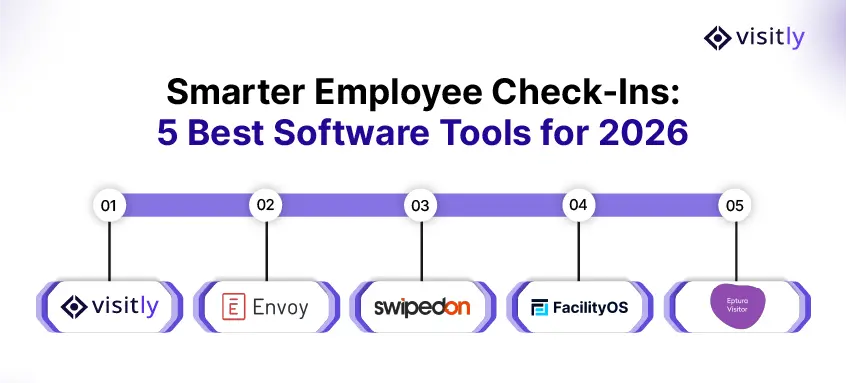
The following platforms stand out for their features, reliability, and adaptability to modern workplace needs:
- Visitly
- Envoy
- SwipedOn
- FacilityOS
- Eptura Visitor
As workplace safety, compliance, and efficiency become increasingly important, choosing the right employee check-in software can make all the difference. Whether you’re managing a hybrid office, industrial site, or enterprise headquarters, this quick comparison highlights the best solutions of 2026 based on features, suitability, and pricing.
Here’s a quick comparison table of the top employee check-in software in 2026 to help you choose the right fit for your organization:
Top Employee Check-In Software: Quick Comparison
| Software | Best For | Key Features | Starting Price |
|---|---|---|---|
| Visitly | Enterprise-ready workplaces | Badge printing, face ID, compliance workflows, audit logs | From $1,000 per location per year |
| Envoy | Hybrid offices | Hot desk booking, health checks, check-in/out automation | $362/location/month (Premium, billed annually) |
| SwipedOn | SMBs and mid-sized offices | Digital sign-in, evacuation management, contact tracing | Now sold as Sign In App |
| Eptura Visitor | Industrial and logistics sites | Access control, dock check-ins, multi-site management | Custom pricing |
| Proxyclick | Privacy-centric organizations | GDPR-focused design, data deletion workflows, ID verification | No published price; quote only |
Let’s Explore the Top Employee Check-In Tools One by One
Below is a closer look at the five leading platforms, what they offer, how they stand out, and which types of workplaces they work best for:
1. Visitly: Best for Enterprise-Grade Employee Check-Ins Across Locations
Visitly is a compliance-first check-in platform built for organizations that manage multiple sites, operate in regulated industries, or require advanced security protocols. Originally designed for visitor management, Visitly now offers full-featured employee check-in capabilities that help enterprises maintain operational transparency and safety compliance across all their locations.
What Does Visitly Offer?
Visitly offers a comprehensive visitor management system with features like biometric check-in, pre-arrival screening, real-time presence tracking, customizable compliance workflows, audit-ready logs, seamless system integrations, and multi-device support, all aimed at improving security, streamlining operations, and enhancing the visitor experience.
Visitly – Core Features
| Core Feature | Description |
|---|---|
| Face ID and Biometric Check-In | Uses facial recognition or QR code check-in for secure and authorized access |
| Pre-Arrival Screening | Enables submission of NDAs and compliance forms before arrival |
| Real-Time Presence Dashboard | Provides live visibility into employee attendance across sites |
| Custom Compliance Workflows | Configurable rules for PPE checks, health screenings, and entry restrictions |
| Regulatory Audit Logs | Maintains exportable records for OSHA, HIPAA, and ISO audits |
| System Integrations | Connects with Active Directory, Slack, Teams, and access control platforms |
| Multi-Device Support | Compatible with iPad kiosks, mobile apps, and desktops |
Why Visitly Stands Out?
Best for: Enterprise-ready workplaces in regulated industries
- Built for industries where compliance and traceability are critical (e.g., healthcare, manufacturing, logistics)
- Supports site-specific workflows and automated approval processes
- Centralized dashboard to track employee presence across multiple locations
- Customizable compliance modules for PPE, health checks, and safety inductions
- Integrates with core business tools like Active Directory and Slack
- Helps eliminate manual logs and reduce admin workload
- Strengthens safety enforcement and audit readiness
- Offers high flexibility without compromising on security
Pricing
Visitly is $1,000 or $2,000 per location per year; for custom deployments, talk to sales. Interested organizations can request a demo and talk to sales about pricing based on specific operational needs.
| Vendor | Published price | What that price includes |
|---|---|---|
| Visitly Starter | $1,000 per location per year | Visitor check-in, single sign-on, audit log |
| Visitly Business | $2,000 per location per year | Adds watchlist and photo ID screening |
| Envoy Premium | $362 per location per month, billed annually ($4,344 per year) | Single sign-on and badge printing; watchlist and ID scanning need a custom Enterprise quote |
| FacilityOS | From $225 per month for visitor management | Emergency, security and contractor modules priced separately |
| Eptura Visitor | No published price | Quote only |
| SwipedOn | Now sold as Sign In App | Its pricing page redirects to Sign In App's |
Prices from each vendor's pricing page, Q4 2026. See Visitly pricing and the full comparison.
For more information on pricing, click here.
2. Envoy: Ideal for Hybrid and Flexible Workplaces
Envoy offers a modern, polished solution tailored for businesses managing flexible work arrangements. With tools that support hot desk booking, visitor access, and health screening, Envoy has positioned itself as a go-to solution for companies transitioning to hybrid work environments.
What Does Envoy Offer?
Envoy offers a robust workplace management platform focused on security, flexibility, and employee experience. Here are its key features:
Envoy – Key Features
| Feature | Description |
|---|---|
| Employee Check-In and Check-Out | Allows employees to register entry and exit via app or kiosk |
| Hot Desk and Room Booking | Supports on-demand workspace reservations |
| Health Screening Workflows | Prompts employees to submit wellness or vaccination status if required |
| Visitor Logs and Watchlists | Tracks guests and alerts teams of flagged individuals |
| Badge Printing | Automates the creation of ID badges during check-in |
| Team Notifications | Sends real-time updates via Slack, Microsoft Teams, or email |
Why Does Envoy Stand Out?
Best for: Hybrid offices and remote-friendly teams
- Designed for flexibility and ease of use
- Lets employees plan in-office days and reserve desks or workspaces
- Offers quick, frictionless check-in with mobile or desktop access
- Centralizes access logs and visitor management for HR and ops teams
- Supports customizable health and safety protocols
- Ideal for tech companies managing hybrid or flexible work setups
- Features a clean, intuitive interface for smooth daily use
- Integrates with tools like Slack, Teams, and access control systems to reduce admin tasks
Pricing
Add-ons such as security compliance features or analytics may be priced separately.
Envoy Premium is $362 per location per month, billed annually ($4,344 per year); watchlist and ID scanning need a custom Enterprise quote.
3. SwipedOn: Budget-Friendly Option for Small to Mid-Sized Teams
SwipedOn provides an easy-to-implement check-in solution designed with small businesses and mid-sized offices in mind. The software is streamlined, cost-effective, and includes the essential features needed for basic attendance tracking and safety workflows.
What Does SwipedOn Offer?
SwipedOn delivers a streamlined check-in solution designed to improve workplace safety, efficiency, and compliance. Here are its key features:
SwipedOn – Key Features
| Feature | Description |
|---|---|
| Employee Sign-In/Out | Enables digital check-in and check-out via kiosk or mobile app |
| Evacuation Management | Supports real-time roll calls and headcounts during emergency situations |
| Contact Tracing | Identifies potential exposure risks using time-stamped check-in records |
| Contractor and Delivery Logs | Tracks activity of contractors, vendors, and deliveries on-site |
| Custom Branding | Allows customization of the check-in interface to reflect company branding |
| Simple Dashboard | Offers an intuitive backend for managing visitor data, settings, and workflows |
Why SwipedOn Stands Out?
Best for: Small to mid-sized offices, co-working spaces, and agencies
- Offers a simple, no-fuss solution for visitor and employee check-ins
- Ideal for workplaces with low compliance requirements but high need for organization
- Easy to set up with little to no technical experience needed
- Digitizes attendance tracking and streamlines front-desk operations
- Great fit for legal offices, creative agencies, and shared workspaces
- Improves visitor management without overcomplicating processes
- Cost-effective with low upfront investment
- Clean interface that focuses on essential features only
Pricing
Pricing may vary based on user volume and additional modules like SMS notifications or delivery tracking.
SwipedOn is now sold as Sign In App: its pricing page redirects to Sign In App's.
4. FacilityOS: Best for Industrial Sites and High-Security Facilities
FacilityOS is engineered for industrial, logistics, and critical infrastructure environments that demand stringent access controls and compliance documentation. From biometric check-ins to dock delivery management, FacilityOS provides end-to-end coverage for secure employee and contractor entry.
What Does FacilityOS Offer?
FacilityOS provides a modern check-in experience tailored to today’s workplace needs. Here are its key features:
FacilityOS – Key Features
| Feature | Description |
|---|---|
| Biometric and ID-Based Access | Uses government ID or biometric data to confirm identity |
| Access Zone Management | Restricts entry based on security clearance or role |
| Real-Time Entry Alerts | Sends notifications on unauthorized or suspicious entries |
| Delivery Check-Ins | Manages shipments and monitors dock activity |
| ERP and SCADA Integrations | Syncs with enterprise resource and automation systems |
| Multi-Site Management | Centralized dashboard for large-scale deployments across facilities |
Why Does FacilityOS Stand Out?
Best for: Industrial sites, warehouses, and logistics operations
- Built for environments with strict security and operational protocols
- Integrates with access control systems and industrial software platforms
- Automates entry workflows, including compliance checks and zone-level restrictions
- Supports enforcement of SOPs across different facility areas
- Ideal for managing shift-based workers and high-traffic industrial zones
- Provides detailed user permission controls, real-time alerts, and reporting
- Helps secure sensitive areas with layered access rules
- Suits businesses in manufacturing, distribution, and logistics sectors
Pricing
Organizations can contact the vendor directly for a demo and quote.
FacilityOS visitor management starts at $225 per month; the emergency, security and contractor modules are priced separately.
5. Eptura Visitor: Privacy-First Platform for Data-Conscious Organizations
Eptura Visitor stands out in sectors where data privacy and regulatory compliance are a top priority. Its architecture supports GDPR-first principles, making it an ideal solution for organizations handling sensitive employee and visitor data.
What Does Eptura Visitor Offer?
Here’s a table outlining Eptura Visitor’s key features that support privacy, compliance, and secure employee check-ins.
Eptura Visitor – Key Features
| Feature | Description |
|---|---|
| Pre-Check-In Workflows | Gathers required forms and identity data before entry |
| QR Code Access | Issues secure, one-time QR codes for employee entry |
| Automated Data Deletion | Configures time-based rules to remove stored personal data |
| Identity Verification | Uses facial recognition or document match to validate identities |
| Compliance Integrations | Works with building access systems and HR platforms |
| Privacy Controls | Gives users and admins granular control over data visibility and access |
Why Does the Eptura Visitor Stand Out?
Best for: Privacy-focused industries like finance, law, and compliance-driven organizations
- Designed for workplaces where confidentiality and data governance are top priorities
- Supports strict internal compliance and audit-readiness
- Offers advanced privacy features and data minimization options
- Allows granular control over what data is collected, stored, and shared
- Enables secure employee check-ins without risking digital privacy
- Compatible with secure hardware like ID scanners and badge printers
- Ideal for firms in financial services, legal sectors, and high-security environments
- Balances transparency with control, making compliance easier to manage
Pricing
Bulk discounts and enterprise packages are available for companies operating at multiple sites.
Eptura Visitor has no published price; quote only.
How to Choose the Right Employee Check-In Software?
Selecting the ideal check-in software involves more than reviewing feature lists.
The right tool should align with your operational model, compliance requirements, and future scalability. Here are the key factors to consider:
- Prioritize Compliance
Ensure the platform supports industry regulations such as OSHA, HIPAA, or GDPR.
- Evaluate Flexibility
Choose a tool compatible with hybrid, remote, and fully on-site work environments.
- Assess Security Features
Look for robust security options like facial recognition, ID verification, and access control zones.
- Plan for Scalability
Ensure the software supports multi-location setups and centralized dashboards.
- Review Integrations
Confirm it integrates with your existing systems like HRMS, Active Directory, Slack, or Teams.
- Automate Where Possible
Opt for platforms that automate compliance forms, training verification, and approval workflows.
- Prioritize User Experience (UX)
The check-in process should be fast and intuitive to avoid delays or frustration.
- Check Hardware Compatibility
Ensure the software supports your hardware setup, whether iPad kiosks, mobile apps, or desktop check-in stations.
Questions to answer before you book a demo
Write down your own requirements first. A demo goes better when you can tell the vendor what the software has to cover.
- How many employees, shifts and locations will check in?
- Should employees, visitors and contractors sit in one record, or does another system already handle some of them?
- Who signs people in today: a front desk, a security officer or nobody?
- Which records will an auditor or your safety lead ask for, and how long must you keep them?
Sites that run shifts should test check-in at shift change, when the line is longest.
Check-in records and time and attendance
Some vendors on this list describe check-in as attendance tracking. The two are different jobs. A check-in record shows who is in a building now and who was there on a given day. Security teams use it for evacuation roll calls and audits. Time and attendance software calculates hours worked for payroll and scheduling.
Some products do both. Ask each vendor which job the product was built for, and whether check-in records can be exported to your HR or payroll system. Your HR lead decides which record payroll relies on.
Conclusion: Building a Future-Ready Workplace
Employee check-in software is a foundation for workplace security, compliance, and productivity in 2026. Whether your priority is regulatory compliance, site visibility, user experience, or cost-efficiency, the right tool can transform how your organization functions daily.
Among the platforms reviewed, Visitly stands out as the most comprehensive solution for organizations with complex compliance requirements and multi-site operations. Its ability to offer real-time oversight, customizable workflows, and robust integrations makes it ideal for enterprises seeking a high level of control and visibility.Book a personalized demo with Visitly to see how you can streamline check-ins, enforce compliance, and gain full visibility across all your workplace locations.
FAQs
What is employee check-in software?
Employee check-in software records when each employee arrives at and leaves a site, using a kiosk, a mobile app or a QR code. The record gives the security team a live list of who is in each building, sorted by site, that can be used for an evacuation roll call or an audit.
Which staff check-in and check-out software suits a multi-location company?
Pick the one that puts employees, contractors and visitors in one record for every site. Visitly does this through an iPad kiosk and the MyVisitly mobile app, with a live roster per location for evacuations and audits. Envoy pairs check-in with desk and room booking.
How much does employee check-in software cost?
Cost is usually set per location per year, with the plan tier as the main variable. Visitly lists $1,000 and $2,000 per location per year. Envoy's Premium visitor plan is $362 per location per month, billed annually. Eptura Visitor is quote only. Prices as of Q4 2026.
How does check-in software help with evacuations and safety audits?
It gives you a current list of who is on-site and a time-stamped history to export. OSHA expects employers with an emergency action plan to account for employees after an evacuation, and a live roster makes that faster than a paper sheet. Your safety lead decides what your plan requires; the software supplies the record.
Can employee check-in software connect to our directory and single sign-on?
Yes, most platforms sync employees from an identity provider such as Entra ID, Okta or Active Directory, so nobody maintains a second list. Ask each vendor which plan includes single sign-on, directory sync and SCIM provisioning, because those often sit in a higher tier. On Sign In App, SSO and SCIM arrive at the Pro plan.
Is employee check-in software the same as time and attendance software?
No. Employee check-in software records who is in a building, for security, evacuation and audit purposes. Time and attendance software calculates hours worked for payroll and scheduling. Some products do both, so ask each vendor which job it was built for and whether check-in records can be exported to your HR or payroll system. Your HR lead decides which record payroll relies on.