Efficient front desk operations are critical for modern workplaces.
Here are two strong, recent statistics to support the importance of efficient front desk operations in modern workplaces:
- 86% of employees and visitors say a fast and seamless front desk experience impacts their first impression of a company.
- Poor front desk management contributes to 38% of lost productivity during daily workplace operations.
They set the tone for every visitor interaction and impact everything from safety to compliance. Traditional sign-in books or unmonitored entry points are outdated because:
- No real-time security or identity verification
- Slow and inefficient check-in process
- No audit trail or compliance support
That’s where iPad check-in kiosk software comes in.
iPads offer a sleek, secure, and intuitive interface for guests, while visitor management platforms handle the rest by automating check-ins, capturing signatures, printing badges, and sending real-time host notifications. In this blog, we review the 5 best iPad check-in kiosk software platforms for 2026, and help you choose the one that fits your front desk operations best.
The Ultimate Guide to iPad Check-In Kiosk Software for 2026
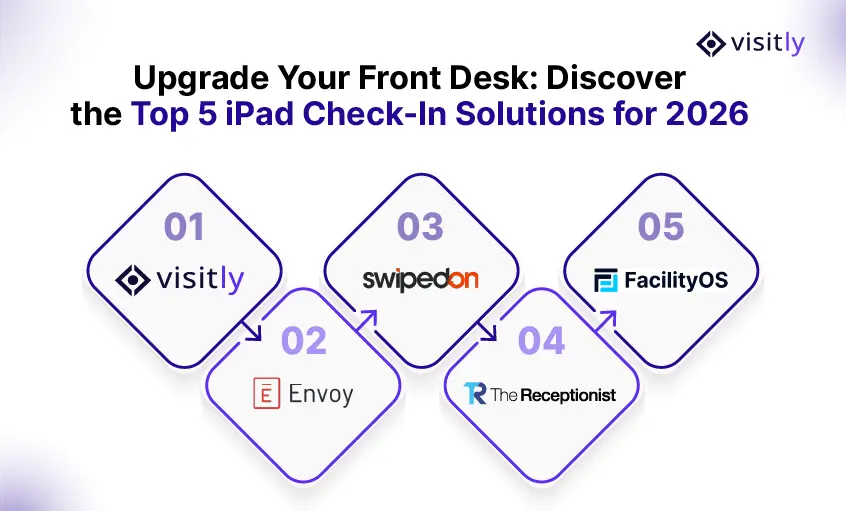
The best iPad check-in kiosk software for 2026 includes:
- Visitly
- SwipedOn
- FacilityOS (formerly iLobby)
- Envoy and
- The Receptionist.
These platforms offer features like touchless check-ins, badge printing, visitor logs, host notifications, and compliance tools. Each is designed to improve front desk efficiency, enhance security, and create a professional visitor experience.
1. Visitly – Best All-Around iPad Check-In Software
Best for: Startups to enterprises looking for simplicity, security, and compliance.
Visitly is a top-rated visitor management software built specifically for iPads. It combines quick setup, strong customization, and robust compliance features, all in a clean, intuitive interface. It is equipped with features such as qr-code check-in, emergency evacuation, visitor watchlist, offender check (school) etc.
Why it stands out
Visitly offers all the essentials (and more) without adding complexity. Setup takes minutes, and admins can deploy the iPad kiosk without IT help. For companies that want fast check-ins and strong compliance coverage, Visitly delivers.
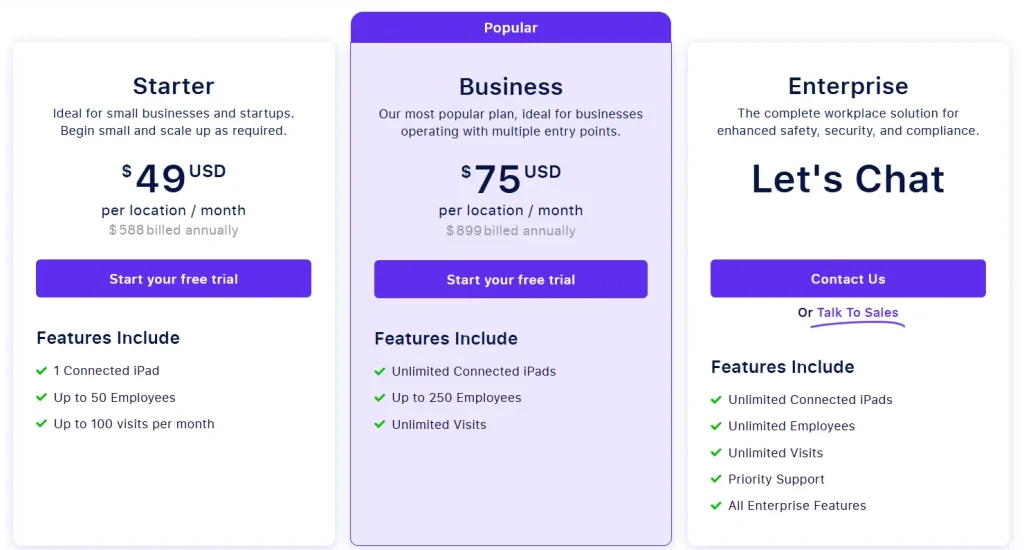
Pricing
2. Envoy Visitors – Best for Enterprise-Grade Integration
Best for: Mid-size to large companies using modern office software stacks.
Envoy is one of the most popular and mature iPad check-in kiosk solutions. It’s trusted by thousands of companies globally, especially those with multiple offices, layered visitor policies, and a heavy reliance on third-party tools like Microsoft 365, Slack, Okta, and access control systems.
Why it stands out
Envoy is deeply customizable and built for companies that live inside SaaS ecosystems. It’s also ideal for workplaces with high visitor traffic or strict security policies.
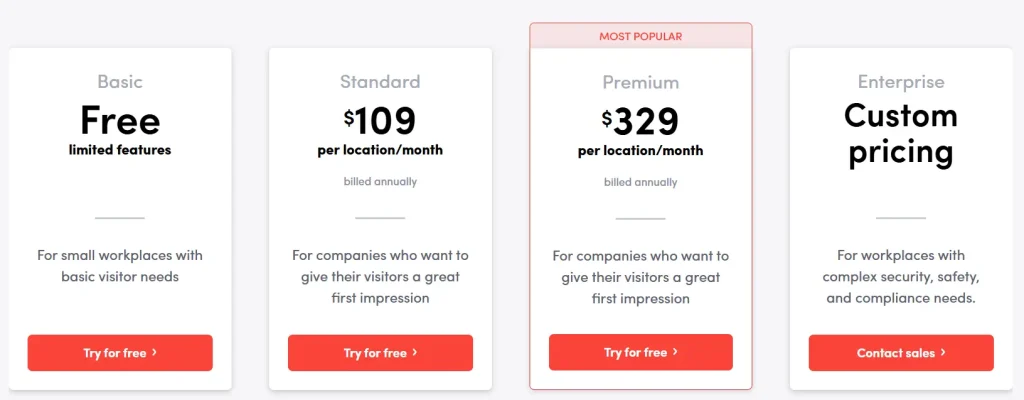
Pricing
3. SwipedOn – Best for Simple, Fast Deployment
Best for: Small businesses, co-working spaces, and growing startups.
SwipedOn focuses on delivering a lightweight, reliable visitor experience without requiring deep configuration or training. It’s perfect for offices that want professional-grade tools but don’t have large IT departments.
Why it stands out
SwipedOn is ideal for organizations that want strong visitor controls but without enterprise-level pricing or integration complexity.
Pricing
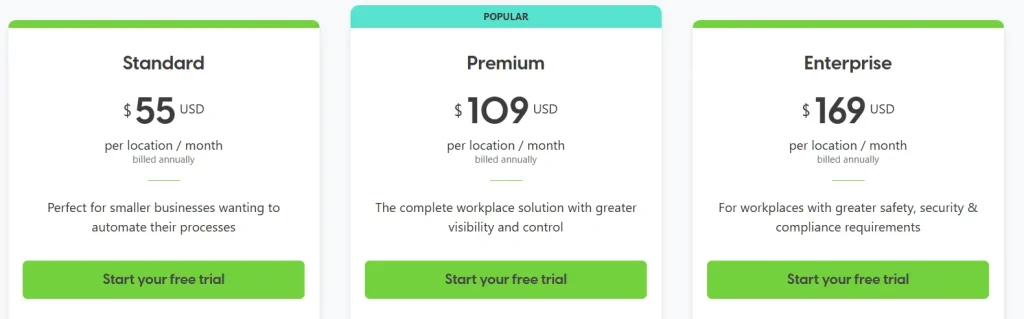
4. The Receptionist for iPad – Best for Custom Workflows
Best for: Healthcare, legal, education, or hybrid offices with multiple visitor types.
The Receptionist allows you to build custom workflows for different visitor groups whether it’s clients, patients, contractors, or deliveries. It’s designed to reduce front desk interruptions by handling everything digitally and directly through the iPad.
Why it stands out
This is the best option if your organization handles diverse guests with specific requirements. The Receptionist puts workflow control in your hands.
Pricing

5. FacilityOS – Best for High-Security and Compliance Facilities
Best for: Government, manufacturing, logistics, and secure corporate campuses.
FacilityOS (formerly iLobby) is a full-featured visitor management and access control platform. While it supports iPads, its real strength lies in compliance management and hardware integrations with turnstiles, RFID, and other security systems.
Why it stands out
FacilityOS is not just for check-in, it’s built for regulated industries. If compliance, training, or credential tracking is a must, this is your tool.
Pricing

Why iPads Are the Preferred Hardware for Visitor Check-In
iPads are now the go-to device for digital reception systems because of the following reasons:
- Touchscreen makes it easy for anyone to use
- Portable and fits into any reception setup
- Battery-powered for uninterrupted use
- Works offline when internet is down
- Looks professional and matches modern office spaces
Let’s look at the table below for a clearer breakdown of features and benefits:
Your front desk is the first impression. An iPad check-in kiosk feels modern, secure, and efficient. It replaces cluttered sign-in sheets and inconsistent receptionist handling with a sleek, automated experience that runs 24/7 without downtime.
iPad Check-In Software Comparison at a Glance – 2026 Edition
See how the top iPad-based contractor and visitor management tools stack up in features, pricing, and use cases. Whether you need fast QR sign-ins, badge printing, or compliance tracking, this 2026 comparison helps you choose the right fit instantly.
How to Choose the Right iPad Kiosk Software
Choosing the best iPad kiosk software comes down to matching features with your specific business needs. Thus, choose iPad kiosk software that:
- Sets up easily on iPads
- Supports custom visitor workflows
- Sends instant host notifications
- Offers security and compliance tools
- Prints visitor badges
- Works offline
- Handles multiple locations
- Tracks visitor data and reports
- Integrates with tools like Google and Slack
- Fits your budget with flexible pricing
Let’s look at the table below for more details.
Choosing the right solution depends on more than just budget. Ask:
- Do you need compliance support like NDAs, HIPAA, or SOC2?
- Will visitors check in via iPad or their own phone?
- Do you need badge printing or ID scanning?
- Should your system integrate with access control, calendars, or internal messaging?
- How many locations do you manage?
- Do you have multiple visitor types with unique check-in needs?
Pro tip: Start with a free trial. All the software listed here offers one, and it’s the fastest way to evaluate fit.
Conclusion
The front desk has evolved into a strategic hub serving as a first line of security, a compliance checkpoint, and a key element of brand experience. The right iPad check-in kiosk software makes a measurable difference in how efficiently and securely your organization operates.
Here’s the final recommendation:
- Choose Visitly for a fast, flexible, and secure all-in-one solution.
- Go with Envoy if integrations and global scale matter.
- Use SwipedOn for simplicity and affordability.
- Pick The Receptionist if you need customized visitor flows.
- Select FacilityOS when compliance and access control are critical.
Whichever solution you choose, ensure it meets both your current needs and future growth plans.
Looking to transform your front desk into a seamless, secure, and professional experience?
See Visitly in action. Book a demo today and discover how effortless check-ins can be.
FAQs: iPad Check-In Kiosk Software
1. What is iPad check-in kiosk software?
It’s a digital solution that turns your iPad into a self-service visitor sign-in system. Guests can register, submit forms, and notify hosts without receptionist involvement.
2. Do I need Wi-Fi for these systems?
Yes, but most also support offline mode. Once reconnected, all data syncs automatically.
3. Is badge printing supported?
All major solutions support badge printing via AirPrint or connected printers.
4. Can I use this for employees too?
Yes. SwipedOn and Visitly both allow employee check-in alongside visitors.
5. How secure is visitor data?
Top systems like Visitly, Envoy, and FacilityOS use encrypted storage, access control, and data retention policies aligned with global compliance standards.
6. What hardware do I need besides an iPad?
Typically just a stand and optional badge printer. Some systems support label printers, QR scanners, or RFID readers.
7. How long does setup take?
Most solutions can be set up in under an hour with minimal IT support.
8. Do these tools support branding?
Yes. You can customize the welcome screen, logo, email templates, and badge design.
9. Can I use it across multiple locations?
Yes. All five solutions support multi-location deployment with centralized management dashboards.
10. Can visitors pre-register before arrival?
Absolutely. Most platforms allow pre-registration links to be sent in advance so guests can fill out forms, upload ID, and speed up check-in on arrival.