Poor contract management is an expensive problem.
- On average, companies lose 8.6% of a contract’s value due to inefficient processes.
- The administrative burden is significant—up to 29% of a company’s workforce is involved in managing these contracts.
These challenges are driving a substantial shift toward automation.
- A whopping 67% of companies plan to invest in contract tools
- 81% already have plans to implement automation in the coming year.
This trend highlights a clear move away from manual contractor management methods and toward streamlined software solutions. A robust contractor management software is a critical tool for maintaining efficiency, compliance, and security across all industries.
This blog will explore the key factors to consider when choosing the right solution and the essential features it should have.
Why Do You Need Contractor Management Software?
A contractor management software like Visitly is required for ensuring projects run smoothly, on time, and within budget in industries such as construction, manufacturing, and healthcare.
However, managing contractors using outdated methods like paper logbooks, spreadsheets, and email communication leads to numerous challenges:
- Security Gaps: Without a secure way to verify contractor identities and monitor who’s on-site, unauthorized individuals may gain access to your facilities, posing significant risks to safety and security.
- Compliance Issues: Manually tracking contractor credentials, certifications, and other essential documents increases the likelihood of compliance violations. Regulatory bodies require that companies maintain specific documentation, and missing or outdated records can lead to fines and penalties.
- Inefficiency: Manual processes are time-consuming and prone to error. Paper-based systems slow down contractor check-in and can cause delays that disrupt workflow.
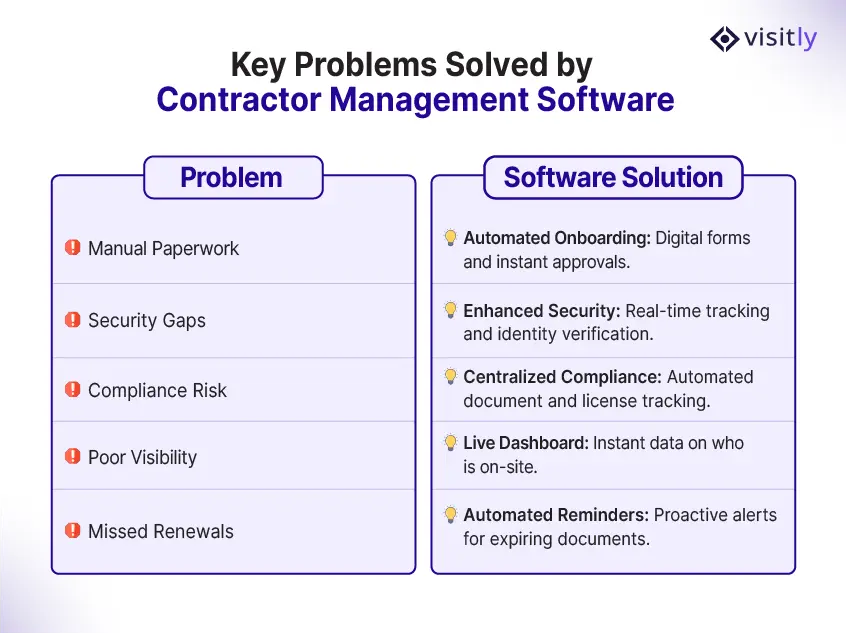
By adopting a contractor management system, you can automate key processes like contractor check-in, safety induction sign-off, and real-time contractor monitoring. This leads to a safer, more efficient, and compliant workplace.
What are the Key Benefits of Contractor Management Software?
Investing in contractor management software brings several key benefits to your business, including:
- Enhanced Security: A contractor management system helps ensure that only authorized individuals can access your facilities. With features like ID checks at check-in and real-time contractor tracking, you can reduce the risk of unauthorized access and improve on-site security and compliance management.
- Streamlined Compliance: Regulatory compliance is essential in industries such as healthcare, manufacturing, and construction. A manufacturing visitor management solution records each contractor check-in, safety induction acknowledgement, and signed document, giving you dated evidence for audits. Certification and insurance tracking usually sits in a contractor prequalification system, separate from visitor management.
- Operational Efficiency: Manual processes are prone to errors and delays. Contractor management software automates tasks like pre-registration, document signing, and real-time contractor monitoring. This streamlines the entire contractor lifecycle, saving time and reducing the risk of human error.
- Real-Time Tracking: With real-time tracking, you can monitor contractor movements on-site, ensuring you have up-to-date information about who is on your premises. In the event of an emergency, this feature enables you to respond quickly and efficiently.
- Better Reporting & Auditing: Contractor management system offers automated reporting and auditing capabilities. You can generate reports on contractor activity, track entry/exit logs, and maintain a digital audit trail for compliance purposes. This is invaluable for regulatory audits and internal assessments.
9 Things to Consider Before Choosing the Best Contractor Management Software
Choosing the right contractor management system for your organization is critical for long-term success.
Here are nine key factors to consider when evaluating potential software solutions:
- Ease of Use: A user-friendly interface is crucial to ensuring your team can adopt the software quickly and effectively. Look for a system that requires minimal training and offers intuitive navigation for all users.
- Scalability: As your business grows, so will your need for contractor management. Ensure that the software can handle an increasing number of contractors, facilities, and users without compromising performance.
- Compliance Features: Compliance is non-negotiable, especially in regulated industries. Look for contractor management software like Visitly or Envoy that collects signed documents at check-in and keeps a dated record of every contractor visit. Tracking of certification and insurance expiry usually sits in a contractor prequalification system, separate from visitor management.
- Integration Capabilities: Your contractor management system should integrate seamlessly with other enterprise systems, such as HR, security, and facility management. This ensures smooth workflow and data consistency across platforms.
- Real-Time Tracking and Reporting: The ability to track contractor movements in real time and generate detailed reports is essential. Ensure the software can provide instant updates on contractor check-ins/outs, along with customizable reporting features.
- Mobile Accessibility: Given that many contractors are on the go, mobile access is essential. Look for software that offers mobile-friendly features, allowing both contractors and team members to use it from anywhere.
- Support and Customer Service: Excellent customer support is crucial for resolving any issues quickly. Ensure the software provider offers timely assistance and robust training resources to help your team make the most of the system.
- Cost: Consider the price of the software and ensure it fits within your budget. Be mindful of hidden fees or costly add-ons that might increase the total cost of ownership. A solution that fits your budget while offering essential features will provide the best ROI.
- Customization: Different organizations have different needs. Choose a contractor management system that offers customization options, allowing you to tailor workflows, documents, and features to suit your business’s unique requirements.
Contractor management software and construction project software
Buyers often shortlist construction project tools alongside contractor management software. They solve different problems.
Construction project software plans the work. It assigns tasks, tracks schedules and shows which crew is on which job. It overlaps with contractor management on one point: both tell you who is supposed to be working.
A project tool does not tell you who is at the gate. It does not check identity at entry or show who is on site right now. Contractor management software covers that side: check-in and check-out, an induction and document signing at entry, and a live on-site list for an evacuation.
If you run construction projects, you may need both. Decide which gap you are closing before you compare vendors.
10 Features Your Contractor Management System Software Must Have
The best contractor management software, like Visitly, should include several key features to ensure smooth operations. Here are 10 must-have features:
- Pre-Registration: Contractors should be able to submit their information ahead of time, enabling a quicker, more efficient sign-in process when they arrive on-site.
- Digital Document Signing: Ensure that contractors can digitally sign safety agreements, NDAs, and other essential documents. This feature saves time and ensures that all necessary documentation is in place.
- Real-Time Notifications: Get instant alerts when contractors check in or out, allowing you to stay informed about who’s on your premises at all times.
- QR Code Check-In: Using QR codes, contractors can check in and out securely with their mobile devices, streamlining the process and enhancing security.
- Customizable Visitor Flows: Tailor the contractor check-in experience to suit your business needs. You can customize the questions contractors are asked and the steps they take during the check-in process.
- Orientation Videos: Provide contractors with essential safety training and site-specific information through orientation videos during the check-in process, helping to ensure compliance and safety.
- Emergency Management: The software should provide emergency management tools, including real-time evacuation alerts and contractor accountability, ensuring you can respond quickly during an emergency.
- Audit and Reporting: Automated reporting capabilities allow you to generate reports on contractor activity, including entry/exit logs, compliance status, and audit trails. This helps with regulatory reporting and internal assessments.
- Mobile Access: Mobile access allows both contractors and managers to check in, track activities, and access key information from anywhere, enhancing flexibility and efficiency.
- Data Retention and Security: Ensure the contractor management system software keeps contractor data secure and complies with data retention policies. The software should also automatically purge records when they are no longer needed for compliance.

How Visitly is Shaping the Future of Contractor Management?
When it comes to contractor management solutions, Visitly offers a comprehensive, user-friendly solution designed to meet the unique needs of large organizations.
Here’s why Visitly stands out:
- Compliance Assurance: Visitly has each contractor complete your safety and compliance steps at check-in, before they enter your facility. The system allows contractors to sign safety documents, watch orientation videos, and submit pre-registration information.
- Real-Time Data and Insights: With Visitly, you gain immediate access to real-time contractor check-in/check-out data. This gives you greater visibility and control over who is on your premises and ensures that you are always prepared for emergencies.
- Customizable Experience: Visitly allows you to customize workflows, documents, and reporting features to suit your organization’s specific needs, making it a flexible solution that adapts to your business.
- Seamless Integrations: Visitly integrates effortlessly with your existing systems, whether it’s HR, security, or facility management software. This ensures your operations run smoothly without interruptions.
- Security & Emergency Management: Visitly prioritizes security and emergency management with features like a live list of contractors on site, real-time notifications, and evacuation alerts, ensuring the safety of your workforce at all times.
Ready to Streamline Your Contractor Management?
Book a Demo with Visitly today!
Conclusion: Choose the Right Contractor Management Solution Today
Ultimately, the best contractor management software is one that simplifies complexity. It should handle the detailed work of compliance and documentation, freeing you to focus on your core business. By choosing software with robust features for security, efficiency, and visibility, you’re not just buying a tool—you’re building a foundation for a more streamlined and resilient operation.
With a comprehensive platform like Visitly, you can transform a risky, time-consuming process into a seamless part of your daily workflow.

FAQs
What is contractor management software, and why does it matter?
Contractor management software records and controls how outside workers are approved, inducted and admitted to your sites. It matters because contractors work in your highest-risk areas while sitting outside your HR systems. Without a system, proof of who was on site, what they signed and who approved them lives in emails and paper sheets.
How do I choose contractor management software for a multi-location company?
Start from the problem you need solved. If it is gate control and on-site records, shortlist platforms built for check-in, induction and evacuation. If it is vetting insurance and qualifications, shortlist prequalification systems. Then test three things at one site: single sign-on, access control integration and whether one policy can be applied to every location.
Can contractor check-in be configured for different industries and sites?
Yes. Most platforms let you set a separate check-in flow per contractor type and per location, so a plant can require a safety induction while a hospital requires a confidentiality agreement. A good test in a demo is to ask the vendor to build two flows live and assign them to different locations.
How does contractor management software support compliance?
It supports compliance by producing dated evidence: who entered, which induction or agreement they acknowledged, who approved the visit and when they left. Some products also track insurance and certification expiry. Visitly does not track contractor certifications or insurance, so raise that point in any demo. The software supplies records, and your organization still owns the compliance program.
What security certifications should a contractor management vendor hold?
Ask for a current SOC 2 Type 2 report and an ISO 27001 certificate, since the vendor will hold ID details and signed documents for your contractors. Healthcare buyers should also ask whether the vendor is HIPAA compliant and signs a business associate agreement. Visitly holds SOC 2 Type II and ISO 27001, is HIPAA compliant and signs a BAA at contract.
How much does contractor management software cost, and how long does it take to deploy?
Cost depends on the pricing unit, so ask whether the vendor charges per location, per user or per contractor. Visitly starts at $1,000 per location per year, or $2,000 with watchlist and photo ID screening. A basic setup takes under an hour, integrations take a couple of days, and a multi-site rollout takes one week to one month depending on your readiness.