A truck pulls into the yard. The driver needs to know which door to back into, the dock team needs to know the load has arrived, and the site needs a record of who came in, with what, and when they left. At many plants and warehouses that still runs on a clipboard at the guard shack or a phone call to the shipping office.
Driver check-in is the step that answers all three. This guide covers what it should record, how to keep it fast enough that drivers actually use it, and how to make sure drivers are counted when the alarm goes off.
What is driver check-in?
Driver check-in is the process of recording a truck or delivery driver's arrival at a site, capturing the details of the load and the vehicle, and telling the right team that the driver is there. It ends with a check-out that records when the driver left.
It differs from visitor check-in in three ways:
- The record is about the load as well as the person. A visitor log needs a name and a host. A driver log also needs the truck, trailer and container numbers and the order or manifest the driver is carrying.
- Drivers arrive at the dock, not the lobby. The person who needs to know is the shipping or receiving team, not a host at reception.
- Drivers come back. A driver on a local route can enter and leave the same site several times a day, each time with different equipment.
What should a truck driver log record?
A driver log is useful when it can answer, months later, who was on site, with which trailer, carrying what, and for how long. The fields most dock teams need:
- Driver name and carrier company
- Phone number, so the team can reach the driver in the yard
- Truck or tractor number and trailer number
- Container number and seal number, where loads are sealed
- Purchase order, booking, bill of lading or manifest number
- Pickup or delivery, and the dock or door assigned
- Arrival and departure time
- Any safety rules or site agreements the driver accepted
Sites in free trade zones, bonded warehouses and regulated plants often have to keep these logs for years and produce them for an audit, so the log has to be searchable and exportable, not a stack of paper sheets.
Why drivers avoid the front desk
Drivers are paid to drive. Every minute spent finding a door, waiting at a window or filling in a paper form is time they are not on the road. If check-in is slow, drivers skip it, phone someone they know on the dock, or wait in the cab until somebody notices them.
Two things fix most of this:
- A short driver flow. Drivers should not answer the questions written for office visitors. Ask only for what the dock needs, and decide whether an ID scan is required at your site. Some sites scan every driver's license; others check identity against the carrier's paperwork and keep the flow short.
- Check-in where the driver already is. A check-in point at the gate or the dock, rather than reception, means the driver does not have to walk through the building to say they have arrived.
How QR check-in works at the dock
With QR check-in, the site posts a QR code at the gate, the dock door or the driver entrance. The driver scans it with their phone and fills in a short form: name, carrier, trailer and load details. Drivers who know they are coming can fill in their details on their phone before they arrive, so check-in at the site takes a scan.
When the form is submitted, the dock team gets a notification. Someone assigns a door and tells the driver where to go. The arrival is time-stamped in the log, and so is the departure when the driver checks out.
Getting the right person to the dock
A common problem in shared buildings: a delivery arrives, and nobody can tell whether the driver is at the front lobby or the loading dock. The host walks to reception, the driver waits at the back door, and the truck sits.
A separate check-in point for the dock fixes this. When a driver checks in at the dock, the notification says so, and the shipping or receiving team, not the receptionist, is the one alerted.
Drivers who come and go several times a day
Local carriers and shuttle drivers can visit the same site many times in a day, with a different trailer each time. Treat each visit as its own record, with its own arrival, departure and equipment. Returning drivers should not have to retype their name and carrier each time; the form should remember them, so only the trailer and load details change.
A monthly driver log, sent automatically to the logistics or compliance manager, gives a record of every driver visit without anyone having to build the report by hand.
Counting drivers in an emergency
Drivers are among the people a roll call most often misses. They are not on the employee list, they may be in a cab in the yard, and they may not know where the muster point is.
If drivers check in through the same system as every other visitor, they appear on the same live list of who is on site. When an evacuation starts, that list goes to the people running the roll call, and drivers are counted along with visitors and contractors. Tell drivers where the muster point is as part of check-in.
How Visitly handles driver check-in
Visitly treats drivers as their own visitor type, with their own fields and their own short flow:
- Driver fields for truck, trailer, container and order or manifest numbers, set by each site
- QR check-in at the dock or gate, with a notification so the team can assign a door
- A separate dock check-in point, so the team knows the driver is at the dock and not the lobby
- A short driver flow that can skip the ID scan where the site allows it
- Pre-filled details from the driver's phone before arrival
- A record of every arrival and departure, including drivers who come back several times a day
- A scheduled monthly driver log report
- The same badge, watchlist screening and emergency roster as every other visitor
Palletized Trucking and Cheese Merchants of America use Visitly to check in drivers. At Cheese Merchants, drivers scan a QR code at the dock and an admin is notified to assign the dock. At Palletized Trucking, drivers have their own visitor type with truck, trailer and container numbers, and can be in and out several times a day.
See how Visitly works for transport and logistics and manufacturing sites, or read more about visitor management for logistics.
Driver check-in checklist for dock and gate teams
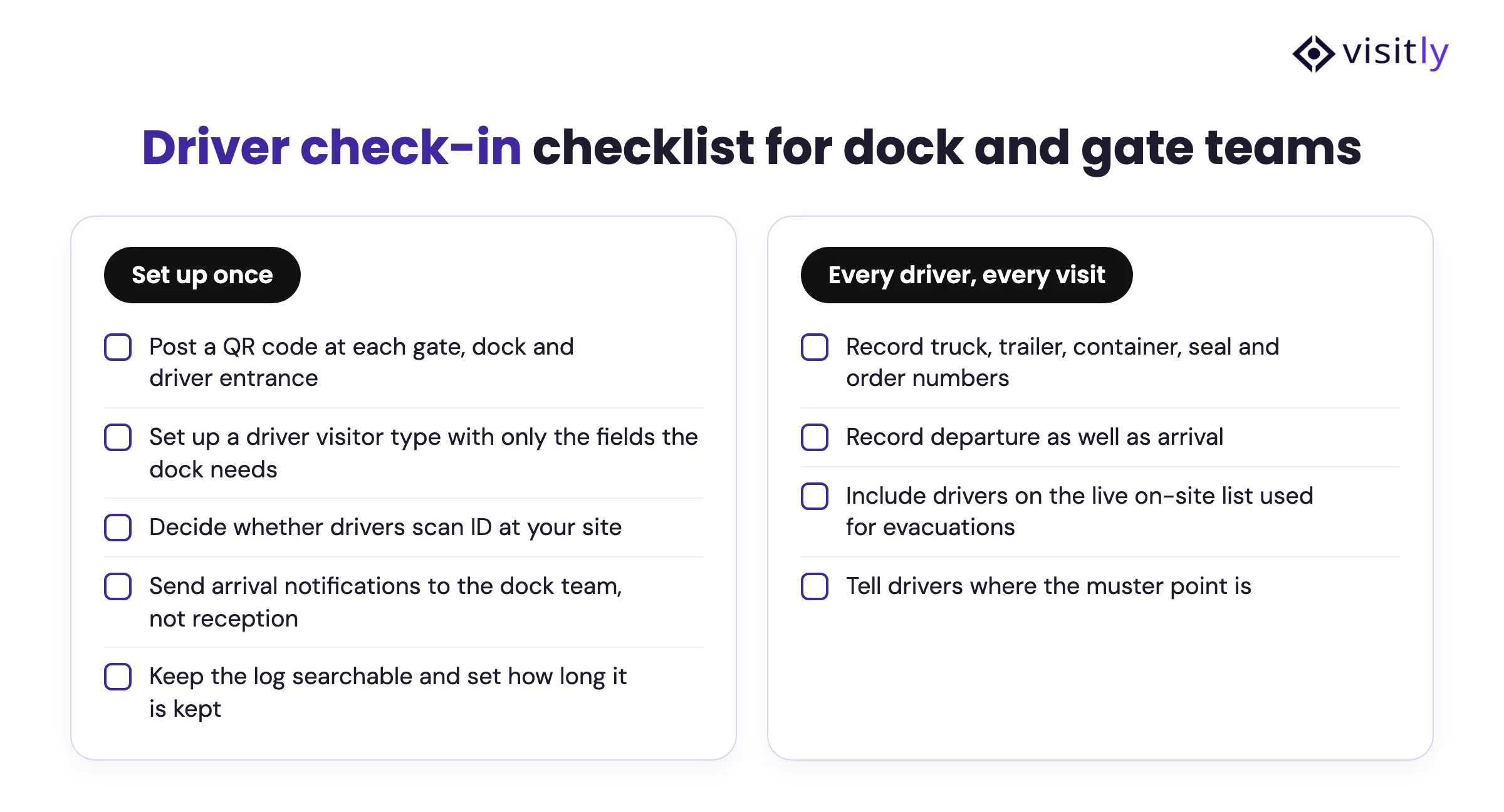
- Post a QR code at each gate, dock and driver entrance
- Set up a driver visitor type with only the fields the dock needs
- Record truck, trailer, container, seal and order numbers
- Decide whether drivers scan ID at your site
- Send arrival notifications to the dock team, not reception
- Record departure as well as arrival
- Include drivers on the live on-site list used for evacuations
- Tell drivers where the muster point is
- Keep the log searchable and set how long it is kept
Talk to our team about driver check-in at your sites.
FAQs
What is driver check-in?
Driver check-in is the process of recording a truck or delivery driver's arrival at a site, with the vehicle and load details, and notifying the dock team that the driver is there. It ends with a check-out that records when the driver left, so the site has a full log of every driver visit.
What should a truck driver log include?
At minimum: driver name, carrier, phone number, truck and trailer numbers, container and seal numbers where used, the order or manifest number, pickup or delivery, the dock assigned, and arrival and departure times. Sites with audit duties also record the safety rules the driver accepted.
Can truck drivers check in without going to the front desk?
Yes. A QR code at the gate or dock lets drivers check in on their own phone where they are, and a separate dock check-in point sends the notification to the shipping or receiving team instead of reception.
Do truck drivers need to show ID at check-in?
That is a site decision. Some sites scan every driver's license; others confirm identity against the carrier's paperwork and keep the driver flow short. In Visitly, the driver flow can include or skip the ID scan.
What is truck visit management?
At ports and container terminals, truck visit management usually means booking appointments for trucks to collect or drop containers. At a plant or warehouse, the term overlaps with driver check-in: recording each truck's arrival, load and departure and getting it to the right dock. Visitly covers the check-in and the log; it does not book dock appointments.
How are truck drivers counted during an evacuation?
Drivers who check in through the visitor management system appear on the same live list of who is on site as visitors and contractors. That list is used for the roll call at the muster point, so drivers in the yard or at the dock are counted with everyone else.