Time theft and manual attendance errors cost US businesses over $11 billion each year—an average loss of 4.5 hours per employee weekly. Relying on paper logs or outdated punch cards means you’re losing more than just time.
You are compromising your workplace safety and opening the door to compliance violations. And without the right tools, your visitor management system simply can’t keep up.
Choosing the right employee check-in and check-out software is a business-critical decision — not just an IT one. This guide walks HR managers, facility managers, and C-suite leaders through 7 clear steps to make the right choice.
Discover what smart, secure check-ins look like. Uncover the essential steps now.
How to Choose the Right Employee Check-In & Check-Out Software? 7 Key Steps Uncovered
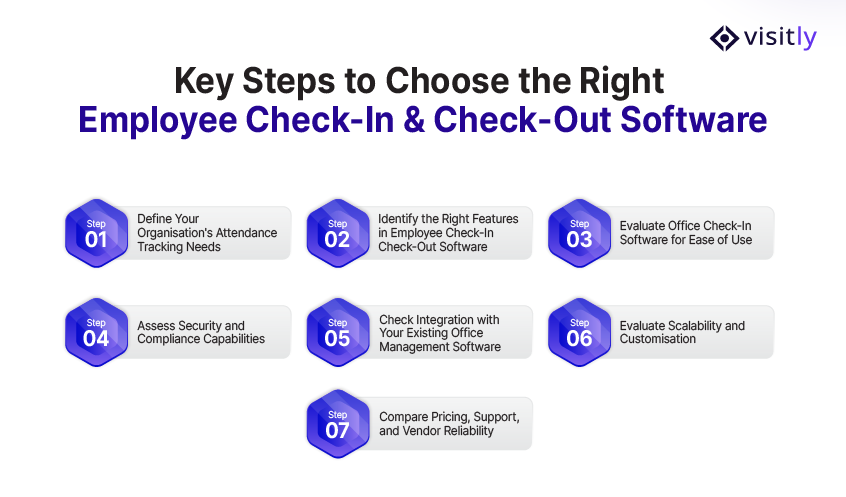
The key steps for choosing the right employee check-in & check-out software are:
Step 1 — Define Your Organisation’s Attendance Tracking Needs
Step 2 — Identify the Right Features in Employee Check-In Check-Out Software
Step 3 — Evaluate Office Check-In Software for Ease of Use
Step 4 — Assess Security and Compliance Capabilities
Step 5 — Check Integration with Your Existing Office Management Software
Step 6 — Evaluate Scalability and Customisation
Step 7 — Compare Pricing, Support, and Vendor Reliability
Now, examine each key step in detail.
Step 1 — Define Your Organisation’s Attendance Tracking Needs
Before comparing software, clarify your organization’s needs. Avoid rushing to demos without first answering what is required; this prevents purchasing an ill-fitting tool.
Assess your workforce structure:
- Number of employees, shifts, and office locations you manage
- Whether you need to check in employees, visitors, and contractors together
- Whether your front desk currently handles visitor and employee sign-in separately
Map your compliance obligations by industry:
- Healthcare: Staff attendance records and contractor access logs under strict regulatory oversight in healthcare facilities.
- Finance & Banking: Audit trails, access control records, and data privacy compliance for financial and banking activities.
- Logistics & Warehousing: Shift accuracy, overtime tracking, and multi-site workforce records.
- Government & Education: Identity verification and workplace security standards with auditable records.
Step 2 — Identify the Right Features in Employee Check-In Check-Out Software
Focus only on features that directly address your operational problems rather than on flashy, unnecessary capabilities.
Visitly’s features cover every must-have — built into one platform with no additional hardware required.
Must-have features:
- Real-time check-in and check-out with accurate time stamping
- Bulk pre-registration for employees, visitors, and contractors
- Custom screening questions per visitor or employee type
- Instant host emergency notifications via SMS, email, or in-app alert
- Digital document signing for NDAs and compliance forms
- ID scanning and identity verification at the point of entry
- No mandatory app download required
- Role-based access control system for administrators
- Multi-site management from a single dashboard
- Audit-ready data storage and reporting
- Security and compliance certifications for your industry
Nice-to-have as you scale:
- AI-powered analytics and attendance trend reporting
- Payroll and HR system integration
- Branded check-in experience with your logo and colours
- Multi-language support for diverse workforces
- Touchless or QR code-based check-in.
Step 3 — Evaluate Office Check-In Software for Ease of Use
The best visitor management software is the one your team actually uses. A powerful platform with a confusing interface will face resistance from day one. Ease of use is not a luxury — it is a business requirement.
For employees, check-in should be:
- Completed in under 30 seconds
- Self-explanatory with zero training required
- Consistent across every device and location
For administrators, the dashboard should:
- Display real-time attendance data at a glance
- Allow instant configuration of screening questions and workflows.
- Generate workplace compliance reports without manual data extraction.
- Provide cloud-based access across iPad, mobile devices, and desktops.
Step 4 — Assess Security and Compliance Capabilities
Did you know 60% of data breaches involve workplace threats, people who already have access to your building? Your check-in software is your first line of defense. It needs to actively protect your organization, not just record arrivals and departures.
Your software must provide:
- End-to-end encryption for all captured employee and visitor data
- Secure cloud storage with role-based access control entry.
- Automatic data purging aligned with your retention policies.
- GDPR and Privacy Act compliant data handling at every stage
Compliance standards to verify:
- Privacy Act 1988 for Australian organisations
- GDPR for businesses serving EU customers
- HIPAA for healthcare organisations
- SOC 2 Type II — the gold standard for SaaS data security
Step 5 — Check Integration with Your Existing Office Management Software
Your check-in software should not operate as a standalone island. Effective integration does not create data silos, manual workarounds, and reporting headaches that cost your team hours every week.
Critical integrations to look for:
- HR platforms: Auto-sync employee records so new starters appear on day one without manual data entry
- Payroll systems: Feed accurate attendance data directly into payroll, eliminating manual timesheet errors
- Access control systems: Connect digital check-in records with physical door access logs for complete site visibility
- Communication tools: Microsoft Teams and Slack for instant check-in notifications
- Productivity suites: Google Workspace and Microsoft 365 for calendar and scheduling sync
- Enterprise HR: BambooHR, Workday, and SAP SuccessFactors for end-to-end workforce management
Step 6 — Evaluate Scalability and Customisation
Your business will not look the same in three years. New locations, seasonal contractors, expanded teams—your software needs to grow with you without a system overhaul every time your organization evolves.
Scalability indicators to assess:
- No hard limits on employees, visitors, or locations
- Predictable pricing that scales reasonably with headcount and sites
- New locations can be configured without involving the vendor or IT team.
- Consistent performance under high-volume check-in conditions
Customization capabilities to look for:
- Custom screening questions per visitor type, location, or event
- Separate workflows for employees, contractors, and visitors
- Branded kiosk experience with your logo, colours, and messaging
- Configurable notification rules send the right alerts to the right people.
Step 7 — Compare Pricing, Support, and Vendor Reliability
Features and integrations matter — but the vendor behind the software matters just as much. This is a long-term operational dependency. Rush this step, and you risk being locked into a platform that underdelivers on support, security, and stability.
Common pricing models to understand:
- Per seat: Pay per registered user—cost-effective for smaller teams but escalates at enterprise scale
- Per location: Flat fee per office—predictable and scalable for multi-site organisations
- Flat fee: Unlimited users and locations for a fixed cost—most budget-friendly for large organisations
Which Industries Need Employee Check-In & Check-Out Software the Most?
The industries that need employee check-in & check-out software the most are:
- Healthcare
- Finance & Banking
- Logistics & Warehousing
- Technology & Startups
- Retail & Manufacturing
- Government & Education
Every industry tracks people, but compliance obligations, security demands, and operational complexity vary significantly.
This is where the right employee check-in/check-out software delivers the biggest impact. Here are some industries that need effective check-in & check-out software.
1. Healthcare
Manual check-in processes cannot meet the regulatory demands of clinical environments. Every staff member, contractor, and visitor must be verified, screened, and logged accurately — every time.
- Real-time visibility of who is on-site across every shift and location
- Automated contractor screening aligned with credentialing requirements
- Digital audit trails satisfying regulatory and accreditation bodies.
- Workplace safety protocols are enforced at every point of entry.
- Restricted area access control preventing unauthorised personnel entry.
2. Finance & Banking
Financial institutions manage sensitive data and high-security environments. A single unverified entry or missing attendance record can trigger regulatory penalties.
- Tamper-proof, timestamped entry and exit records for every individual
- Identity verification at the point of access — not just at reception
- Instant audit trail retrieval for regulatory review and investigation
- Integration with physical access control for end-to-end security visibility
- Security and compliance documentation generated automatically — not assembled manually.
3. Logistics & Warehousing
Logistics operations run on shift accuracy. Missed check-ins mean payroll errors. Unverified contractors on loading docks mean safety and liability risks.
- Accurate shift start and end tracking for large, rotating workforces.
- Contractor verification at every site entry point without creating queues
- Centralised dashboard showing real-time attendance across all locations
- Bulk pre-registration for large contractor cohorts arriving for scheduled shifts
- Contractor management workflows handling high-volume, multi-site environments efficiently.
4. Technology & Startups
Tech companies and startups move fast; hybrid work, frequent visitor traffic, and headcounts that double in months. Manual check-in cannot keep up.
- Flexible workflows supporting hybrid and remote-first work models
- Seamless visitor management system for clients, investors, and candidates
- No app download required — frictionless check-in for every visitor type
- Instant scalability as headcount and office locations grow.
- Branded check-in experience reflecting company identity and culture
5. Retail & Manufacturing
Time theft and manual timesheet inflation cost retail and manufacturing businesses significantly every year, and manual systems make it almost impossible to detect.
- Verified, timestamped digital check-ins replacing manual timesheets.
- ID scanning eliminates buddy punching and attendance fraud.
- Workplace security inductions are enforced at check-in for every shift worker.
- Automatic shift attendance reports generated for payroll and compliance
- High-volume check-in handling without front desk bottlenecks
6. Government & Education
Government and educational facilities carry the highest duty of care obligations. Every person on-site must be verified, screened, and logged without exception.
- Mandatory identity verification for every visitor and contractor on site
- Custom screening questions aligned with security and safeguarding requirements
- Real-time emergency evacuation lists, knowing exactly who is on-site instantly
- Digital document signing for NDAs, safeguarding declarations, and site inductions
- Complete audit trails satisfying government procurement and compliance requirements
How does Visitly Meet All Criteria Across Every Industry?
Most employee check-in & check-out software solves one problem well and creates three others. Visitly is built differently — a unified platform that covers every step of this guide out of the box, without additional hardware or mandatory app downloads.
1. Defining Your Needs
Visitly handles employees, visitors, and contractors through a single system, eliminating the fragmented tools most organizations rely on. Whether you manage one office or ten locations, everything runs from one centralized dashboard.
2. Right Features
Visitly goes beyond basic attendance tracking. Every feature is designed to eliminate manual gaps that cost organizations time, money, and confidence in compliance, without requiring additional hardware or complex setup.
3. Ease of Use
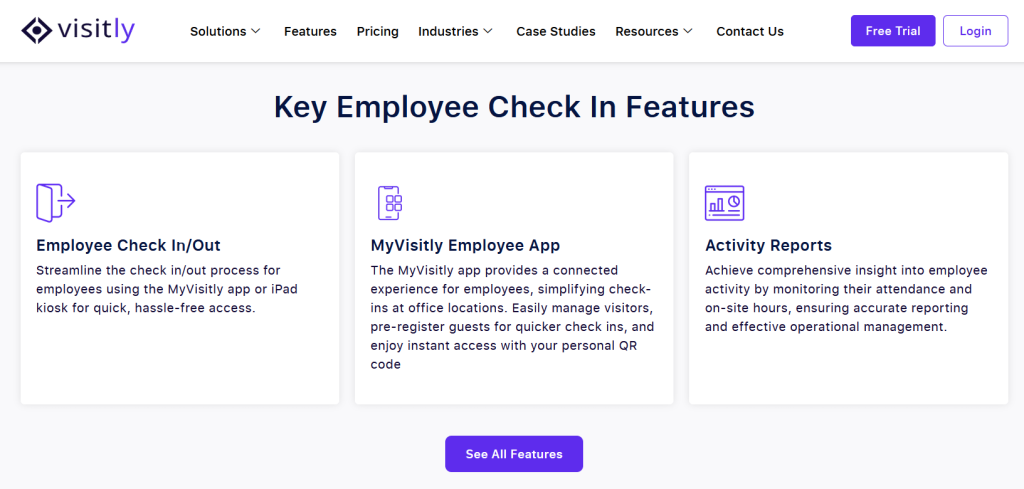
Visitly runs on a fully customizable iPad-based kiosk. Employees and visitors check in within seconds; no training, no friction, no IT involvement. Administrators manage everything from a clean, intuitive dashboard accessible on any device.
4. Security and Compliance
Visitly’s security and compliance software protects every data point from capture to storage — with encrypted records, role-based access controls, and automatic audit trail generation. Your legal, HR, and compliance teams get documented evidence without manual assembly.
5. System Integration
Visitly integrates with leading HR platforms, physical access control systems, and communication tools, syncing employee records, triggering notifications, and feeding attendance data into your existing workflows without manual intervention.
6. Scalability and Customisation
Visitly scales with your organization, adding new locations, employee types, and screening workflows without involving your IT team or the vendor. Branding, screening questions, and notification rules can all be configured in minutes.
7. Vendor Reliability
Visitly is trusted by organizations across healthcare, finance, logistics, government, and enterprise operations globally. With responsive support, transparent pricing, and a proven deployment track record, Visitly consistently delivers on its commitments.
Closing Thoughts
Choosing the right employee check-in & check-out software is not just an IT decision; it is a business-critical one. Define your needs, identify the right features, evaluate ease of use, verify security and compliance, confirm integrations, assess scalability, and scrutinize your vendor before signing. Get these 7 steps right, and you stop managing attendance — you start controlling it.
The software you choose today shapes your workforce efficiency, compliance posture, and workplace safety for years ahead. A wrong choice costs far more than the subscription fee.
Visitly checks every box: seamless check-ins, real-time visibility, enterprise-grade security, and zero app downloads required.
Ready to streamline your employee check-ins?
Start your free trial with Visitly today and experience the difference a purpose-built platform makes.
FAQs
1. What is employee check-in check-out software?
Employee check-in & check-out software is a digital system that records when employees, visitors, and contractors enter and exit a workplace. It replaces manual sign-in sheets with automated, timestamped records, improving accuracy, security, and compliance across all locations.
2. How does employee check-in software prevent time theft?
Employee check-in software prevents time theft by replacing manual timesheets with verified digital records. Features like ID scanning and identity verification eliminate buddy punching, while timestamped check-ins create an accurate, tamper-proof attendance record that payroll teams can rely on.
3. What is the best office check-in software for small businesses?
The best office check-in software for small businesses is easy to deploy, requires no app download, and scales as the business grows. Visitly offers a fully customizable iPad-based check-in system with real-time notifications, digital document signing, and no specialist training required.
4. Can employee check-in software integrate with payroll and HR systems?
Yes, modern employee check-in software integrates with leading HR and payroll platforms, syncing attendance data automatically and eliminating manual timesheet reconciliation. Look for software that offers open APIs and native integrations with the tools your organization already uses.
5. Is employee check-in & check-out software suitable for multiple office locations?
Yes, cloud-based employee check-in & check-out software is specifically designed for multi-site organizations. It provides a centralized dashboard that shows real-time attendance across all locations, with location-specific workflows, compliance records, and reporting, all managed from a single admin account.