Office lobbies play a critical role in shaping first impressions, ensuring security, and supporting compliance efforts. Yet many businesses still depend on outdated methods like paper sign-in sheets or overloaded front desk teams to manage visitors.
With the visitor management market projected to double by 2028, organizations are shifting to smarter, more secure solutions. This marks the evolution of visitor management, a move toward digital systems that streamline check-ins, provide real-time oversight, and strengthen workplace safety.
A modern visitor management system helps:
- Simplify guest check-ins
- Monitor and log visitor activity
- Support safety protocols and compliance standards
Whether managing a single office or multiple locations, businesses are investing in tools that make visitor interactions more efficient, professional, and secure.
This blog will walk you through “What Is Visitor Management? Types, Benefits, and How It Works.” Continue Reading!
Visitor Management vs Visitor Management System
Have you ever walked into an office and been handed a pen and paper to scribble down your name? Now imagine walking into another office where a sleek tablet greets you, asks for your details, and instantly notifies your host. These two scenarios perfectly illustrate the gap between visitor management and a visitor management system (VMS).
So, what is visitor management?
Visitor management refers to the process an organization uses to monitor and record the individuals who enter their premises. It is more than just checking people in. In addition, it also makes sure visitors have a smooth arrival and keep track of who is on-site at all times.
Now, what is a visitor management system?
Visitor management systems help organizations efficiently greet, track, and manage individuals visiting a building, facility, office, business location, or similar site. These systems typically fall into three main categories: manual, on-premises, and cloud-based.
- Manual visitor management systems rely on paper logbooks or sign-in sheets for example, a receptionist recording guest details in a physical register.
- On-premises systems are locally hosted digital solutions installed within the organization’s network for instance, a check-in kiosk that stores visitor data on the company’s internal servers.
- Cloud-based systems operate online and store data in the cloud, enabling remote access and real-time updates such as a tablet-based visitor app that syncs with a web dashboard.
Here’s a quick comparison to break it down:
Types of Visitor Management Systems
Visitor management is essential in guaranteeing that guests have a smooth, secure, and inviting experience. Different system types meet different needs based on the industry, size of the organization, and necessary level of security.
Let’s look at the different types of Visitor Management Systems:
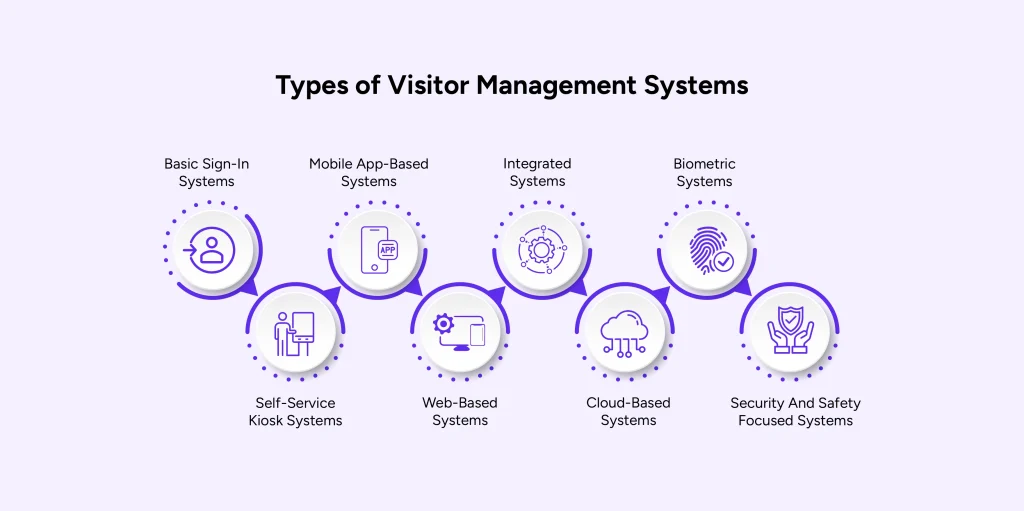
- Basic Sign-In Systems
- Self-Service Kiosk Systems
- Mobile App-Based Systems
- Web-Based Systems
- Integrated Systems
- Cloud-Based Systems
- Biometric Systems
- Security And Safety Focused Systems
1. Basic Visitor Management Systems
A basic visitor management system is a digital replacement for the traditional paper logbook. Visitors enter their names and other details on a screen, but there are no advanced features.
Example: A small clinic uses a tablet at the reception where visitors manually type in their names and appointment times.
Benefits:
- Easy to set up
- Affordable for small businesses
- Faster than paper logs
- Digital recordkeeping
- Minimal training needed
2. Self-Service Kiosk Systems
These systems allow visitors to check in on their own using a touchscreen kiosk. They can enter personal details, take a photo, print a badge, and view appointments.
Example: A corporate office uses a kiosk where guests check in, get a badge, and notify the host automatically.
Benefits:
- Reduces reception workload
- Speeds up guest check-ins
- Professional first impression
- Badge printing for easy identification
- Records visitor data securely
3. Mobile App-Based Systems
In this type of visitor management system, guests can check in using their own smartphones. Features may include QR code scanning and mobile notifications.
Example: A coworking space offers an app for visitors to check in using a QR code when they arrive.
Benefits:
- Contactless check-in
- Convenient for visitors
- Can integrate with employee apps
- Enhances security with real-time data
- Works well for hybrid workplaces
4. Web-Based Visitor Management Systems
Visitors can pre-register online before they arrive. Admins can bulk upload guest lists and speed up check-ins on arrival.
Example: An event venue uses a web portal to register all attendees before the event.
Benefits:
- Pre-registration saves time
- Great for large groups or events
- Reduces front-desk congestion
- Admin control from anywhere
- Better visitor experience
5. Integrated Visitor Management Systems
These systems connect with access control tools like doors, cameras, or ID scanners. They sync visitor data with building security systems.
Example: A tech company uses a system that integrates with its security gates and surveillance cameras.
Benefits:
- Stronger building security
- Real-time monitoring
- Blocks unauthorized access
- Syncs with employee directory
- Supports compliance needs
6. Cloud-Based Visitor Management Systems
Cloud-based systems store all visitor data online, which means it can be accessed from anywhere with an internet connection.
Example: A company with offices in multiple cities uses a cloud-based platform to manage all visitor entries in one dashboard.
Benefits:
- Remote access to data
- Easy for multi-location use
- No need for local servers
- Real-time updates
- Secure cloud backups
7. Biometric Visitor Management Systems
These systems use fingerprints or facial recognition for check-ins. It’s one of the most secure ways to manage visitors.
Example: A secure research facility uses facial recognition in visitor management to verify identities at entry.
Benefits:
- High-level security
- No need for physical ID
- Fast and contactless
- Accurate visitor logs
- Blocks repeat offenders
8. Security and Safety-Focused Visitor Systems
These are built for organizations that need tight security. Features include background checks, watchlist alerts, and emergency evacuation tracking.
Example: A government building uses a visitor management system with ID scanning and real-time watchlist alerts.
Benefits:
- Real-time threat detection
- Supports emergency response
- Keeps unapproved visitors out
- Tracks visitor history
- Meets regulatory compliance
Depending on the requirements of the organization, each type of system has distinct advantages. An appropriate visitor management system can guarantee security, effectiveness, and a wonderful visitor experience if you are managing a big company or a small café.
Benefits of Visitor Management System
A Visitor Management System helps your business manage guests easily. It makes things run smoother, safer, and more efficient.
First Impressions
A visitor management system creates a strong first impression by sending guests a customized invite with all the important details they need before arriving. This preparation helps enhance workplace safety by reducing confusion and delays at entry.
Professional Appearance
Using a digital visitor management system instead of paper logs gives your business a polished and efficient look. It speeds up check-ins and allows your team to focus on other priorities.
Instant Notifications
Automatic alerts notify employees when their guests arrive, freeing reception staff to offer a warm welcome. This improves the overall safety of the workplace by ensuring visitors are attended to promptly.
Enhanced Security
A visitor management system boosts security in the visitor management system by pre-screening visitors and tracking their time onsite. This protects your workplace from potential workplace threats and unauthorized access.
Compliance Ease
Digital visitor records simplify compliance and privacy management. Controlled access to sensitive data helps maintain strong security in visitor management system practices.
Scalable Solution
Centralized visitor management enables easy scaling to new locations while keeping processes consistent. This supports workplace safety and operational efficiency across multiple sites.
Accurate Tracking
Real-time occupancy data ensures everyone onsite is accounted for accurately. This insight helps identify workplace threats early and supports effective safety planning.
How Does a Visitor Management System Work?
A guest management system simplifies guest management at your office while keeping things secure and functioning smoothly. It takes visitors through the check-in process and ensures that all information is logged and meets safety standards.
This is how it works:
1. Visitors Arrive: Make the First Moments Count
Finding your way in an unfamiliar place can be frustrating. A visitor management system (VMS) recognizes guests upon arrival and directs them efficiently through automated reception, signage, or front desk assistance—ensuring a smooth welcome.
2. Visitors Check In: A Seamless and Secure Process
Not all visitors are the same, so their check-in process shouldn’t be either. Using a smartphone or self-service kiosk, guests can register, provide details, and complete safety screenings – all while minimizing physical contact.
3. The Host Employee Is Notified: No More Waiting Around
A quick connection between guests and hosts makes all the difference. Automated notifications via call, text, or messaging apps like Slack and Teams ensure visitors are promptly attended to upon arrival.
4. The Visitor Is Checked Out: Keep Track of Every Exit
A structured check-out process records the visitor’s time on-site, their visited locations, and departure time. This not only enhances security but also helps maintain accurate records for future reference.
5. Everything Is Logged: Data That Works for You
A well-maintained log isn’t just for record-keeping. It helps with audits, compliance, security reviews, and even crisis management. With real-time reporting, you can access visitor logs anytime, from anywhere.
Let’s say Rosy visits your office for a meeting. First, she arrives and uses the self-check-in kiosk to enter her details and get a badge. Her host receives an instant notification, letting them know she’s here. After her meeting, Rosy checks out, and the system records her time spent and location visited. The company can generate a report later if needed, ensuring everything is compliant and secure.
Effortless Visitor Management with Visitly: Secure, Fast, and Easy
Curious how businesses track visitors and keep things running smoothly?
The answer is simple: an intelligent visitor management system.
Welcome to Visitly, the easiest way to manage guests, contractors, and employees. It’s a secure & modern tool to handle guest sign-ins and sign-outs, all in a simple-to-use app with exceptional features. Managing visitors has always been tricky, no matter the size of your business. Visitly makes it simpler by automating the process of tracking guests, contractors, & workers.
Here are some of the exceptional features of Visitly:
- Visitor Management
Say goodbye to manual check-ins. Visitly lets you customize visitor flows, send instant notifications, and streamline the process.
- Security and Compliance
Secure visitor data while ensuring compliance. Visitly centralizes access so you can manage everything in one place.
- Facial recognition
Streamline check-ins with secure Face ID recognition, ensuring a quick and seamless visitor experience.
- Visitor Watchlist
Easily flag and monitor visitors for added security with Visitly’s built-in watchlist feature.
- Contractor Management
Capture contractor details quickly with tailored sign-in flows. Stay on top of compliance and contractor management effortlessly.
- Workplace Safety
Stay proactive about workplace safety with real-time presence tracking. In an emergency, Visitly ensures you can quickly identify who’s on-site.
- Emergency Evacuation
Access real-time visitor lists for swift evacuations and safety during emergencies, keeping everyone secure.
- Employee Check-In
The employee sign-in and out solution from Visitly lets you keep tabs on your employees in real time. This solution allows you to keep track of who is entering and exiting the office at any given time.
- iPad-Enabled
Experience simple, modern, and fast visitor management with iPad-enabled sign-in and sign-out. Visitly blends simplicity, security, and efficiency, making it the preferred solution for modern organizations wanting to enhance their visitor management systems.
Final Thoughts
A Visitor Management System is essential for efficiently managing guest arrivals and ensuring workplace security. Thus, Visitly stands out as one of the best solutions, offering features like customizable visitor flows, instant notifications, and secure data management. It also provides contractor management, real-time employee tracking, and emergency evacuation support.
Visitly is a simple yet powerful tool for businesses of all sizes, improving security and visitor experience. Want to see how Visitly can transform your visitor management? Book a demo today!