Stop imagining your lobby is safe. It’s not.
What takes place during those initial 60 seconds when your top client, a valuable contractor, or a prime job applicant comes to your office? Are they greeted by a smooth, high-tech reception that loudly proclaims “professional and secure”? Or are they stuck fumbling for a pen, staring at a shared, clumsy paper log that exposes every visitor’s private data, while your receptionist is buried under internal calls?
Let’s cut to the chase: Your front desk is no longer just a place for greetings; it’s the most overlooked firewall in your entire organization. And if you’ve only upgraded to a generic tablet app, ask yourself: is that truly an enterprise-grade solution capable of protecting your sensitive data, your employees, and your intellectual property across dozens of global sites?
The hard truth is, those small, basic solutions fall short. The genuine, modern solution isn’t just a simple digital checklist. It’s a dedicated visitor sign-in kiosk—the polished, visible interface of a powerful, centralized Visitor Management System (VMS). This VMS isn’t office decor; it’s the strategic core of a unified security and operational strategy.
Ready to see how a VMS transforms your reception from a point of vulnerability into a pillar of your security posture?
Let’s dive into what a true enterprise solution looks like.
What Is a Visitor Sign-In Kiosk, Anyway?
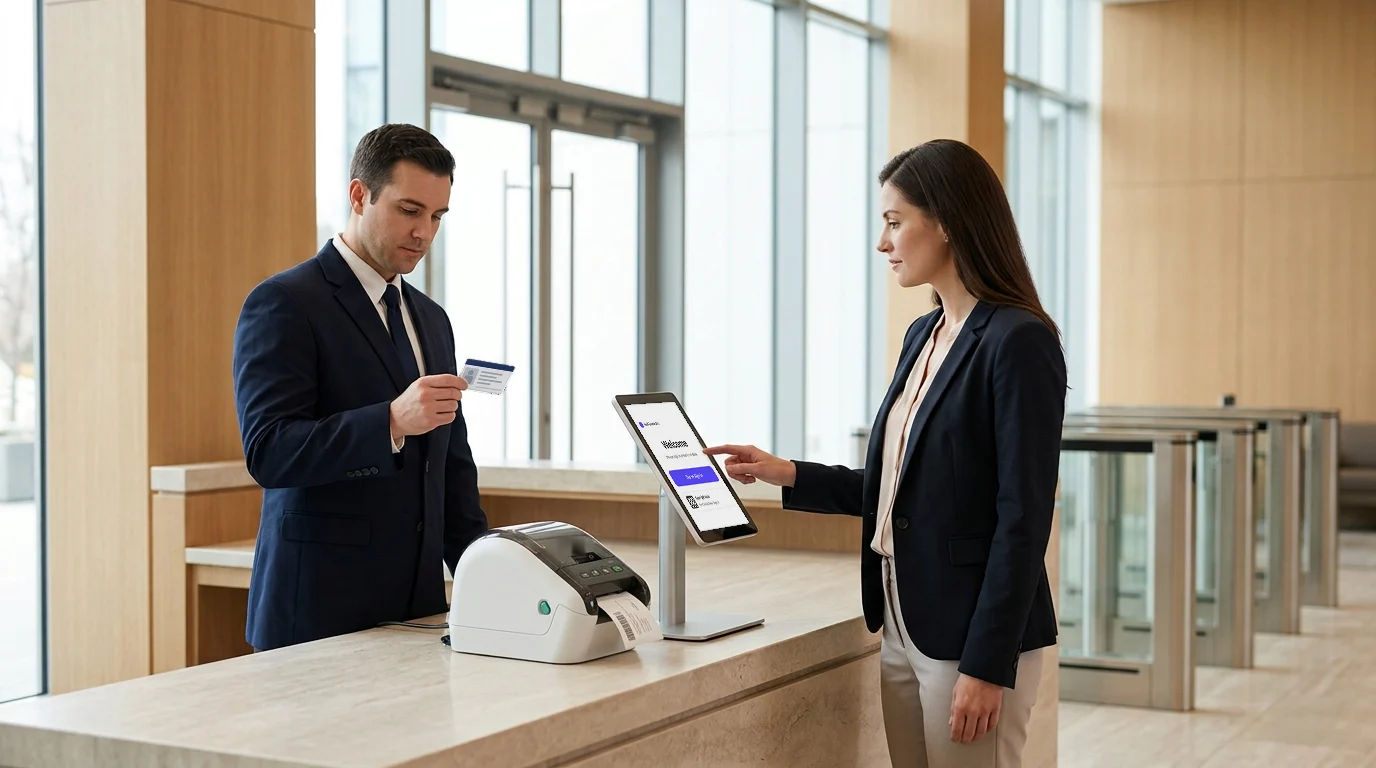
Before we dive into the details, let’s clear the tech first. A visitor sign-in kiosk is a self-service, touchscreen apparatus that enables visitors to register upon arrival, capturing essential data and promptly alerting their hosts simultaneously.
It’s the digital evolution of the receptionist, engineered for the 21st-century enterprise. For many, an iPad visitor sign-in system offers the perfect balance of form and function.
But the kiosk is only one part of the equation.
Key Components of an Enterprise VMS
- Hardware: This is the physical touchpoint—robust, industrial-grade touchscreen tablets or kiosks, often paired with integrated accessories like ID scanners (for passports or driver’s licenses) and badge printers for instant, professional visitor credentials.
- Software (The VMS Engine): This is the brain of the operation. It’s a cloud-based, automated visitor check-in software system that manages visitor data, ensures compliance workflows are followed, and, most importantly, integrates with your existing corporate infrastructure, including security, IT, and communication tools.
How the Modern VMS Check-In Works
- Arrival: The visitor approaches the kiosk, which presents a professional, guided, and multi-lingual check-in flow.
- Data Capture: The guest enters key details (name, purpose of visit, host, etc.). This step is often frictionless, leveraging visitor pre-registration or contactless QR codes.
- Verification & Compliance: The system may request an ID scan or photo capture. It then presents mandatory documents, such as a digital NDA or safety waiver, for e-signature.
- Credentialing: An authorized visitor badge is instantly printed using a seamless visitor badge printing system, often with a picture and a clear expiration time, thus giving the visitor a verified physical credential.
- Notification: The host receives an instant and discreet notification about the guest’s arrival through their preferred communication channel—be it a direct Slack message, an SMS, or an email.
Simple, right? But the real power is in the data and the protection this process provides.
The Three Pillars of an Enterprise-Grade VMS
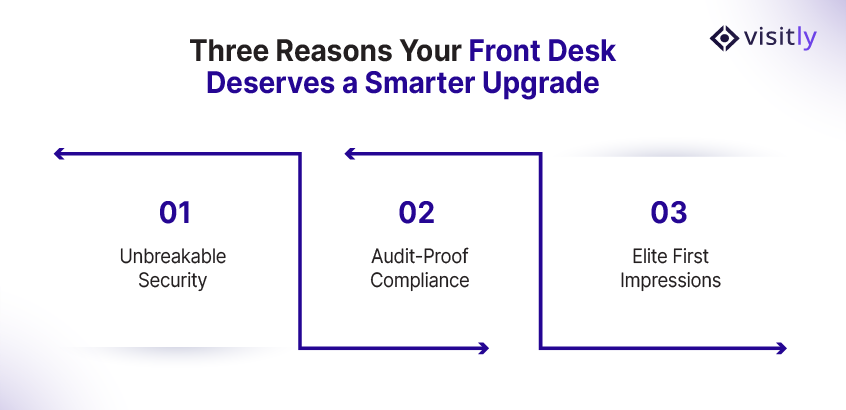
The upgrade from a paper log to an enterprise-grade VMS is a fundamental shift in how you approach security, compliance, and corporate image. It rests on three critical pillars.
Pillar 1: Unbreakable Security Posture
In a world where workplace security threats are constantly evolving, simply logging a name isn’t enough. Your VMS needs to establish a verifiable identity.
When was the last time a receptionist manually screened every visitor against an internal watch-list? The answer is probably never, and that’s why VMS automation is non-negotiable.
- Automated ID Scanning: Using a dedicated scanner to capture data from a driver’s license or passport validates a visitor’s identity and dramatically cuts down on manual entry errors.
- Real-time Watchlist Screening: A must! The VMS instantly cross-checks the visitor’s details with internal watchlists and potentially governmental or industry-specific databases to flag the high-risk individuals even before they are able to walk past the lobby.
Pillar 2: Compliance Support and Audit-Readiness
Regulatory enforcement is quite stringent in the United States. Non-compliance carries some serious risks, especially when it comes to data privacy (like CCPA) or industry-specific regulations. Data breaches with a high level of non-compliance cost the victims, on average, an astounding $5.05 million, according to the IBM Cost of a Data Breach Report 2023.
Can you afford a $5 million-plus mistake just because a visitor scrawled something incoherent on a paper log?
- Digital, Time-Stamped Logs: Every check-in, check-out, and signed document is digitally recorded as an immutable record, creating the perfect audit trail.
- Mandatory signing of digital NDA/waivers: Visitors have to review and sign e-waivers and NDAs as part of the check-in flow. This is exponentially more secure than paper, as 83% of current e-signature users report increased security as the most common benefit of the technology.
- Customizable Workflows: Does a contractor working on a defense project need to watch a special safety video and sign a specific form? The VMS enables granular data capture and customized compliance paths for every visitor type.
Pillar 3: World-Class First Impression and Efficiency
Your lobby is the gateway to your brand. A smooth, guided, professional check-in process sends a powerful message, i.e., this is a professional, technologically advanced, and secure organization.
- Guided, Multi-lingual Check-in: A dedicated visitor sign-in kiosk offers an intuitive and easy-to-use interface that can be translated instantly, which allows foreign-language visitors to feel welcomed and respected. Visitly check-in supports more than 150 languages.
- Instant, Discreet Host Notification: No more receptionists playing phone tag. The host gets an instant ping via SMS, email, or a corporate chat platform like Slack or Teams.
- Contactless Check-in: Guests who have already registered can simply scan a QR code that has been sent to their phone, thus converting a 3-minute manual process into a 15-second self-service experience.
Turning Visitor Management into Measurable Business Value
For facility managers and operations leaders, the decision isn’t just about security—it’s about the bottom line. What is the return on investment (ROI) of an enterprise VMS?
While non-compliance fines can reach millions, the wasted time across multiple locations further increases the cost. If your large office sees just 15 visitors a day, and per visitor, if you spend 3 minutes, then that’s 45 minutes of a receptionist’s time spent solely on check-in, every single day. Multiply that across dozens of locations, and the cost of the human bottleneck is staggering.
Hard ROI for Facility/Operations Leaders
- Efficiency Savings: By automating the entire process—data entry, NDA signing, host notification, and badge printing—a VMS can free up 35% of the waiting time for visitors. For facilities that need 24/7 access control or have unstaffed secondary entrances, the VMS is the only efficient solution.
- Compliance Certainty: The digital audit trail is your insurance policy. The cost of a VMS is negligible compared to the financial and reputational costs of failed audits or a security lapse due to inadequate visitor screening.
- Scalability & Standardization: Can your paper system manage 10 locations from one dashboard? An enterprise VMS license is designed for multi-site management, allowing a single policy to be instantly enforced across all your domestic and global facilities.
Critical VMS Features That Go Beyond Simple Check-In
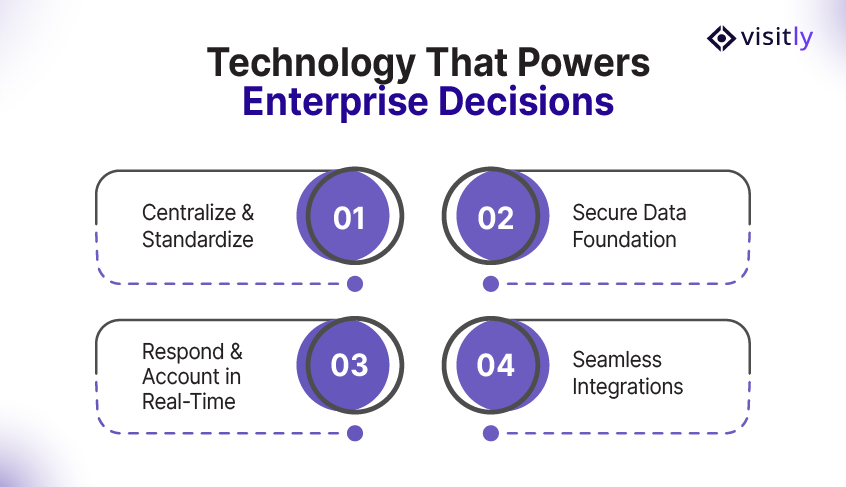
When investing in a critical piece of security and compliance infrastructure, the features need to move beyond simple check-in. The VMS software—the “engine” of the kiosk—is where the enterprise difference truly lies.
Centralized Management & Standardization
For the Head of Operations, this means total control. You can manage welcome messages, safety videos, and compliance forms from a single, centralized dashboard. Any change in your safety protocol can be pushed out instantly to all 100 of your sites, ensuring standardization and mitigating dispersed risk.
Security and Data Architecture
Your CIO needs to know where the data lives. The VMS should incorporate features like secure cloud hosting, data encryption both at rest and in transit, and compliance with the major standards such as ISO and SOC 2. In addition, visitor log access based on particular roles guarantees that sensitive personal data can be accessed only by authorized personnel, including security, legal, and HR.
Emergency Preparedness & Real-Time Accountability
This is arguably the most critical feature. In case of a fire or natural disaster, do you have an instant and accurate list of everyone, including visitors, at the location?
With a paper log, the answer is no. With an enterprise VMS, you have a real-time safety roll call list instantly accessible via mobile, telling emergency responders exactly who is inside. Many systems also integrate with emergency notification systems to automatically alert all on-site visitors and hosts of an evacuation or lockdown.
Robust Integration Ecosystem (The Visitly Advantage)
The true value of an enterprise VMS is its ability to stop being a standalone system and start being a data-enriching, integrated platform.
- IT: Integration with your host directory via systems like Microsoft Entra ID or Okta automatically maintains an accurate staff/host list, ensuring visitors can always find and notify the right employee.
- Custom Webhooks: This is nothing less than a boon for sales organizations. With the help of webhooks, you can easily gather visitors’ data and send it to your preferred marketing automation platform. With such analytics, you can easily target for more effective campaigns, driving positive interactions.
How to Choose the Right Visitor Sign-In Kiosk
You’ve decided to upgrade. Then, how will you unearth the VMS solutions market that is already thick with vendors? Usually, the decision ends up being about one issue: Is the solution for a small office or for the whole corporation?
Your Enterprise Evaluation Checklist:
- Hardware Reliability: Do you want to acquire a consumer tablet with a cheap plastic stand or an industrial-grade kiosk designed for 24/7 use, offering high-level reliability, security, and tamper resistance?
- Software Flexibility: Can the VMS handle complex workflows with ease? For instance, can it display separate check-in screens for contractors, interviewees (who must complete the NDA), and executive guests?
- Cost Model: Is the pricing structure clear and adaptable? Is it on a per site, per kiosk, or per check-in volume basis?
At Visitly, our model is built to scale efficiently for multi-site organizations, focusing on your long-term expansion.

The Final Verdict
The visitor sign-in kiosk is not a fancy gadget. It is the modern evolution of the front desk and a critical piece of security, compliance, and operational infrastructure. In a business world defined by regulatory scrutiny and non-stop security threats, you simply cannot settle for a basic, paper-replacement app.
You must invest in an enterprise-grade VMS like Visitly that protects your people, data, and reputation.
The time for hesitation is over. Stop managing unnecessary risk and start mastering your security posture. The best way to understand the enterprise difference from multi-site management to deep access control integration is to see it in action.
Ready to see Visitly’s multi-site VMS and Kiosk solution in action? Schedule a personalized demo with us today.
FAQs
What is a visitor sign-in kiosk?
A visitor sign-in kiosk is a self-service touchscreen, usually a tablet on a stand, where visitors register on arrival without a receptionist typing their details. It records who they are and who they are visiting, notifies the host and can print a badge. The kiosk is the front end of a visitor management system that stores every visit record.
How does a visitor sign-in kiosk work?
A visitor types their name, company and host on the touchscreen, or scans a QR code from a pre-registration email. The kiosk can then take a photo, present an NDA or safety document for signature, print a badge and message the host by email, SMS or chat. Each step is timestamped in the visit record.
How is a visitor management kiosk different from a basic sign-in tablet app?
A basic sign-in app replaces the paper logbook, while a visitor management kiosk also applies your security policy at the door. It screens visitors against a watchlist, collects signed documents, connects to the employee directory and access control, and keeps an audit trail. Security teams at multi-location companies usually need that second set of controls.
How much does a visitor sign-in kiosk cost?
The cost has two parts: the hardware and the software subscription. Visitly prices the software per location, at $1,000 or $2,000 a year; above that, talk to sales (visitly.io/pricing). It runs on an iPad you already own with a standard badge printer, or on a hardware bundle bought from Visitly.
How does a kiosk protect visitor data and privacy?
A kiosk protects visitor data by sending each record to an encrypted store, so the next visitor cannot read earlier entries as they can on a paper log. Ask any vendor about encryption, retention settings and independent audits. Visitly encrypts data in transit with TLS 1.3 and at rest with AES-256, and holds SOC 2 Type II and ISO 27001 certifications. It is also HIPAA compliant.
Can one system manage kiosks across multiple offices?
Yes, a cloud-based visitor management system manages the kiosks at every office from one account. Check-in steps, documents and watchlists are set centrally and can vary by location or visitor type, and visit records from all sites sit in one place for reporting. If you are planning a multi-location rollout, talk to sales about deployment timing.