Workplace injuries don’t just hurt people, they damage productivity, trust, and your bottom line. Thus, companies can’t afford to treat safety as an afterthought as the right software makes all the difference.
Let’s look at some of the interesting stats:
- U.S. businesses lose over $167 billion each year due to workplace accidents.
- Workplaces with digital safety tools report 70% fewer lost workdays (OSHA).
Still, many teams rely on outdated methods like spreadsheets or paper checklists. These tools create blind spots in compliance, incident tracking, and emergency response.
The solution? Use smart workplace safety software.
In this blog, you’ll find the 5 best workplace safety software tools for 2026:
- Visitly
- SafetyCulture (iAuditor)
- EcoOnline
- Intenseye
- MyFieldAudits
We’ll look at pricing, core features, real-world benefits, and which type of organization each platform is best suited for. Each one helps you stay compliant, reduce risks, track incidents in real time, and protect your workforce, no matter your industry.
Continue reading to explore the best workplace safety software!
What’s the Best Workplace Safety Software in 2026? Top 5 Reviewed
The best workplace safety software in 2026 helps organizations ensure compliance, reduce risks, and improve on-site safety with real-time tracking and automation features. Based on performance, features, and industry use cases, here are the top 5 workplace safety software solutions for 2026:
- Visitly – Best for all-in-one visitor, employee, and contractor safety tracking
- SafetyCulture (iAuditor) – Best for mobile inspections and safety audits
- EcoOnline – Best for compliance-driven EHS (Environment, Health & Safety) management
- Intenseye – Best for AI-powered workplace hazard detection via CCTV
- MyFieldAudits – Best for customizable safety checklists and reporting
Key Features
| Feature | Details |
|---|---|
| Best For | Visitor and contractor safety check-ins across all facility types |
| Key Features | Touchless check-in, contractor compliance workflows, emergency evacuation tools, real-time presence tracking, badge printing, watchlist screening |
| Integrations | Slack, Microsoft Teams, Outlook, access control systems |
| Compliance | GDPR, HIPAA, ITAR-ready |
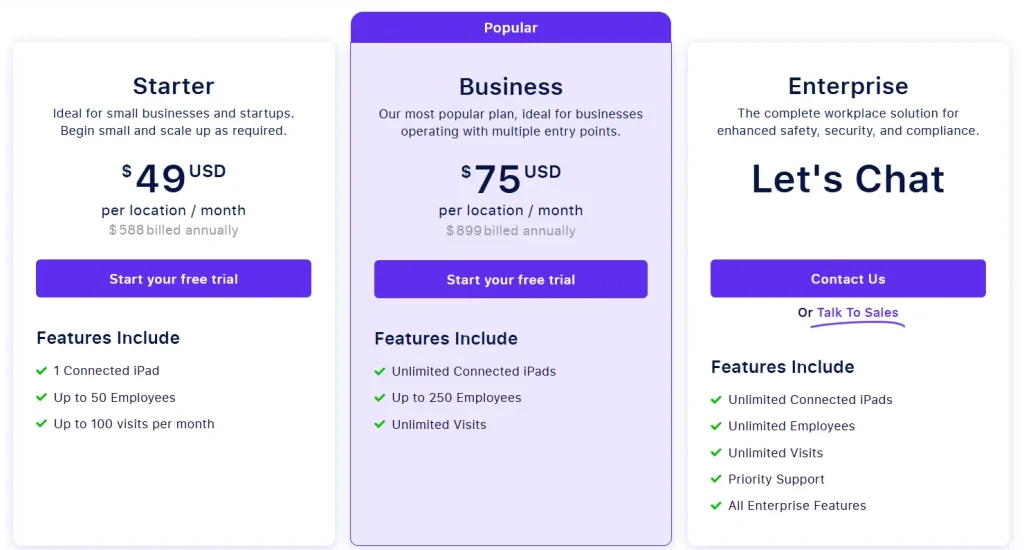
| Pricing | From $1,000 per location per year, 14-day free trial |
Real-World Benefits
- Emergency Preparedness: Quickly locate and account for all visitors during a fire drill or real incident.
- Regulatory Compliance: Collect signatures, track entry/exit, and archive logs for audits.
- Professional First Impressions: Digital check-in looks modern, improves front desk efficiency, and reinforces brand trust.
- Improved Oversight: Watchlist alerts and ID scanning give security teams more visibility over who’s in the building.
Pricing
Best for: Mid-sized to enterprise organizations that want secure, compliant check-in for all workplace visitors and vendors.
2. SafetyCulture (iAuditor) – End-to-End Safety Audit & Inspection Platform
SafetyCulture, widely known through its mobile-first app iAuditor, is a robust workplace safety and quality management platform used by over 75,000 teams worldwide. It’s ideal for conducting digital inspections, managing recurring safety checks, logging hazards, and creating a culture of accountability.
Key Features
| Feature | Details |
|---|---|
| Best For | Versatile safety inspections and asset tracking |
| Key Features | Customizable inspection checklists, incident reporting, asset management, training modules, analytics dashboard |
| Integrations | Salesforce, Google Workspace, Microsoft 365, Zapier |
| Compliance | ISO 45001, OSHA-ready |
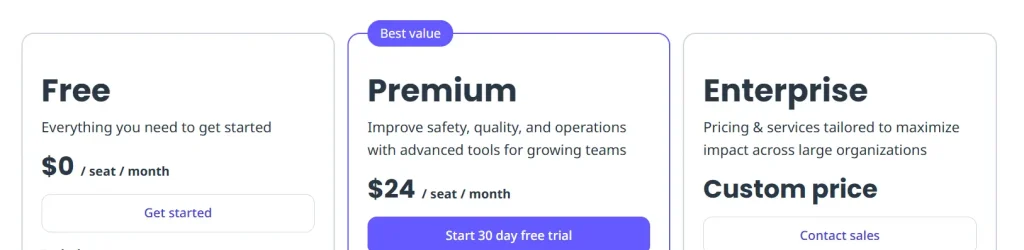
| Pricing | Free plan available, Premium from $24/user/month |
Real-World Benefits
- Fewer Accidents: Proactively find and fix issues before they become incidents.
- Accountability: Assign safety tasks and track completion across departments or job sites.
- Paperless Auditing: Speed up safety walkthroughs and inspections using mobile devices.
- Evidence in One Place: Log photos, location, timestamps, and digital sign-offs for audit trails.
Pricing
Best for: Safety teams, quality auditors, or operational leaders in high-risk industries who need mobile inspections and rapid issue resolution.
3. EcoOnline – Compliance-Driven EHS Management System
EcoOnline is a comprehensive cloud-based Environment, Health & Safety (EHS) software platform trusted by global enterprises to streamline compliance, incident reporting, chemical safety, and risk management. Its strength lies in depth, tailored modules for safety, sustainability, occupational health, and chemical documentation make it a one-stop solution for highly regulated sectors.
KeyFeatures
| Feature | Details |
|---|---|
| Best For | Regulatory compliance and chemical safety management |
| Key Features | Chemical inventory management, SDS management, risk assessments, regulatory reporting, environmental monitoring |
| Integrations | ERP systems, HR platforms, compliance databases |
| Compliance | REACH, GHS, OSHA HazCom, GDPR |
| Pricing | Custom pricing - contact sales |
Real-World Benefits
- Reduce Regulatory Risk: Track and prove compliance through auditable digital logs.
- Centralized EHS Data: Manage incidents, chemicals, and training records in one place.
- Empower Field Teams: Mobile-first design lets workers report hazards instantly.
- Smarter Risk Control: Turn assessments into action plans with automated workflows.
Pricing
Contact EcoOnline directly for pricing information.
Best for: Enterprises in manufacturing, energy, pharma, or chemical sectors needing complete EHS oversight and audit-ready records.
4. Intenseye – AI-Powered Workplace Safety Through Camera Analytics
Intenseye is a cutting-edge, AI-driven workplace safety software that leverages computer vision to identify unsafe behaviors and environmental risks in real time. It connects to your existing CCTV infrastructure and uses privacy-compliant AI models to monitor compliance with PPE policies, detect slips, trips, and falls, and alert safety managers proactively.
Key Features
| Feature | Details |
|---|---|
| Best For | AI-powered, real-time safety monitoring from existing cameras |
| Key Features | Computer vision risk detection, PPE compliance monitoring, near-miss identification, real-time alerts, safety analytics |
| Integrations | Existing CCTV infrastructure, EHS platforms, Slack |
| Compliance | OSHA, ISO 45001 |
| Pricing | Custom pricing - contact sales |
Real-World Benefits
- Prevent Incidents Before They Happen: AI flags non-compliance or risk in seconds.
- Maximize Camera ROI: Use existing surveillance systems for proactive safety monitoring.
- Boost Culture of Safety: Employees become more aware when behaviors are tracked anonymously.
- Audit-Ready Visual Records: Access historical footage linked to incident reports.
Pricing
Contact Inenseye directly for pricing information.
Best for: Industrial operations, warehouses, factories, and high-footfall facilities with camera infrastructure looking for proactive and automated safety detection.
5. MyFieldAudits – Simplified Safety Audits and Compliance Reporting
MyFieldAudits is a cloud-based auditing and safety inspection software built for small to mid-sized businesses (SMBs) that need to streamline their safety, sanitation, and quality control operations. It’s particularly popular in industries like food service, retail, education, and hospitality.
Key Features
| Feature | Details |
|---|---|
| Best For | Simple, checklist-driven safety and sanitation audits |
| Key Features | Drag-and-drop audit builder, mobile-friendly checklists, photo capture, corrective action tracking, report generation |
| Integrations | Email, CSV exports, basic third-party tools |
| Compliance | FDA food safety, OSHA-ready |
| Pricing | From $25/month |
Real-World Benefits
- Simple & Effective: Built for non-technical users who need functional auditing tools fast.
- Better Follow-Up: Turn failed items into corrective tasks with due dates and notifications.
- Offline Mode: Conduct audits in remote areas without losing data.
- Multi-Location Support: Track performance and compliance across sites.
Pricing
Contact MyFieldAudits directly for pricing information.
Best for: SMBs and franchises needing a simple, mobile-friendly solution for checklists, sanitation audits, and safety compliance.
What Are the Best Tips for Choosing the Right Workplace Safety Software?
The best tips for choosing the right workplace safety software start with understanding your organization’s unique safety challenges and compliance requirements. The right solution should not only meet industry standards but also fit seamlessly into your existing workflows and company culture.
Start by identifying your top priorities: Is it reducing incident rates, staying audit-ready, or streamlining safety inspections?
Once that’s clear, evaluate software options based on these factors:
- Industry fit: Some tools are designed for high-risk industries like manufacturing or construction, while others are tailored for small teams or service-based businesses.
- Mobile capability: If your teams are often on the move or in areas with limited connectivity, make sure the software has strong mobile apps and offline functionality.
- Scalability: Consider whether the platform can support multiple locations, user roles, and future growth.
- Compliance support: Look for solutions that include built-in templates or frameworks for OSHA, ISO 45001, or other regulations relevant to your operations.
- Ease of use: A complicated UI can lead to poor adoption. Choose a platform your teams can quickly learn and use without constant hand-holding.
- Integration options: Check if the software can connect to your existing systems like HR tools, access control, or analytics platforms.
- Data security: Ensure the tool meets your organization’s standards for privacy, especially if you’re using AI or video-based platforms.
- Support and training: Onboarding, live support, and training resources are essential, especially if your team isn’t tech-savvy.
- Free trial/demo: Before committing, always test the product with a real use case to see if it fits your workflow.
By focusing on these criteria, you’ll avoid overpaying for unused features and pick a solution that actually improves safety outcomes.
Quick Comparison: Which Workplace Safety Software Should You Choose?
Here’s a quick side-by-side comparison of the top workplace safety software tools for 2026. This table covers key features, best use cases, and pricing to help you choose the right fit for your organization.
| Software | Best For | Key Strength | AI / Automation | Pricing |
|---|---|---|---|---|
| Visitly | Visitor and contractor safety | Fast, compliant check-ins with emergency tools | Watchlist screening, automated alerts | From $1,000/location/year |
| SafetyCulture | Inspections and asset tracking | Versatile checklists and mobile inspections | Smart templates, analytics | Free, from $24/user/month |
| EcoOnline | Chemical and regulatory compliance | End-to-end chemical safety management | Regulatory reporting automation | Custom pricing |
| Intenseye | AI-based real-time monitoring | Camera-based PPE and risk detection | Full AI-powered computer vision | Custom pricing |
| MyFieldAudits | Simple audits and sanitation | Easy drag-and-drop audit builder | Basic automation | From $25/month |
Conclusion: Safety Starts With the Right Software
Workplace safety is about creating an environment where employees, visitors, and contractors feel secure and operations run smoothly. Whether you need AI-powered risk detection, customizable audit tools, or fast visitor check-ins, the right workplace safety software will help you reduce incidents, stay compliant, and respond faster.
Here’s the bottom line:
- Choose Visitly for fast, secure visitor and contractor safety flows.
- Pick SafetyCulture if you want versatile safety inspections and asset tracking.
- Go with EcoOnline if regulatory compliance and chemical safety are your top priorities.
- Use Intenseye for AI-based, real-time safety analytics from cameras.
- Try MyFieldAudits if you need a simple, checklist-driven safety and sanitation platform.
Each of these tools serves a different need, but all five can help you raise your safety game in 2026. Book a demo with Visitly to experience the exceptional!
Top 5 FAQs About Workplace Safety Software
1. What is workplace safety software?
Workplace safety software is a digital tool that helps organizations manage incidents, conduct inspections, track risks, and ensure regulatory compliance. It streamlines EHS management by centralizing safety data and automating workflows.
2. Is Visitly just for visitors?
No, Visitly is also a workplace safety software solution that supports contractor check-ins, safety document capture, badge printing, and visitor pre-screening. It enables EHS teams to improve compliance and on-site security.
3. Do these tools work without the internet?
Yes, leading workplace safety software like Visitly, SafetyCulture, and MyFieldAudits offer offline functionality. This ensures safety data collection and inspections continue even in low-connectivity environments.
4. Can I integrate workplace safety software with other systems?
Most workplace safety platforms support integrations with HR, access control, and compliance management systems. This helps organizations maintain a unified and efficient safety management process.
5. Can I test these platforms before buying?
Yes, most workplace safety software providers offer free trials or demos. This allows you to evaluate usability, features, and integration before making a purchase.