A visitor walks into your office. They expect to check in and meet their host within a few minutes. Instead, they may be asked to fill out a form, repeat their details, wait while reception contacts their host, and stand around until someone finishes the process.
That delay may seem small, but it can quickly become frustrating for visitors and add more work for the front desk.
QR code check-in can remove several of these friction points by letting visitors start the process with a quick scan. But a QR code is only one part of a visitor management system; pre-registration, verification, host notifications, and visitor records need to work together behind it, along with the access and compliance controls that keep the process secure.
So, what does a better QR code check-in experience actually look like? Let’s look at four ways it can reduce friction from the moment a visitor arrives.
How Does QR Code Check-In Work for Visitors?
QR code check-in helps visitors in the registration process before or when they arrive at an office. A typical visitor check-in flow starts with pre-registration, moves through a QR scan and any required verification, and ends with host notification and a digital record of the visit.
1. Before the visitor arrives
- Host pre-registers the visitor
- The visitor receives an invitation
- Visitor completes required information
- QR code/check-in instructions are provided
- Screening questions or documents can be completed in advance
2. When the visitor arrives
- The visitor scans the QR code
- Details are confirmed
- Required screening/verification is completed
- Host is notified
- The visitor receives a badge or further instructions
3. After check-in
- The visitor appears in the live visitor log
- Security/reception can see who is on-site
- Visitor checks out when leaving
- Digital record is retained for future reference
What Are the 4 Ways QR Code Check-In Creates a Better Visitor Experience?
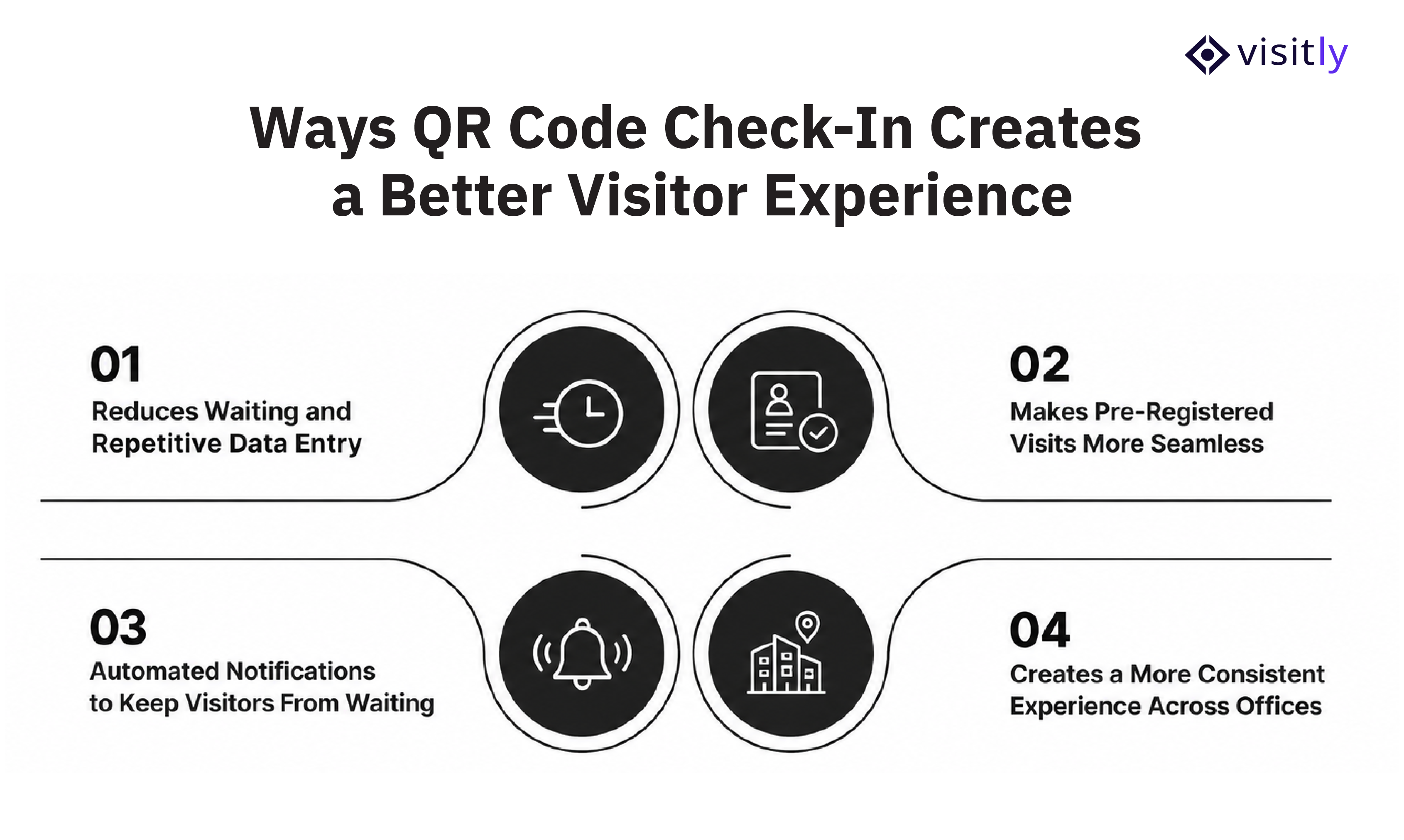
The 4 ways QR code check-in creates a better visitor experience are:
1. Reduces Waiting and Repetitive Data Entry
2. Makes Pre-Registered Visits More Seamless
3. Automated Notifications to Keep Visitors From Waiting
4. Creates a More Consistent Experience Across Offices
The value of QR code check-in isn’t the scan itself. It is the number of unnecessary steps that the scan can remove from the visitor journey. When it connects with visitor pre-registration, host notifications, and digital visitor records, check-in becomes less dependent on manual reception work and easier for visitors to complete.
1. It Reduces Waiting and Repetitive Data Entry
A visitor shouldn’t have to spend several minutes filling out a paper register when their visit is already scheduled. QR code check-in can replace much of this manual process with a quick scan and digital form.
For pre-registered visitors, details collected before arrival can already be available in the system. This means the visitor only needs to confirm or complete what is still required instead of starting from scratch.
It also helps when several people arrive at once. During events, interview days, client meetings, or busy arrival periods, visitors can begin the process themselves rather than waiting for a receptionist to enter each person's information.
What does a faster arrival look like?
Before:
Arrive → Fill out form → Wait → Reception enters details → Host is contacted → Wait
With QR check-in:
Scan → Confirm details → Complete required steps → Host notified → Proceed
The difference is not simply a faster scan. It is fewer manual steps between walking through the door and getting to the meeting.
2. It Makes Pre-Registered Visits More Seamless
Pre-registration moves part of the visitor check-in process from arrival time to before arrival. Instead of asking visitors to provide everything at the reception desk, the host or office team can collect the necessary information ahead of the visit and send the visitor their check-in instructions.
A visitor invitation can include details such as:
- Visit date and time
- Host information
- Visitor details
- QR code or check-in instructions
- Screening questions
- NDAs or other documents that need to be completed
By the time the visitor reaches the office, fewer administrative steps remain. The host also knows who is expected, which can make the arrival process more predictable.
Which visitors benefit most from pre-registration?
Pre-registration is particularly useful for:
- Clients: Get through reception and into meetings with fewer delays.
- Candidates: Avoid unnecessary waiting before an interview.
- Vendors and contractors: Complete required information or documents before arriving.
- Partners: Receive clear arrival instructions in advance.
- Event attendees: Handle multiple visitors without creating a long reception queue.
- Recurring visitors: Avoid repeating the same registration process for every visit.
3. Automated Notifications Keep Visitors From Waiting
A visitor can complete every check-in step correctly and still end up waiting if someone has to manually call their host.
Automated notifications remove that dependency. Once a visitor checks in, the system can identify the visitor and notify the host that they have arrived. The host can then meet them or take the next required action.
The basic flow looks like this:
Visitor checks in → System identifies arrival → Host is notified → Host responds → Visitor proceeds
This matters for both sides of the reception desk. Visitors spend less time wondering whether their host knows they have arrived, while reception teams do not have to repeatedly call, message, or search for employees.
For scheduled meetings, this can also help keep arrivals closer to the planned meeting time instead of adding an avoidable delay before the meeting even starts.
4. It Creates a More Consistent and More Controlled Experience Across Offices
A visitor’s experience should not change completely because they are visiting a different office location. For companies with multiple offices, campuses, or shared workplaces, QR code check-in can help standardize the basic arrival workflow while still allowing individual locations to have their own requirements.
A visitor management system can help teams maintain consistency across:
- Check-in steps
- Visitor questions
- Screening requirements
- Host notifications
- Visitor records
- Check-in and check-out processes
At the same time, different offices can adapt the workflow to their specific needs. A corporate headquarters may require identity verification and document signing, while another location may use a simpler check-in flow.
Is QR Code Check-In Secure for Visitors and Businesses?
QR code check-in can make visitor arrival faster, but the QR code itself is not the security layer. Security comes from the visitor management workflow built around it. The system should determine what information is collected, what verification is required, who can access visitor records, and how those records are managed after the visit.
How Does Visitor Verification Work?
Not every visitor needs the same level of verification. A digital visitor management system can let businesses define the information and checks required for different visitor types, locations, or visits.
Depending on the workflow, this can include:
- Visitor name and contact information
- ID scanning
- Photo capture
- Identity verification
- Visitor type, such as client, contractor, or vendor
- Screening questions
- Required documents or acknowledgements
This allows businesses to add verification steps without making every visitor go through the same process.
How Does a Visitor Management System Track Who Is On-Site?
Knowing who has entered the workplace is an important part of visitor management. A digital visitor log gives reception, workplace, and security teams a current view of visitors instead of relying on a paper register.
The system can record details such as:
- Check-in and check-out times
- Current visitors on-site
- Visitor and host information
- Visit timestamps
- Visitor status
- Digital sign-in and sign-out system records
This information can also help teams respond more quickly when they need to confirm who is currently in the building.
What Happens to Visitor Information After Check-In?
Visitor information should not become accessible to everyone simply because it was collected during check-in. Businesses need clear controls around how visitor data is stored, accessed, retained, and reviewed.
When evaluating an enterprise visitor management system, look at whether it provides:
- Data storage controls: Where and how visitor information is stored.
- Access permissions: Who within the organization can view visitor records.
- Retention settings: How long visitor information is kept.
- Auditability: Whether visitor activity and records can be reviewed when needed.
- Privacy and security controls: Measures that help protect visitor information from inappropriate access or use.
How Does Visitly Make QR Code Check-In Part of a Better Visitor Experience?
A QR code can make the first step of visitor check-in quicker, but the experience depends on everything that happens around that scan. Visitors still need a simple way to register, hosts need to know when they arrive, and workplace teams need the right information to manage visitors safely.
This is where a visitor management system can bring the different parts of the process together. Visitly combines QR-based check-in with pre-registration, notifications, visitor verification, and digital visitor records, so the check-in process does not stop at the QR scan.
1. Check In Without Downloading an App
Visitors can use their own device to scan a QR code and complete the check-in process without installing an app. For offices that prefer an on-site setup, Visitly also supports iPad-based check-in.
This gives offices flexibility in how they handle arrivals while keeping the process familiar for visitors.
2. Pre-Register Visitors Before They Arrive
Pre-registration moves visitor administration out of the reception queue and into the period before the visit. Visitly allows teams to prepare for expected visitors and send invitations before they arrive.
Teams can use pre-registration for:
- Individual visitors
- Multiple visitors through bulk pre-registration
- Recurring visitors
- Contractors
- Expected visitor lists
This gives visitors the information they need before arrival and helps reception teams know who to expect.
3. Make Returning Visitor Check-In Faster
A returning visitor already has a history with the workplace, so asking them to repeat the entire registration process can add unnecessary friction.
Visitly's smart QR workflow can recognize the QR code and support returning visitor check-in and check-out. Depending on what information has changed, returning visitors can complete only the required step instead of going through the full process again.
4. Keep Hosts Informed Automatically
A visitor arriving at reception should not have to wait while someone manually tracks down their host. Visitly can send real-time host notifications when a visitor checks in.
This creates a clearer handoff between reception and the host:
Visitor checks in → Host is notified → Host responds → Visitor proceeds
For reception teams, this also reduces the need to make repeated calls or messages to confirm that a visitor has arrived.
5. Keep Security and Compliance Built In, Not Bolted On
Visitly supports ID scanning, screening questions, digital document signing, visitor badges, and audit-ready visitor records as part of the same check-in flow, so faster doesn't mean less controlled.
- ID scanning
- Screening questions
- Digital document signing
- Visitor records
- Visitor badges
- Security and compliance controls
This allows offices to decide what visitors need to complete while keeping those requirements within the same visitor check-in process.

Closing Thoughts
QR code check-in can remove unnecessary steps from the visitor journey, reduce waiting, and take some manual work off the reception desk. But the QR code itself is only the starting point. A better visitor experience comes from connecting it with pre-registration, visitor verification, automated host notifications, returning visitor workflows, digital records, and the right security controls.
Visitly brings these parts together in one visitor management workflow, helping offices make check-in easier for visitors while giving workplace teams more visibility and control.
Create a Faster, Better Visitor Experience With Visitly
Ready to make visitor check-in faster without adding more work for your front desk? Explore Visitly or book a demo to see how its visitor management workflow can fit your workplace