Ever wonder how some workplaces seem to handle visitors effortlessly while others are in a constant state of chaos? The answer lies in one thing: a solid visitor management system.
How you handle a VIP client, or a candidate for an interview, and delivery speaks volumes about your workplace. A smooth system isn’t just about being polite—it’s about security, efficiency, and leaving the right impression.
Did you know: according to reports, 72% of people feel frustrated when they experience poor reception at a workplace? It’s clear that visitor management isn’t just a nice-to-have; it’s essential.
Why is visitor management important? From first hellos to final goodbyes, every step matters in crafting a memorable visitor experience. Let’s look into the details of workplace visitor management effectively, ensuring your workplace is secure, professional, and welcoming.
Continue reading!
Workplace Visitor Management: Steps to Follow
A remarkable visitor experience relies on several key steps to ensure a smooth and professional interaction. As workplace management trends shift toward automation and digital solutions, businesses can enhance efficiency and security by implementing a more effective workplace visitor policy. Here’s how you can make every visit memorable and stress-free with the proper workplace visitor management steps.
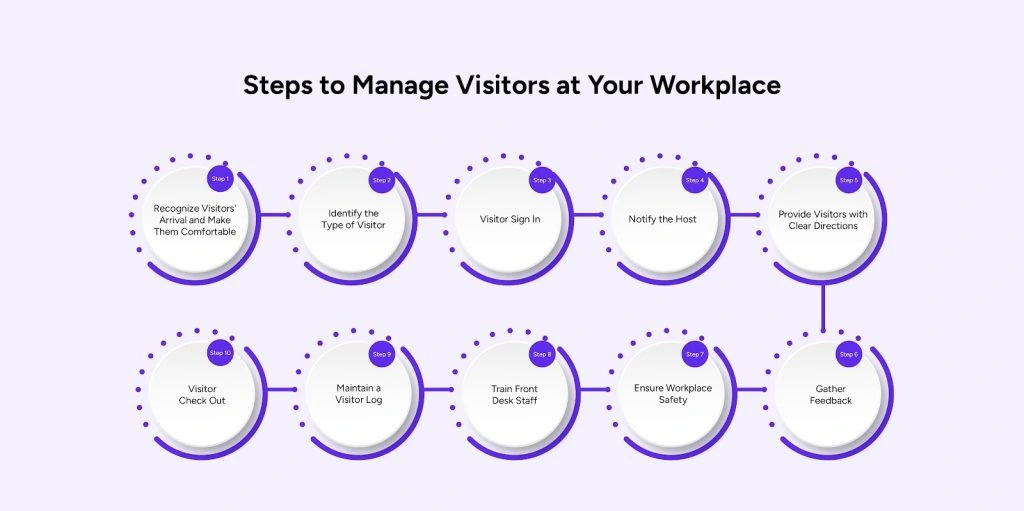
Step 1: Recognize Visitors’ Arrival and Make Them Comfortable
When a visitor walks in, the first impression is everything. Acknowledge their arrival immediately with a smile, a friendly greeting, and clear instructions. A welcoming environment, featuring comfortable seating, Wi-Fi access, and refreshments, demonstrates to your visitors that they’re valued. Making them comfortable helps reduce anxiety, especially if they’re new to your workplace.
Tips to make visitors feel comfortable:
- Welcome visitors warmly within 30 seconds of their arrival.
- Provide comfortable seating and offer water or coffee.
- Ensure the waiting area is clean, quiet, and well-lit.
- Display clear signage to guide them to the reception.
- Train front-desk staff to handle visitor inquiries politely.
Example:
When potential customers arrive for a meeting, they are greeted with a smile. They are given access to the guest Wi-Fi and a drink while they wait.
Step 2: Identify the Type of Visitor
Different visitors have different needs. Identifying whether someone is a contractor, a delivery person, or a client helps you tailor the experience to their specific needs. Categorizing visitors ensures your processes run efficiently while prioritizing security and compliance.
Tips for identifying visitor types:
- Ask visitors the purpose of their visit during check-in.
- Use badges or labels to differentiate between visitor types.
- Have distinct procedures for contractors, clients, and deliveries.
- Train staff to handle each category with professionalism.
- Use a digital system to track and categorize visitors.
Example:
A delivery driver arrives to drop off packages. Instead of waiting in line, they’re directed to a dedicated delivery area, ensuring minimal disruption.
Step 3: Visitor Sign In
A smooth sign-in process in the workplace visitor management system sets the tone for the remainder of the visit. Utilizing workplace management software enhances accuracy, saves time, and improves security. Collect essential details, such as name, purpose of visit, and contact information, while respecting privacy laws.
Tips for an efficient sign-in process:
- Use digital kiosks or tablets for a quick and easy sign-in.
- Allow pre-registration for faster check-ins.
- Include a privacy notice to comply with regulations.
- Offer multilingual options for international visitors.
- Display clear instructions for first-time users.
Example:
A pre-registered visitor scans a QR code at the reception kiosk, saving time and eliminating the need for lengthy paperwork.
Step 4: Notify the Host
Visitors should be able to arrive quickly. Once they sign in, notify their host immediately to avoid delays. Automating notifications ensures prompt communication between the front desk and the host with workplace management software.
Tips for notifying the host promptly for better workplace visitor management:
- Use automated workplace management software for instant notifications via email or SMS.
- Include visitor details, such as name and purpose, in the notification.
- Follow up if the host doesn’t respond within a set time.
- Train staff to direct visitors to alternative waiting areas as needed.
- Encourage hosts to acknowledge notifications.
Example:
When a candidate checks in for an interview, the hiring manager receives an instant notification, and within minutes, the manager escorts the visitor to the meeting room.
Step 5: Provide Visitors with Clear Directions
Visitors can only navigate your workplace if they know where to go. Clear directions or a guided escort ensure they reach the proper location without confusion or delay.
Tips for providing clear directions:
- Use maps or floor plans near the reception area.
- Provide verbal directions in conjunction with printed or digital maps.
- Have staff escort VIP visitors to their destination.
- Use colour-coded signs for different areas of the workplace.
- Label meeting rooms and office sections.
Example:
Visitors are given a printed map and a verbal guide to their meeting room. This small gesture saves time and prevents them from wandering.
Step 6: Visitor Check Out
Checking visitors out is just as important as welcoming them for better workplace visitor management. This step ensures security and provides accurate records of workplace activity. A quick, hassle-free check-out process also gives visitors a positive final impression.
Tips for an easy check-out process:
- Use the same digital system for check-in as for check-out.
- Thank visitors personally before they leave.
- Ensure all visitor badges are returned.
- Update logs to reflect accurate departure times.
- Provide follow-up communication, such as a thank-you email.
Example:
A client checks out using a digital kiosk. The system thanks them for their visit and emails a survey to collect feedback, leaving them impressed with the professionalism.
Step 7: Maintain a Visitor Log
Keeping a detailed visitor log isn’t only good practice, but also essential for compliance, audits, and security in workplace visitor management. Workplace management software is easy to manage, search, and analyze.
Tips for maintaining a visitor log:
- Use an office visitor management system for central record-keeping.
- Regularly review logs for accuracy and completeness.
- Ensure logs comply with data protection laws.
- Use analytics to identify trends in visitor activity.
- Restrict access to logs to authorized personnel only.
Example:
During a security review, your team pulls up detailed visitor logs showing who entered the premises, their purpose, and how long they stayed.
Step 8: Train Front Desk Staff
Your front desk staff is the face of your visitor management program. Well-trained employees guarantee that every interaction is professional, courteous, and efficient.
Tips for training front desk staff:
- Conduct regular workshops on handling visitors.
- Teach effective communication and conflict resolution skills.
- Role-play common scenarios for practice.
- Familiarize staff with digital workplace management software and workplace visitor policy.
- Emphasize the importance of security and confidentiality.
Example:
A receptionist trained in visitor management calmly manages a situation in which a contractor arrives without prior registration, guaranteeing the problem is handled quickly and correctly.
Step 9: Ensure Workplace Safety
The priority should always be safety. Everyone on-site is protected by a strong safety strategy, which includes everything from emergency protocols to visitor tracking.
Tips for maintaining workplace safety:
- Use the office visitor management system to track visitor movements.
- Set up watchlists for restricted access.
- Provide safety guidelines during the sign-in process.
- Install cameras in common areas for added security.
- Run regular safety drills for staff and contractors.
Example:
In the manufacturing industry, a visitor management system ensures that contractors and suppliers complete mandatory safety briefings before accessing high-risk areas, reducing workplace accidents.
Step 10: Gather Feedback for better workplace visitor management
Collecting feedback helps improve your visitor management system. Ask visitors about their experience to identify areas for enhancement.
Tips for gathering feedback:
- Use digital surveys sent via email or SMS after check-out.
- Keep surveys short and easy to complete.
- Offer incentives, such as discounts, for completing feedback forms.
- Address any complaints or suggestions promptly.
- Analyze feedback trends to identify opportunities for improvement.
Example:
After their meeting, visitors receive a quick survey, which provides valuable insights into how your reception team can improve its service.
Simplify Visitor Management with Visitly
Visitly is a secure, modern visitor management solution that makes signing in and out effortless for visitors, contractors, and employees.
Here are some of the key features of Visitly:
- Visitor Management: Enjoy digital logs, pre-registration, instant notifications, and customizable visitor flows.
- Contractor Management: Simplify contractor sign-ins, compliance checks, and on-site tracking.
- Employee Check-In: Use the My Visitly app for seamless employee activity tracking.
- Security and Compliance: Protect data and maintain privacy with robust features.
- Workplace Safety: Enhance safety with effective evacuation management and emergency alert systems.
Visitly eliminates the guesswork of managing visitors, enabling you to create a secure and efficient workplace.
Conclusion
Managing visitors doesn’t have to be a stressful task. Following these steps helps you create a welcoming and secure environment that leaves a lasting impression on your guests. From recognizing arrivals to maintaining logs, every detail matters to ensure smooth operations and workplace safety.
Want to take your visitor management to the next level? Visitly has everything you need to enhance security, efficiency, and guest experience.

FAQs
1. What is Workplace Visitor Management?
Workplace visitor management refers to the process of tracking, recording, and managing visitors who enter a workplace. It ensures a smooth, efficient, and secure visit, from pre-registration to check-out.
2. Why is Workplace Visitor Management Important?
Visitor management is crucial for ensuring workplace security, streamlining guest experiences, and complying with regulations. A smooth process builds trust and professionalism while enhancing safety and operational efficiency.
3. How Does a Workplace Visitor Policy Help Manage Visitors?
A workplace visitor policy outlines procedures and guidelines for welcoming and tracking visitors. It helps ensure that all visitors are registered, categorized, and safely escorted, creating a streamlined, organized system.
4. What Are the Benefits of Using Office Visitor Management Software?
Office visitor management software automates sign-ins, tracks visitor history, and provides real-time notifications to hosts. It enhances security, ensures compliance, and improves the overall visitor experience.
5. How Does Workplace Management Software Improve Visitor Tracking?
Workplace management software offers a digital solution to monitor and record visitor activity. It centralizes data, automates workflows, and enables efficient tracking, improving both security and workplace efficiency.