Your Front Door Is Your First Line of Defense. Is It Strong Enough?
A shocking 74% of workplace security breaches happen due to inadequate visitor screening. Yet, many businesses still rely on outdated, manual logs or unsecured check-in processes, leaving their offices vulnerable to workplace threats like unauthorized access, data breaches, and compliance failures.
Think about it, without a proper visitor management system, who’s really walking through your doors? A former employee with a grudge? A competitor looking for intel? A cybercriminal disguised as a delivery person? One oversight can cost millions.
Take the infamous Twitter security breach of 2020, where hackers gained access to internal systems by posing as contractors. The result? High-profile accounts including Elon Musk and Barack Obama were compromised, causing reputational damage and financial loss. Thus, poor visitor management is a business risk.
The good news? These mistakes are preventable. From enforcing access control systems to ensuring security and compliance, businesses can safeguard their workplace and reputation.
This blog explores deep into the top 10 visitor management mistakes companies make and, more importantly, how to avoid them. Let’s build a workplace safety strategy that leaves no room for error!
Visitor Management Gone Wrong: The Costly Mistakes Your Business Must Avoid
Visitor management is about protecting your business, employees, and sensitive data. Yet, many companies unknowingly cut corners, leaving their workplace vulnerable to security breaches, compliance issues, and unauthorized access. A single weak point, like a missing visitor log or unchecked credentials, can open the door to serious risks.
But here’s the good news: these mistakes are preventable. By identifying the most common pitfalls and applying smarter visitor management best practices, businesses can turn their front desk into a fortress of security and efficiency.
Let’s look into the biggest blunders and how to fix them before they cost you time, money, or worse your reputation.
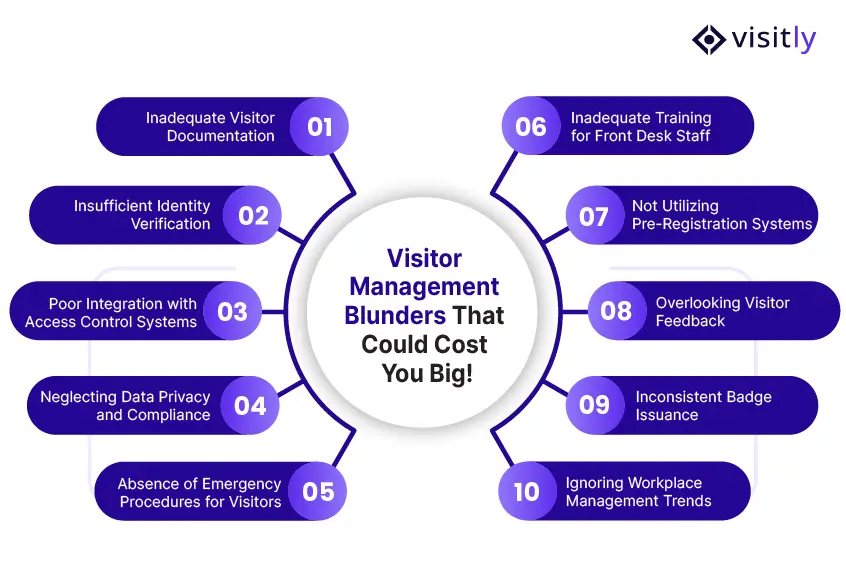
- Inadequate Visitor Documentation
A missing entry in the visitor log might seem harmless, until a security incident occurs. Without proper visitor documentation, tracking who enters and exits becomes nearly impossible, putting business security at risk. Implementing a visitor management system ensures accurate records and enhances overall safety.
- Insufficient Identity Verification
Letting in the wrong person can lead to workplace threats and data breaches. Relying on verbal confirmation or outdated ID methods makes it easier for unauthorized individuals to slip through. Strengthening ID checks and integrating background screenings fortify security measures while maintaining a smooth check-in process.
- Poor Integration with Access Control Systems
A visitor management system without access control integration is like a locked door with the key left outside. Visitors might enter restricted areas if there are no clear access boundaries. Seamless integration with access control systems ensures that visitors have appropriate access while maintaining security protocols.
- Neglecting Data Privacy and Compliance
Handling visitor data irresponsibly can result in hefty fines and loss of trust. Many businesses store visitor information without considering security and compliance risks, making them vulnerable to data breaches. Following visitor management best practices ensures visitor privacy while keeping businesses compliant with regulations like ITAR compliance.
- Absence of Emergency Procedures for Visitors
Emergencies don’t wait for preparation. Businesses that fail to plan for visitor safety risk chaos during workplace safety incidents. Establishing clear evacuation routes, visitor checklists, and real-time headcounts can prevent confusion and ensure everyone’s safety.
- Inadequate Training for Front Desk Staff
A visitor management system is only as good as the people using it. Without proper training, receptionists may overlook security risks, mismanage visitor logs, or fail to enforce ID checks. Investing in regular training ensures a professional, secure check-in experience.
- Not Utilizing Pre-Registration Systems
Long wait times and bottlenecks at reception make for a bad first impression. Without a visitor management system that allows pre-registration, front desk staff are often overwhelmed, leading to delays and security oversights. Enabling pre-registration streamlines check-ins and improves overall efficiency.
- Overlooking Visitor Feedback
If businesses don’t ask, they’ll never know what’s wrong. Ignoring visitor feedback means missing valuable insights into security gaps, check-in delays, and overall visitor experience. Collecting and acting on feedback ensures continuous improvement in visitor management best practices.
- Inconsistent Badge Issuance
Without a clear badge system, differentiating between employees, guests, and contractors becomes difficult. A well-managed badge system improves security by allowing only authorized individuals access to designated areas. Consistency in badge issuance ensures seamless visitor tracking.
- Ignoring Workplace Management Trends
Sticking to outdated methods in visitor management can lead to inefficiencies and security gaps. Modern workplace management trends focus on automation, AI-powered check-ins, and real-time security monitoring. Embracing new technologies enhances visitor experience while maintaining security.
Why Visitly is the Smart Choice for Visitor Management
A secure, seamless, and efficient visitor management system is a necessity. That’s where Visitly comes in. Designed for businesses that prioritize workplace safety, security, and compliance, Visitly takes the guesswork out of visitor management while keeping operations smooth and hassle-free.
Top Features of Visitly (And Why They Matter)
- Visitor Watchlist – Stay One Step Ahead
Security should never be an afterthought. With Visitly’s built-in watchlist, businesses can flag high-risk visitors, ensuring unauthorized individuals don’t slip through the cracks. This feature acts as an early warning system, giving security teams real-time alerts before a potential threat becomes a problem.
- Facial Recognition – Smarter, Faster, Safer
Bid goodbye to the old-school manual sign-in sheets—Visitly’s Face ID recognition provides a fast, contactless, and secure check-in process. No more bottlenecks at the front desk or worries about unauthorized entry. Just a quick scan, and visitors are verified in seconds.
- Emergency Evacuation – Be Prepared for the Unexpected
In a crisis, every second counts. Visitly offers real-time visitor tracking, so you’ll always know who’s on-site. Whether it’s a fire drill or an actual emergency, businesses can swiftly evacuate personnel and account for every visitor, ensuring a safe and organized response.
- iPad-Enabled – Simplicity Meets Innovation
No clunky machines or confusing interfaces—Visitly is designed for effortless check-ins using a user-friendly iPad system. Visitors can sign in and out in seconds, reducing entry delays and offering a modern, professional experience.
- Affordable Pricing – Top Security Without the Hefty Price Tag
Security shouldn’t break the bank. Visitly provides enterprise-level features at an affordable rate, making it a cost-effective solution for businesses of all sizes.
- No Expensive Hardware Required – Use What You Already Have
Forget about costly, complicated setups—all you need is an iPad. Visitly works with existing technology, eliminating the need for additional hardware expenses.
- No App Download for Visitors – Instant, Hassle-Free Check-In
Nobody likes being forced to download an app just to enter a building. With Visitly, guests can sign in instantly without any downloads, ensuring a frictionless experience while maintaining top-tier security.
Conclusion
Don’t Wait for a Security Breach to Fix Your Visitor Management. A small oversight today can turn into a major security nightmare tomorrow. Businesses that ignore visitor management risks are leaving the door wide open to unauthorized access, compliance violations, and workplace threats. But the good news? These mistakes are completely avoidable with the right system in place.
With Visitly, you get seamless check-ins, real-time security alerts, and compliance-ready visitor tracking—all in one easy-to-use platform. Why wait for a problem when you can prevent it?
Book a demo with Visitly today and upgrade your visitor management system—the smart way.