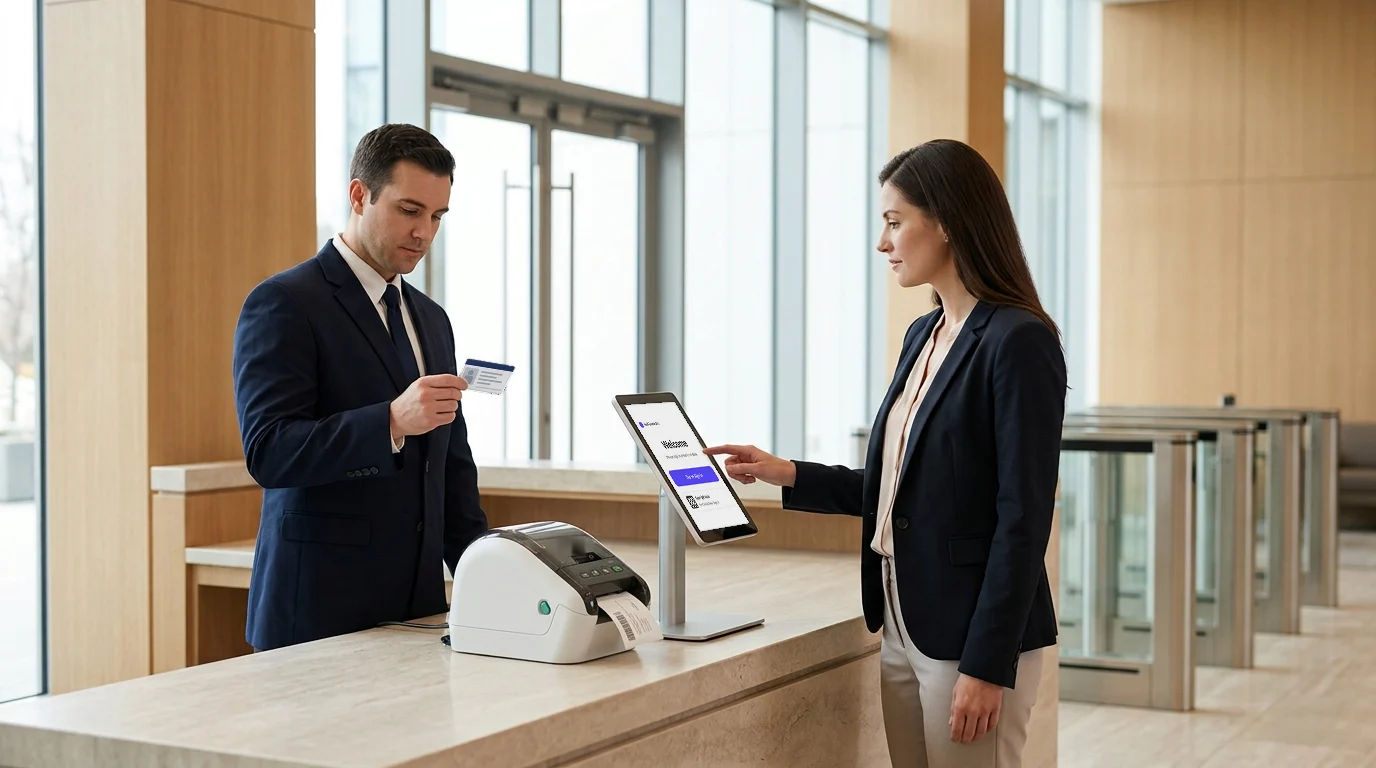
Paper logbooks can record a visitor’s name, but they make it harder to track who is on-site, verify identities, and maintain accurate entry records. Businesses are increasingly replacing them with digital sign-in and out systems that automate visitor entry and improve visibility.
The global visitor management system market was valued at $2.16 billion in 2025 and is projected to grow from $2.45 billion in 2026 to $6.77 billion by 2034, according to Fortune Business Insights.
Modern systems can help businesses:
- Pre-register and verify visitors
- Send automatic host notifications
- Track check-ins and check-outs
- Maintain searchable visitor records
- Manage contractors and multiple locations
The shift is no longer optional. This guide breaks down 5 digital sign-in and sign-out systems for 2027, their features and strengths, and which one best fits your business.
So, let us start!
What are the 5 Digital Sign-In and Sign-Out Systems for Businesses?
The 5 Digital Sign-In and Out Systems for Businesses are:
1. Visitly
2. Envoy
3. FacilityOS
4. Lobbytrack
5. Sign In App

1. Visitly
Overview
Visitly is an enterprise-focused digital sign-in and out system built for organizations that need stronger control over visitors, contractors, employees, and other people entering their facilities.
Rather than stopping at visitor registration, Visitly connects the check-in process with identity verification, security screening, approvals, badges, documentation, emergency response, and audit records. This makes it particularly relevant for organizations where knowing who is on-site, why they are there, and whether they have completed the required security or compliance steps matters as much as providing a fast check-in experience.
Businesses can use Visitly across a single office or multiple sites while managing visitor policies, records, workflows, and real-time presence from a centralized platform. The platform currently serves more than 1,300 organizations across 40+ countries.
Key Features
- Customizable sign-in workflows: Build different visitor check-in processes that flow for contractors and employees, with tailored screening questions for each group.
- Bulk pre-registration: Visitor pre-registration invites and registers large groups in advance, cutting lobby wait times by up to 60%.
- Real-time host notifications: Instant emergency notifications via SMS, email, Slack, or Microsoft Teams the moment a visitor arrives.
- Digital document signing: NDAs, waivers, and safety agreements signed and stored digitally at check-in.
- ID scanning: Verify visitor identity quickly and accurately at the point of entry.
- Employee check-in: Track staff attendance and real-time on-site presence alongside visitors.
- Contractor management: Contractor management with custom sign-in flows, a logged safety induction, and on-site hour logging.
- Emergency evacuation management: Live on-site presence lists are accessible instantly during emergencies.
- Multi-location control: Centralized dashboard to manage visitor access across all sites from one place.
- Integrations: Connects with Slack, Microsoft Teams, Google Calendar, Okta, Salesforce, and major access control systems.
- GDPR, HIPAA & SOC 2 compliance: Enterprise-grade security and compliance for data governance built in from day one.
- Touchless and iPad check-in: Support iPad kiosks, web check-in, QR-based sign-in, and visitor pre-registration.
- Languages: Check-in supports more than 150 languages.
Strengths
- The only system on this list that manages visitors, employees, contractors, and mailroom operations under one roof.
- No app download required for visitors, setting Visitly apart as the fastest, most user-friendly automated front desk system on this list.
- Compliance-first architecture with configurable data retention, legal document signing, and immutable audit trails
- An iPad-based kiosk is fully brand-customizable; your sign-in screen reflects your company, not a generic template.
- Trusted by industries with the most demanding visitor management compliance requirements: healthcare, education, manufacturing, energy, finance, and government.
Why Visitly Stands Out from Other Systems
- More than check-in: integrates with your access control system and does not control doors
- Combines:
- Visitor management
- Contractor tracking software
- Employee check-in and access visibility
- Creates a single source of truth for everyone on-site
- Designed for audit readiness, not just convenience
- Reduces security blind spots at the front desk
- Most tools digitize logs.
- Visitly builds a system of control and accountability.
Best Suited For
- Mid-sized to large enterprises with multi-location or campus operations.
- Organizations in compliance-intensive industries:education, healthcare, finance,energy, and manufacturing.
- Coworking spaces and commercial property managers.
- Businesses managing a mix of visitors, employees, contractors, and deliveries.
- Any organization that needs a single, scalable platform to replace fragmented front-desk tools.
2. Envoy
Overview
Envoy is one of the most recognized names in digital visitor management, particularly popular among technology companies, creative agencies, and modern hybrid offices.
It offers a polished, intuitive check-in experience built around the tools that tech teams already live in: Slack, Google Workspace, Zoom, and more. Beyond visitor management, Envoy extends into desk booking and room scheduling, making it a broader workplace platform for teams managing space alongside foot traffic.
Key Features
- Contactless QR code and touchscreen kiosk check-in
- Visitor badge printing with photo capture
- Automated host notifications via Slack and email
- Desk booking and room scheduling integrated with visitor flows.
- Watchlist and blocklist visitor screening
- Visitor analytics and real-time reporting
- Integration with Google Calendar, Slack, Zoom, and access control systems
Strengths
- Very easy to set up and use
- Affordable for smaller teams
- Minimal training required
Best Suited For
- Mid-sized companies
- Office environments with moderate visitor traffic
- Teams prioritizing simplicity and experience
3. FacilityOS
Overview
FacilityOS is a visitor management system designed specifically for enterprises in heavily regulated or industrial sectors.
While most visitor management platforms focus on the front-desk experience, FacilityOS’s distinguishing strength is deep operational compliance. It supports contractor inductions, safety briefings, zoned badging, and regulatory reporting as its core differentiators.
This platform is specifically designed for the workflow of external workers who must clear multiple compliance checkpoints before stepping on-site.
Key Features
- Advanced visitor and contractor management with induction tracking
- Multi-location and multi-site centralized control
- Zoned access badge printing tied to site permissions
- Safety briefing and compliance document workflows for contractors
- Watchlist and background check integrations
- Emergency evacuation management with live on-site lists
- Detailed regulatory reporting and audit trail exports
- Integration with ERP, HR, and physical access control systems
Strengths
- Deepest contractor compliance and induction management in this category
- Designed for high-security, high-regulation environments where visitor risk is genuinely high
- Robust multi-site administration with granular permission control
- Regulatory reporting capabilities that satisfy audit requirements out of the box
Best Suited For
- Large enterprises
- Multi-location facilities
- Organizations needing deep operational integration
4. Lobbytrack
Overview
Lobbytrack is a cloud-based digital visitor management system that delivers a solid, well-rounded feature set without a premium price tag. It reliably handles the core requirements most businesses need: pre-registration, photo capture, badge printing, host notifications, and visitor logs, without unnecessary complexity.
Its recurring visitor recognition feature is a genuine time-saver for sites that see the same contractors, delivery personnel, or regular guests repeatedly.
Key Features
- Visitor pre-registration with QR code check-in
- Photo capture and ID scanning on arrival
- Badge printing with customizable templates
- Recurring visitor recognition for faster repeat check-ins
- Host notifications via SMS and email
- Watchlist screening
- Multi-location support
- Detailed visitor reports and searchable audit logs
Strengths
- Flexible and adaptable system
- Easy to scale across different environments
- Strong reporting capabilities
Best Suited For
- Businesses with varying visitor volumes
- Offices needing customization
- Organizations looking for scalable solutions
5. Sign In App
Overview
Sign In App positions itself as “Visitor Management 2.0”; a platform that connects the entire visitor journey, from pre-arrival through to post-visit audit, with workplace safety and compliance woven into every step.
It holds ISO 27001, SOC 2, and Cyber Essentials certifications and natively supports GDPR, CCPA, and HIPAA compliance, making it a credible choice for organizations in healthcare, government, finance, and education where data governance is non-negotiable.
Sign In App is the visitor management product of Sign In Solutions, a group backed by the investor PSG. SwipedOn, which Sign In Solutions bought in 2024, is now sold as Sign In App, and The Receptionist for iPad, also part of the group, is moving its customers onto Sign In App. That is why neither is listed separately here.
Key Features
- Customizable visitor and employee sign-in workflows
- Safety and compliance screening questions integrated at check-in
- Emergency evacuation management with real-time on-site presence lists
- Pre-registration with automated host notifications
- Digital document signing for NDAs and safety agreements
- Space and resource booking integration
- Multi-site management dashboard with centralized reporting
- Visitor analytics and compliance audit exports
Strengths
- Highly customizable workflows
- Strong integration capabilities
- Works across different business sizes
- Published prices, starting at $630 per site per year
Best Suited For
- Businesses with complex integration needs
- Enterprises with multiple systems in place
- Organizations requiring flexible workflows
- Small and mid-sized offices that want a published price per site
How Do These 5 Digital Sign-In Systems Compare at a Glance?
| System | Best For | Compliance Depth | Contractor Management | Ease of Deployment | Pricing Tier |
|---|---|---|---|---|---|
| Visitly | Enterprises, coworking, multi-location | High | Yes | Very Easy | Mid–Enterprise |
| Envoy | Tech companies, hybrid workplaces | Medium | Limited | Easy | Mid–Enterprise |
| FacilityOS | Industrial, regulated sectors | Very High | Advanced | Moderate | Enterprise |
| Lobbytrack | Budget-conscious enterprises | Medium | Basic | Easy | SMB–Mid |
| Sign In App | SMB and mid-market offices, healthcare, government, finance | High | Moderate | Easy | SMB to mid-market |
When Has Your Business Outgrown a Basic Digital Check-In System?
A basic digital check-in system may work for a small office with limited visitor traffic. But as visitor volume, locations, and security requirements increase, businesses often need a system that provides better control, visibility, and recordkeeping.
You may need a more advanced digital visitor management system if:
1. You Manage Multiple Locations
Managing visitors separately at each location can make processes inconsistent and reporting difficult.
- Apply consistent visitor policies across sites
- View visitor activity from one place
- Maintain centralized visitor records
2. You Regularly Receive Contractors and Vendors
Contractors often need a different check-in process than regular visitors.
They may need to:
- Complete safety forms or orientations
- Sign agreements
- Submit required documents
- Receive approval before entry
Visitly supports customized workflows, contractor records, pre-registration, and document collection.
3. You Need Stronger Visitor Verification
A visitor name and arrival time may not provide enough information for secure workplaces.
Businesses may also need:
- ID verification
- Photo capture
- Watchlist screening
- Visitor badges
- Approval records
These checks help teams confirm who is entering the workplace and maintain a clear record of each visit.
4. You Need Reliable Records During Emergencies
Paper logs can quickly become outdated during an emergency. A digital system provides a current record of who is on-site.
This helps teams:
- Identify visitors inside the facility
- Check who has signed out
- Account for people during an evacuation
5. You Need Integrations With Existing Systems
Visitor management often needs to work with other workplace and security tools.
Common integrations include:
- Access control systems
- Employee directories
- Identity providers
- Calendars
- Slack and Microsoft Teams
- Emergency notification systems
Which Businesses Need More Advanced Digital Visitor Management?
Some workplaces need more than a basic sign-in kiosk. Businesses with higher security requirements, frequent contractors, multiple sites, or strict visitor records often need a more advanced digital visitor management system.
1. Manufacturing Facilities
Manufacturers often manage contractors, vendors, delivery teams, and temporary workers while protecting restricted production areas.
They may need:
- Visitor ID verification
- Contractor records
- Safety acknowledgments
- Entry and exit tracking
2. Healthcare Organizations
Healthcare facilities need better control over visitor access, privacy, and on-site visibility. A digital visitor management system can help standardize check-ins and maintain accurate visitor records.
3. Energy, Government, and Defense Facilities
These environments often have stricter security and documentation requirements.
Common needs include:
- Identity verification
- Approval-based entry
- Visitor badges
- Audit-ready records
- Real-time on-site tracking
Visitly supports these types of security-focused visitor workflows.
4. Logistics and Multi-Site Operations
Warehouses, distribution centers, and transport facilities often manage drivers, vendors, contractors, and visitors across several locations.
Centralized visitor management helps teams:
- Apply consistent check-in rules
- Track visitors across sites
- Maintain one set of visitor records
5. Corporate Offices
Even standard offices can benefit from:
- Visitor pre-registration
- Faster check-in
- Automatic host notifications
- Digital agreements
- Searchable visitor history
How to Choose the Right Digital Sign-In System for Your Business?
Choosing the right digital sign-in and out system is not about features.
It’s about how well the system fits your security, operations, and scale.
Most businesses don’t fail because they picked the wrong tool.
They fail because they didn’t ask the right questions before choosing one.
Key Questions to Ask Before You Decide
- Can it integrate with your existing security and access control systems?
Your sign-in system should not operate in isolation. It must integrate with badge systems, access control, and internal tools to ensure seamless, secure entry management.
- Can it handle high visitor volume and multiple locations?
If your business operates across offices, campuses, or facilities, the system must support centralized visibility without slowing down operations at any location.
- Is it scalable and adaptable to your workflows?
Your needs will evolve. The system should allow custom workflows for visitors, contractors, vendors, and employees without requiring constant reconfiguration.
- Does it provide real-time tracking and audit-ready logs?
You should be able to instantly answer:
- Who is inside right now?
- When did they enter?
- Who approved them?
If not, the system is not built for compliance or accountability.
- Does it reduce manual work or just digitize it?
Some tools only replace paper with a screen.
The right system should:
- Automate check-ins
- Send notifications
- Capture documents
- Maintain structured records
That’s where real efficiency comes from.
Cloud or on-premise hosting
Ask each vendor where the system runs. Most digital sign-in systems are cloud-hosted: the vendor runs the servers, updates arrive automatically and every location reports into one account. You pay a subscription and need only the kiosk hardware on site.
An on-premise system runs on servers you host. Your IT team controls the data and the update schedule, and also carries the setup, patching and backup work.
Visitly is cloud-hosted and needs no on-premise infrastructure. If your security policy requires self-hosting, confirm the hosting model with every vendor before you shortlist.
Closing Thoughts
A digital sign-in and out system has become a necessity. It is a practical way to improve security, reduce manual work, and create a better experience for everyone entering your workplace.
The right system helps you do more than replace paper logs. It gives you real-time visibility, stronger access controls, cleaner records, and a process that scales with your business. While each platform brings something different, Visitly stands out with its unified approach to visitor, contractor, and workplace access management.
If your business is ready to move beyond outdated sign-in methods and build a smarter front desk operation, now is the time to act.
Take control of your visitor management with a system built for security, efficiency, and scale.
Connect with us now for further insights.
FAQs
What is a digital sign-in and out system?
A digital sign-in and out system is software that records each person's arrival and departure at a site in place of a paper logbook. Visitors, contractors and employees sign in on a kiosk or their phone and sign out when they leave, which produces a live on-site list and a time-stamped history.
How does a digital check-in system improve workplace security?
It ties every person on-site to an identity, a host and a time. The system can capture a photo, check the visitor against a watchlist, print a dated badge and alert the host. Sign-out closes the visit, so the on-site list stays accurate for an evacuation and the history holds up in an incident review.
Can one electronic sign-in system cover employees and visitors at every location?
Yes. Most cloud systems run every site from one account. Policies, watchlists and reports are set centrally, and each location keeps its own check-in steps and hosts. Visitly records employees, contractors and visitors in the same system, so one roster shows who is in each building.
What features should a digital sign-in system have?
At minimum it needs sign-in and sign-out time stamps, host notifications, pre-registration, document signing, badge printing and an audit log you can export. Regulated sites should add ID verification, watchlist screening and access control integration. Check that single sign-on is included in the plan you are quoted, because some vendors reserve it for higher tiers.
How much does a digital sign-in system cost?
List prices range from a few hundred to several thousand dollars per location per year. Sign In App starts at $630 per site per year. Visitly starts at $1,000 per location per year. Envoy Premium is $362 per location per month, billed annually. Prices as of Q4 2026.
When has a business outgrown a basic sign-in system?
You have outgrown it when sign-in has to enforce a rule as well as record a name. Common triggers are a second location, regular contractors, a need to verify identity, an auditor asking for visitor records, or an evacuation drill that exposed gaps. At that point compare platforms on screening, integrations and audit export.