Here’s an uncomfortable truth from the front line of workplace safety!
A report highlights that nearly 81% of employees say they’ve personally experienced an emergency or safety incident at work. However, 35% still feel unprepared for when it happens.
And yet, according to a report, while 96% of workers say physical safety at work is essential, over 56% say they don’t feel entirely safe in their workplace.
What’s driving this gap?
Slow alerts, outdated communication channels, and fragmented systems that leave teams in the dark right when they need clarity most. According to Globe Newswire research, poor communication during safety incidents affected 90% of firms that lacked modern mass‑notification systems.
In high‑stakes industries—from manufacturing plants in India to corporate campuses in the USA—every second counts. Having a robust emergency notification software isn’t optional. It’s the difference between chaos and control, between evacuation success and crisis escalation.
In this guide, we’ll walk you through exactly how to trigger emergency notifications effectively—so your workplace becomes a model of security and compliance, not vulnerability.
Let’s get started!
Why Are Emergency Notifications Critical for Workplace Safety?
The emergency notifications are critical for workplace safety because they help:
1. Compliance with Workplace Safety Regulations
2. Rapid Response to Save Lives
3. Reducing Business Downtime and Losses
They are a crucial part of any effective workplace safety strategy.
Here’s why businesses must prioritize them:
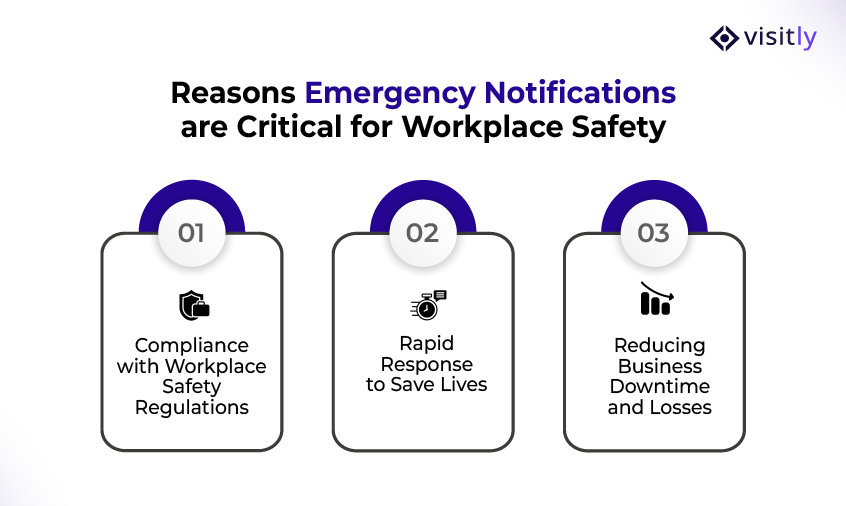
1. Compliance with Workplace Safety Regulations
- Legal Requirements: Various regulations (such as OSHA in the US and the EU Workplace Directive) mandate that businesses have effective emergency communication protocols.
- Avoiding Penalties: Failing to comply with these safety regulations could result in fines and legal consequences.
- Documenting Preparedness: An effective notification system provides tangible proof that your organization is prepared to handle emergencies, essential for audits and inspections.
2. Rapid Response to Save Lives
- Timely Alerts: Emergencies—whether it’s a fire, natural disaster, or security threat—require immediate action. Delayed responses can escalate the situation, leading to injuries or even fatalities.
- Employee Safety: Quick alerts provide employees with sufficient time to evacuate or take protective measures, thereby minimizing the risk of injury or loss of life.
- Real-Time Tracking: Modern notification systems can track employee locations in real time, ensuring that no one is left behind during evacuations.
3. Reducing Business Downtime and Losses
- Minimizing Disruptions: Delayed emergency responses can lead to significant disruptions in business operations. A rapid response ensures that incidents are addressed promptly, reducing downtime and enabling business operations to resume more quickly.
- Financial Impact: A slow response could result in more significant damage to property or equipment, ultimately impacting the company’s financial stability. Quick, effective notifications limit these risks.
How to Trigger Emergency Notifications Effectively?
To trigger emergency notifications effectively, follow these steps:
Step 1: Identify the Emergency Situation and Severity
Step 2: Select the Right Notification Channels
Step 3: Integrate with Workplace Management Systems
Step 4: Personalize Alerts for Specific Roles and Locations
Step 5: Monitor the Response and Confirm Actions
Step 6: Test the System Regularly
Triggering emergency notifications efficiently is key to ensuring safety and reducing risks during crises. By taking the proper steps, businesses can minimize confusion, protect their workforce, and provide a quick, coordinated response.
Below are the steps to trigger emergency notifications effectively:

Step 1: Identify the Emergency Situation and Severity
- Categorize Emergencies Based on Severity
- Fire: Immediate evacuation; use loudspeakers and alarm systems.
- Natural Disasters: Earthquakes, floods, or storms may necessitate sheltering in place or evacuation, depending on their severity and the local conditions.
- Intruder or Security Threat: Lockdown protocols and real-time location tracking.
- Medical Emergency: Alerts to first responders and medical staff.
- Hazardous Material Spill: Evacuation or Containment Procedures and Specialized Team Alerts.
- Escalation Protocols:
- Have a well-defined escalation protocol for different types of emergencies.
- Determine when and how notifications should be sent based on the severity and urgency (e.g., automated alerts for minor issues vs. immediate evacuation in a major crisis).
Step 2: Select the Right Notification Channels
- Determine Effective Communication Channels Based on the Emergency Type
- For fire drills, use loudspeakers and emergency alarms for audible alerts.
- For real-time alerts, send SMS and push notifications to mobile devices for immediate action.
- For evacuations, integrate visual displays in common areas and use PA systems to guide employees.
- Multi-Channel Communication:
- Ensure notifications are delivered across multiple devices and channels to reach everyone, including employees, contractors, and visitors.
- This includes email, text messages, automated phone calls, and an emergency alert on iPhone for comprehensive coverage.
Step 3: Integrate with Workplace Management Systems
- Integrate Emergency Alerts with Existing Systems
- Leverage HR software, security tools, and visitor management systems for seamless data flow.
- Visitor Roster: Integration with Visitly shows you which visitors and contractors are checked in during an emergency, ensuring you can account for everyone on-site.
- Real-Time Integration for Triggering Alerts:
- Utilize integrated systems to trigger notifications based on real-time conditions automatically.
- Example: A fire alarm system could automatically notify security, HR, and management, and send evacuation instructions via SMS or mobile app using an emergency notification on iPhone.
Step 4: Personalize Alerts for Specific Roles and Locations
- Role-Based Alerts
- Security personnel may require detailed instructions on the emergency and how to secure the area, while employees need clear evacuation instructions.
- HR may need to send a safety confirmation message to all employees, while department heads need specific information to lead their teams effectively.
- Location-Specific Alerts
- Geolocation is vital—why notify employees on the 10th floor if the emergency is on the 5th floor? By integrating geolocation technology, you can send localized alerts to specific floors, offices, or areas of the building.
- This ensures that messages are relevant, which not only saves time but also reduces confusion during high-stress situations.
Step 5: Monitor the Response and Confirm Actions
- Track Employee and Visitor Acknowledgment
- Ensure the system allows you to track who has received the alert and who has taken action (e.g., confirmed evacuation or taken shelter).
- Features such as real-time dashboards can help managers confirm everyone’s safety during emergency management.
- Confirmation Systems:
- Use a mobile check-in app or employee check-in software to verify that employees and visitors are safe and secure.
- Employees can “check in” after receiving the alert, allowing you to confirm workplace security and account for all individuals.
Step 6: Test the System Regularly
- Routine Testing
- Testing your emergency notification system regularly ensures it works when needed most. This includes both software tests and practical drills to check the effectiveness of the communication channels.
- Best Practices for Testing:
- Conduct regular emergency drills to simulate a variety of scenarios (fire, medical emergency, lockdown) and test the system’s response.
- Evaluate the frequency of alerts and response times during these tests to ensure optimal performance during real emergencies.
What are the Types of Emergency Notification Systems to Implement?
The various types of emergency notification systems for businesses are:
1. Manual Emergency Notification Systems
2. Automated Emergency Notification Systems
3. Mobile-based Emergency Notification Systems
4. Multi-Channel Emergency Notification Systems
5. Integrated Emergency Notification Systems
6. Emergency Notification System for Schools
Let us discuss the types of emergency notification systems for business in detail.

1. Manual Emergency Notification Systems
How They Work:
- Manual emergency notification systems rely on human intervention to send alerts, such as phone calls, emails, or even word-of-mouth communication.
- These systems might involve someone manually calling employees or using a public address system to alert people.
Limitations:
- Time-Consuming
- Error-Prone
- Not Scalable
When to Use:
- Smaller businesses or those with fewer personnel to manage might rely on manual systems for less complex situations, but this approach is generally not recommended for high-risk environments.
2. Automated Emergency Notification Systems
How They Work:
- Automated emergency notification systems for business utilize software and technology to trigger alerts in real-time. They can send preconfigured messages to multiple channels, such as SMS, email, voice calls, and push notifications, simultaneously.
- They are also capable of triggering alerts automatically when certain conditions or thresholds are met (e.g., a fire alarm triggers, a security breach is detected, or a medical emergency arises).
Advantages:
- Increased Speed
- High Scalability
- Reliable
- Multi-Channel Reach
When to Use:
- Highly recommended for businesses of all sizes, especially in high-risk environments, such as manufacturing plants, hospitals, and corporate offices.
3. Mobile-based Emergency Notification Systems
How They Work:
- Mobile-based systems send emergency alerts directly to smartphones via SMS, push notifications, or mobile apps.
- These systems can be integrated with geolocation data, ensuring alerts are sent based on location (e.g., employees in a particular building or on a specific floor).
Advantages:
- Instant Notifications
- Real-time Tracking
- Location Awareness
When to Use:
- Ideal for businesses with employees who work in the field or are constantly on the move, such as sales teams or field technicians.
- Particularly useful in large campuses or multi-building offices, this feature provides localized alerts.
4. Multi-Channel Emergency Notification Systems
How They Work:
- Multi-channel systems combine SMS, email, voice alerts, mobile app notifications, and physical alerts (such as loudspeakers) to ensure comprehensive communication across the organization.
- These systems enable businesses to send the same alert message across multiple devices and platforms, ensuring that no one misses an important message.
Advantages:
- Redundancy
- Comprehensive Coverage
- Customization
When to Use:
- Best suited for businesses of all sizes and industries, especially those with large or complex infrastructures, such as hospitals, warehouses, universities, and manufacturing plants.
5. Integrated Emergency Notification Systems
How They Work:
- Integrated workplace management software connects your emergency notification system with existing workplace management tools, including HR systems, visitor management systems, and security standards.
- For example, when a fire alarm sounds, the system can automatically trigger notifications to the HR team, facility managers, and security personnel, while also sending alerts to all employees via mobile apps or email.
Advantages:
- Automated Responses
- Centralized Communication
- Improved Coordination
When to Use:
- Ideal for businesses that already use multiple systems (e.g., HR software, security management systems, visitor management) and want to integrate them for streamlined emergency responses.
6. Emergency Notification System for Schools
Educational institutions face unique challenges when it comes to emergency notifications due to their large and often geographically dispersed campuses.
Here’s why an emergency notification system is essential for a visitor management system for schools:
Challenges in Educational Institutions:
- Large Populations: Schools must account for hundreds or thousands of students, teachers, and visitors.
- Multiple Buildings and Areas: The emergency notification system for schools must reach various locations across large campuses, including classrooms, gyms, dorms, and outdoor areas.
How Emergency Notification Systems Help:
- Instant Alerts to All Areas: Whether it’s a lockdown or evacuation order, multi-channel notifications ensure everyone is informed simultaneously.
- Visitor Management Integration: Systems like Visitly show which visitors and contractors are checked in at each site, ensuring they’re accounted for during an emergency.
- Tailored Alerts: An emergency notification system for schools can be sent to teachers, administrators, and emergency responders with specific instructions tailored to the nature of the emergency.
What are the Key Features to Look for in an Emergency Notification System?
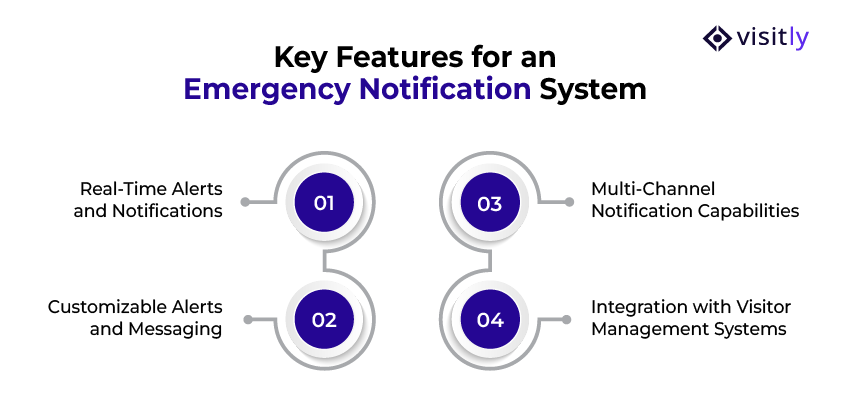
The key features to look for in an emergency notification system are:
- Real-Time Alerts and Notifications
- Customizable Alerts and Messaging
- Multi-Channel Notification Capabilities
- Integration with Visitor Management Systems
Here are the essential features every organization should look for in an emergency notification service:
1. Real-Time Alerts and Notifications
Why Real-Time Alerts Matter?
In an emergency, every second counts. Real-time updates can mean the difference between avoiding disaster and facing severe consequences. Immediate notifications help ensure that employees and key responders can act quickly.
Benefits of Real-Time Alerts
- Faster Response Times
- Less Confusion
- Improved Safety
2. Customizable Alerts and Messaging
Why Customization is Key?
Different emergencies require different responses. Whether it’s a fire, a medical emergency, or a security breach, the message and instructions must be tailored to the specific situation. Customizable notifications allow you to tailor the content and tone of your messages to be both clear and actionable for each specific scenario.
Benefits of Customizable Alerts
- Role-Specific Instructions
- Urgency and Clarity
- Message Templates
3. Multi-Channel Notification Capabilities
Why Multi-Channel Communication is Essential?
People use various devices, and relying solely on one method of communication can result in missed alerts. A multi-channel emergency notification system ensures that your messages reach everyone—regardless of their location or the device they’re using.
Benefits of Multi-Channel Alerts
- Redundancy
- Wider Reach
- Universal Accessibility
4. Integration with Visitor Management Systems
Why Integration with Systems Like Visitly Matters
In emergencies, knowing who is on-site and their location is crucial. Integrating your emergency notification system with your visitor management system, such as Visitly, gives you a real-time list of all visitors and contractors checked in.
Benefits of Integration
- Accountability
- Accurate Data
- Quick Access to Critical Information
What Are the Challenges in Emergency Notification Systems?
The challenges in emergency notification systems are:
1. Delays in Notification Triggering
2. Lack of Multi-Channel Communication
3. Ensuring Employee Engagement and Response
4. Limited Scalability of Notification Systems
5. Difficulty in Real-Time Tracking and Accountability

Closing Thoughts
In an era where workplace dynamics are constantly evolving, emergency notification systems are no longer a luxury—they are a critical necessity for safeguarding employees, visitors, and assets.
Businesses, particularly those in high-risk industries such as manufacturing, construction, and healthcare, face distinct challenges in managing emergencies. The ability to trigger immediate, effective notifications can mean the difference between minimizing damage and facing catastrophic consequences.
Automated systems like Visitly, such as those integrated with visitor management systems, enable seamless communication across multiple platforms, ensuring that every individual on-site is accounted for and informed.
Key Takeaways:
- Effective emergency notification software is essential for workplace safety.
- Real-time alerts, multi-channel communication, and system integration save lives and reduce damage.
- Regular training and drills ensure that employees respond appropriately in emergencies.
Ready to implement more innovative emergency notification software for your workplace?
Contact us today to learn how Visitly can help you ensure maximum safety with our advanced notification system.
Prioritize your workplace safety with Visitly—efficient, reliable, and real-time solutions to keep your business protected.
FAQs
What is an emergency notification system?
An emergency notification system is software that sends the same alert to many people at once over several channels, usually SMS, voice call, email, mobile app and desktop pop-up. Safety teams use it to tell employees what is happening and what to do, and most systems log who received and acknowledged each message.
How do you trigger an emergency notification?
Decide in advance who may send an alert, for which events and with which template, then launch it from the console or mobile app. Good practice is a short message that names the hazard, the location and the action to take, sent to the affected site only, followed by an all-clear when the event ends.
What types of emergency notification systems are there?
There are five common types: manual call trees and public address, automated systems triggered by a sensor or alarm, mobile-first systems built on SMS and push, multi-channel systems that combine them, and integrated systems tied to HR and visitor records. Larger sites usually choose multi-channel with integrations, because one channel rarely reaches everyone.
Does OSHA require an emergency notification system?
OSHA requires an employee alarm system wherever an emergency action plan is required, and the alarm must use a distinctive signal that employees can perceive. It does not require mass notification software. Many employers add one to reach remote areas, contractors and visitors. Your safety lead confirms what each site needs under OSHA and the local fire code.
Can a visitor management system work with an emergency notification system?
Yes. The notification system reaches employees, and the visitor platform supplies the people it does not know about: visitors and contractors signed in that day. Visitly connects to AlertMedia, Everbridge, InformaCast, Omnilert and Rave Mobile Safety, so incident commanders see the live visitor roster when an alert fires; talk to sales for this integration. Visitly also sends its own emergency and evacuation alerts by SMS, email and voice call.
How often should an emergency notification system be tested?
A common practice is to test it at least twice a year and after any change to contact data, sites or integrations. Run one silent technical test to confirm each channel delivers, and one live drill where people must acknowledge. Compare acknowledgment rates by site, then fix stale phone numbers and missing contractor contacts.