How can enterprises maintain workplace security while staying prepared for compliance requirements?
Managing visitors, contractors, and vendors through manual logs can create security gaps, inaccurate records, and challenges during audits.
A modern visitor management system helps organizations replace outdated processes with secure digital check-ins, real-time visitor tracking, and automated compliance records.
With increasing focus on security and compliance, enterprises need better visibility into who enters their facilities, why they visit, who approves access, and when they leave. The right visitor management software improves audit readiness, strengthens workplace safety, and enhances operational efficiency.
This guide explores the key features decision-makers should evaluate when choosing an automated visitor management system for enterprise compliance.
What are the Key Features to Evaluate in Enterprise Compliance Software?
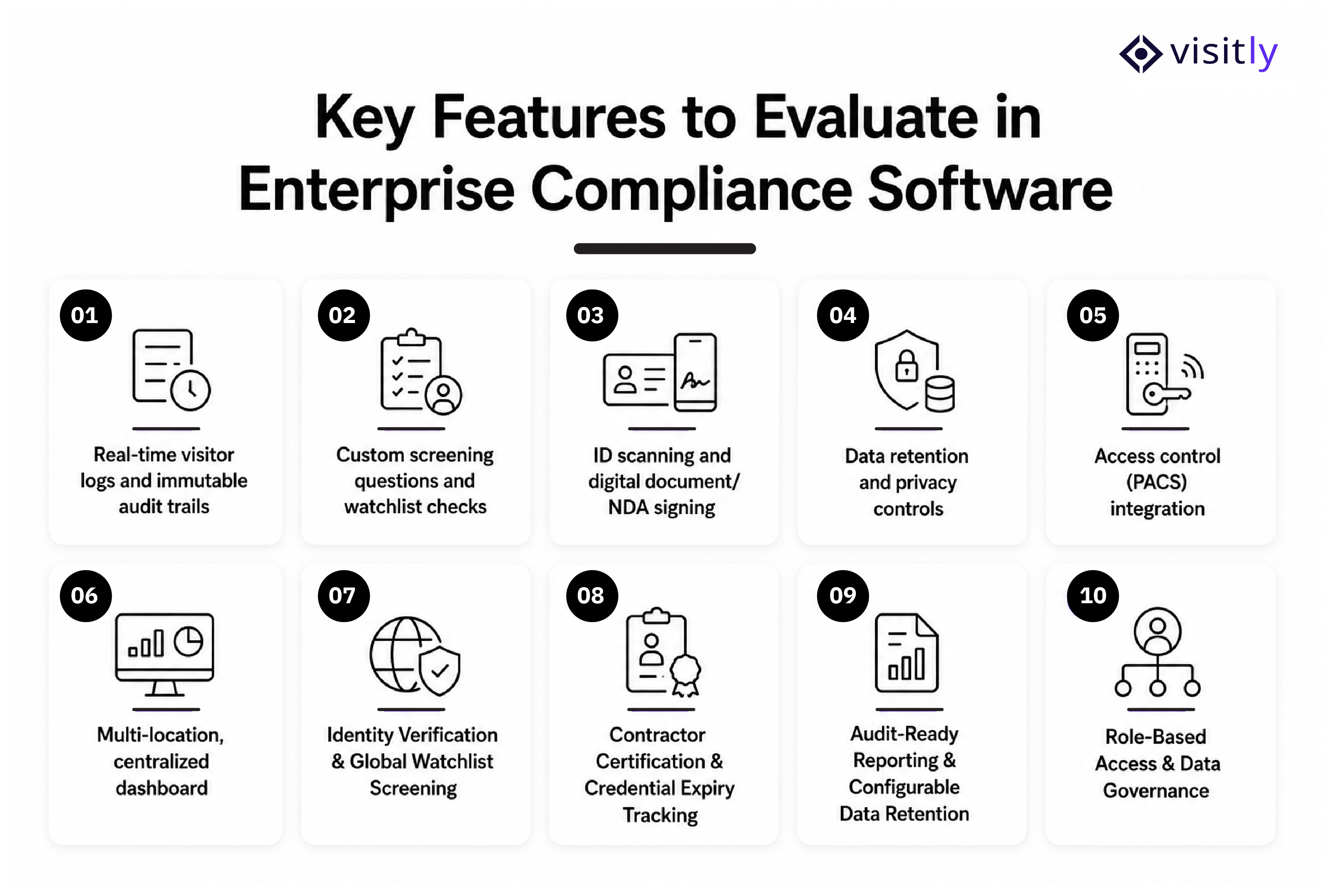
The key features to evaluate in enterprise compliance software are:
- Real-time visitor logs and immutable audit trails
- Custom screening questions and watchlist checks
- ID scanning and digital document/NDA signing
- Data retention and privacy controls (GDPR, CCPA, India's DPDP Act)
- Access control (PACS) integration
- Multi-location, centralized dashboard
- Identity Verification & Global Watchlist Screening
- Contractor Check-In & Safety Induction
- Audit-Ready Reporting & Configurable Data Retention
- Role-Based Access & Data Governance
Choosing enterprise compliance software for visitor management requires more than looking at basic check-in capabilities. Enterprises need features that help maintain accurate records, enforce security policies, support audits, and provide visibility across facilities.
The right system should combine security controls, compliance workflows, and operational efficiency in one platform.
1. Real-Time Visitor Logs and Immutable Audit Trails
A compliant digital visitor management system should automatically capture every visitor interaction from check-in to check-out. Digital visitor logs provide a reliable record of who accessed the facility, when they arrived, who they met, and when they exited.
Unlike manual registers, automated audit trails reduce missing information and provide security teams with accurate records during compliance reviews, investigations, or audits.
Key capabilities to evaluate:
- Timestamped visitor entry and exit records
- Searchable visitor history
- Complete access to activity records
- Exportable reports for compliance audits
2. Custom Screening Questions and Watchlist Checks
Visitor screening is essential for enterprises operating in regulated industries or handling sensitive facilities. A touchless visitor management system should allow organizations to create customized screening workflows based on their security policies.
For example, enterprises can collect information about visitors' purposes, health declarations, safety requirements, or authorization details before granting access.
Important capabilities include:
- Custom visitor questionnaires
- Pre-visit screening workflows
- Watchlist and restricted visitor checks
- Automated approval or rejection workflows
3. ID Scanning and Digital Document/NDA Signing
Enterprises often require visitors, contractors, and vendors to verify their identity or acknowledge workplace security policies before entering a facility. Manual document collection creates delays and makes record management difficult.
A modern system should support digital identity verification and document signing to ensure workplace compliance requirements are completed before access is granted.
Essential features include the following:
- Government-issued ID scanning
- Digital NDA signing
- Safety acknowledgement forms
- Paperless document storage
4. Data Retention and Privacy Controls (GDPR, CCPA, India's DPDP Act)
Visitor information contains sensitive personal data, making privacy management a critical part of enterprise compliance. Organizations should evaluate whether an enterprise visitor management system provides control over how visitor data is collected, stored, accessed, and deleted.
The platform should support privacy requirements while allowing compliance teams to maintain necessary records.
Evaluate capabilities such as:
- Configurable data retention periods
- Secure visitor data storage
- Access permissions for sensitive information
- Privacy compliance support for regulations like GDPR, CCPA, and India's DPDP Act
5. Access Control (PACS) Integration
Visitor management compliance should not operate as an isolated system.
Integration with Physical Access Control Systems (PACS) allows enterprises to connect visitor approvals with actual facility access.
This creates a stronger security workflow where only approved visitors receive access permissions.
Look for:
- Integration with access control systems
- Automated visitor badge printing or access activation
- Temporary visitor access management
- Immediate access removal after visit completion
6. Multi-Location Centralized Dashboard
Enterprises managing multiple offices, campuses, or facilities need centralized visibility instead of separate visitor records for each location.
A multi-location visitor management system allows security and compliance teams to monitor visitor activity, enforce policies, and generate reports across all facilities from one dashboard.
Key capabilities:
- Centralized visitor data management
- Location-specific compliance policies
- Cross-site reporting
- Standardized visitor workflows
7. Identity Verification and Global Watchlist Screening
For enterprises with strict security standards and requirements, verifying visitor identity before granting access is essential. Identity verification capabilities help reduce unauthorized entry and improve confidence in visitor screening processes.
Important features include the following:
- Identity validation workflows
- Watchlist screening
- Risk-based visitor approvals
- Enhanced verification for high-security facilities
8. Contractor Check-In and Safety Induction
Contractors often require additional verification, including certifications, licenses, insurance documents, or safety training records. Managing these manually can result in expired credentials and compliance risks.
This tracking usually sits in a contractor prequalification system, separate from visitor management. An integrated visitor management system covers contractor check-in, the safety induction and signed documents.
In the prequalification system, evaluate:
- Contractor profile management
- Certification tracking
- Expiry notifications
- Compliance document verification
9. Audit-Ready Reporting and Configurable Data Retention
Compliance teams need quick access to accurate reports during internal reviews, regulatory audits, or security investigations. A digital sign-in and out system should provide configurable reporting instead of requiring manual data collection.
Required reporting capabilities:
- Visitor activity reports
- Contractor access history
- Compliance audit exports
- Custom reporting filters
10. Role-Based Access and Data Governance
Not every employee should have access to all visitor information. Enterprise compliance software should provide role-based permissions to control who can view, edit, or manage visitor data.
This improves data governance while reducing the risk of unauthorized access to sensitive information.
Important controls include:
- User permission management
- Department-level access controls
- Administrative privileges
- Secure data visibility rules
Choosing the Right Enterprise Compliance Solutions for Regulated Industries
Different industries have different security requirements, regulatory obligations, and visitor risks. The right enterprise compliance solutions should help organizations enforce industry-specific access policies while maintaining accurate visitor records, audit trails, and workplace security standards.
1. BFSI
Banks and financial institutions manage sensitive customer data, restricted areas, and high-security facilities. A visitor management system should support identity verification, visitor screening, access tracking, and detailed audit records to meet strict security and regulatory requirements.
2. Healthcare
Healthcare organizations must protect patient privacy, control facility access, and manage visitors, vendors, and contractors in sensitive environments. Compliance-focused visitor management helps maintain visitor logs, verify identities, and support privacy requirements such as HIPAA and other healthcare data protection standards.
3. Manufacturing
Manufacturing facilities often manage contractors, suppliers, and visitors accessing production areas with safety and operational risks. Enterprises need solutions that support contractor check-in, safety acknowledgements, restricted access controls, and real-time visibility into facility occupancy.
4. Education
Schools and universities need to balance open campus experiences with visitor safety and security requirements. A visitor management system helps institutions verify guests, manage authorized access, maintain visitor records, and improve emergency preparedness.
Questions to Ask Before You Choose a Visitor Management System
Before investing in a visitor management system, enterprises should evaluate whether the solution can meet their security, compliance, and operational requirements. These questions can help decision-makers identify the right platform for their workplace needs:
1. Does the visitor management system provide complete audit trails and compliance-ready reports?
Ensure the platform can maintain accurate visitor records, generate reports, and support internal or regulatory audits.
2. Can the system integrate with our existing security and workplace systems?
Check whether it connects with access control systems, HR platforms, SSO solutions, and other enterprise tools.
3. Does it support identity verification, visitor screening, and custom approval workflows?
Evaluate whether the solution can enforce security policies based on visitor type, location, or risk level.
4. How does the platform protect and manage visitor data?
Understand its data retention policies, privacy controls, and support for regulations such as GDPR, CCPA, and India's DPDP Act.
5. Can it scale across multiple locations and departments?
Enterprises should ensure the system supports centralized management while allowing location-specific compliance requirements.
6. Does it improve emergency response and workplace safety?
Confirm whether the platform provides real-time visitor headcount, occupancy visibility, and quick access to visitor information during emergencies.
What your organization still has to do
Software supplies the controls and the records. The program around them is yours. Five practices keep it sound.
- Write a visitor policy. State how visitors are registered, how identity is checked, who approves access and how visitor data is handled.
- Review visitor records on a schedule. Check that entries are complete and that retention and deletion follow the policy.
- Train the people who run check-in. Front desk and security staff should know the procedure and what to do when a visitor is flagged.
- Plan for incidents. Decide who is told, who documents the event and who reviews it afterwards.
- Vet your vendors. Ask for the security reports and data processing terms of any vendor that holds visitor data.
Your compliance lead or counsel decides what each regulation requires of you.
Why Visitly Fits Enterprise Compliance Needs
Enterprise compliance requires more than maintaining visitor records. Organizations need a visitor management system that improves security, supports audits, and provides real-time visibility into workplace access.
Visitly helps enterprises replace manual processes with a secure digital check-in experience for visitors, contractors, and employees.
Key capabilities include:
- Modern visitor sign-in experience: Digital check-ins replace manual logs and create accurate visitor records.
- Secure visitor management: Manage visitors, contractors, and employees with structured access workflows.
- Custom screening questions: Collect required information and enforce workplace safety policies before access.
- Bulk visitor pre-registration: Register multiple visitors in advance for meetings, events, or contractor visits.
- Real-time host notifications: Alert employees through emergency notifications instantly when visitors arrive.
- Digital document signing: Collect NDAs, waivers, and safety acknowledgements digitally.
- ID scanning: Verify visitor identities and maintain reliable access records.
With these capabilities, Visitly helps enterprises improve security and compliance, simplify visitor operations, and maintain better workplace visibility.
Why Enterprises Choose Visitly for Visitor Management
- Faster check-ins: Reduce waiting times with automated digital workflows.
- Better compliance visibility: Access centralized visitor records and audit-ready reports.
- Improved workplace safety: Strengthen visitor verification and access control.
- Simple implementation: Quickly adopt a user-friendly visitor management solution.
- Scalable operations: Support growing visitor volumes and multiple locations.
Closing Thoughts
Visitor management has become a critical part of enterprise security and compliance strategies. The right solution helps organizations maintain accurate visitor records, improve workplace visibility, reduce security risks, and simplify compliance audits.
Before selecting a platform, enterprises should evaluate key capabilities such as automation, security controls, integrations, reporting, and scalability to ensure the solution can support future business needs.
With customizable workflows, secure check-ins, digital records, and compliance-focused features, Visitly helps enterprises create safer, smarter, and more efficient visitor experiences.
Make every visitor interaction secure, compliant, and effortless with Visitly. Book a demo today to see how Visitly can support your enterprise compliance goals.
FAQs
What is a visitor management system for enterprise compliance?
It is a visitor management system chosen for the records it keeps as much as for the check-in. It verifies who a visitor is, applies your screening and approval rules, captures signed documents, and writes every step to an audit trail. Those records support the compliance programs your organization runs.
What features should enterprises evaluate in visitor management software?
Evaluate the controls an auditor will ask about. That means an immutable audit trail, ID verification, watchlist screening, digital NDA signing, configurable data retention, role-based admin access and access control integration. Ask every vendor which plan includes each item, because the same feature can sit in a base plan at one vendor and the top tier at another.
Does a visitor management system make an enterprise compliant?
No. A visitor management system supplies visitor-side controls and evidence; the organization still owns its HIPAA, ITAR, CMMC or OSHA program. Visitly holds SOC 2 Type II and ISO 27001 certifications and is HIPAA compliant as a vendor, and supports those customer programs, but it does not certify or guarantee compliance. Your compliance lead or counsel makes that determination.
Can a visitor management system support compliance across multiple locations?
Yes. An enterprise system gives one admin console for all sites while each site keeps its own visitor types, documents and screening rules. Central teams can push a policy to every location and search visits across sites. Check the site limit on your plan and whether per-site administrators are supported.
How does visitor management software help during a compliance audit?
It lets you answer the auditor's visitor questions from an export instead of a paper log. You can show who entered a controlled area, when, who approved the visit and which documents were signed. Visitly keeps an immutable audit log as standard, with audit log search and export included at $2,000 per location per year.
How long does it take to deploy visitor management across an enterprise?
A basic setup can be done in under an hour. Integrations and complex setups, such as directory provisioning, access control and HR systems, take a couple of days. A multi-site rollout takes from one week to one month, depending on how ready your sites are. Talk to sales for a timeline based on your own integrations.