A visitor badge system issues every visitor a badge at check-in that shows who they are, who they came to see, where they may go and when the badge expires. It is usually part of a visitor management system, so the badge prints from the same record that holds the visitor's photo, ID check and signed documents.
From high-traffic offices to hospitals and schools, visitor badging makes the check-in process visible: anyone without a valid badge stands out. Workplace security teams judge a badging system on what the badge shows, how it expires and whether it ties into access control.
This guide covers what a visitor badge should show, the main types of visitor badges, and the 10 visitor badging system features security teams expect.
What should a visitor badge show?
A badge is useful only if a member of staff can read it from a few steps away and know whether the person belongs there. Print:
- The visitor's name and photo
- Their company and the host they are visiting
- The date and expiration time
- The areas they may enter, or a zone color
- Their visitor type, such as contractor, vendor or guest, and whether an escort is required
Leave off anything that does not help staff make that call. A badge that carries a visitor's phone number or home address shows personal data to anyone who finds it.
Types of visitor badges
- Printed label badges. Adhesive labels printed at check-in with the visitor's details and photo. The most common type, and the one most visitor management platforms print.
- Reusable badge cards. Plastic cards or lanyards handed out at the desk and returned on exit. Cheap, but they say nothing about the person wearing them and are easy to keep.
- Color-coded or zone badges. A color or band for each visitor type or area, so staff can enforce area rules at a glance.
- Self-expiring badges. Badges printed with an expiration time, or made of material that changes color after a set period, so an old badge cannot be reused.
- Digital badges. A badge in the visitor's phone wallet, sent before the visit or at check-in.
- Access-control credentials. A temporary card or code that opens only the doors the visitor is approved for, issued from the check-in record through an access control integration.
What are the 10 Key Visitor Badging System Features Security Teams Expect?
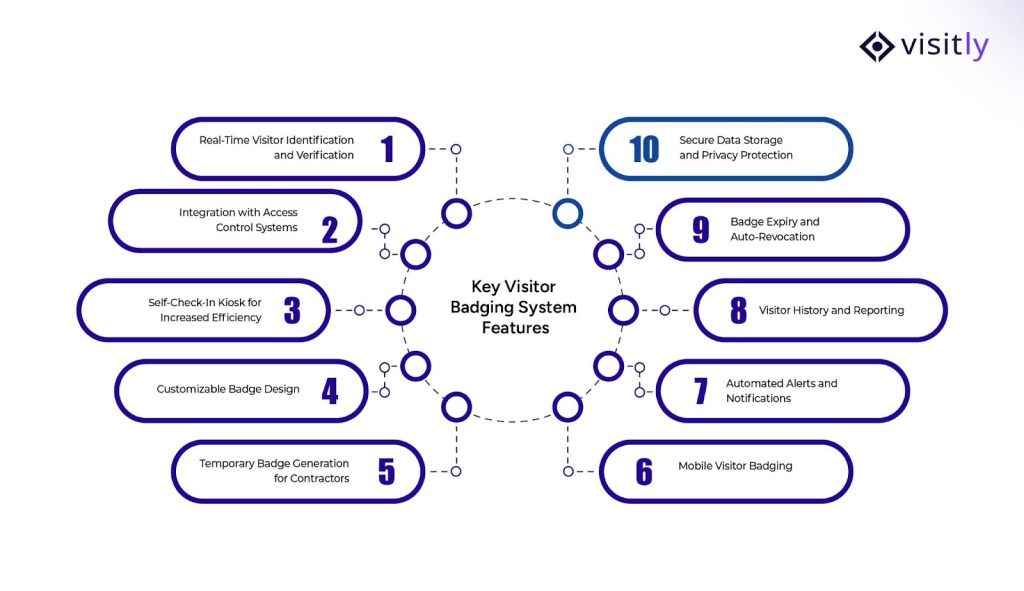
The 10 key visitor badging system features security teams expect are:
- Real-Time Visitor Identification and Verification
- Integration with Access Control Systems
- Self-Check-In Kiosk for Increased Efficiency
- Customizable Badge Design
- Temporary Badge Generation for Contractors
- Mobile Visitor Badging
- Automated Alerts and Notifications
- Visitor History and Reporting
- Badge Expiry and Auto-Revocation
- Secure Data Storage and Privacy Protection
As security management systems mature, visitor badging is how most security teams manage visitor access day to day.
These systems give security teams real-time control over access, enhancing workplace safety, compliance, and operational efficiency. In busy offices, hospitals and schools, a well-run visitor badging system reduces security risks and shortens check-in.
In this section, we highlight the 10 essential features security teams expect from an effective visitor badge to ensure a compliant, secure visitor management system.
1. Real-Time Visitor Identification and Verification
- Why It Matters:
Real-time visitor identification is the backbone of a secure building. It allows security teams to instantly verify visitors upon entry.
- Benefit:
By validating visitors in real time, businesses grant entry only to authorized individuals, effectively preventing unauthorized access and mitigating the risk of security breaches. This ensures overall safety and gives staff confidence in the security process.
- How It Works:
The visitor management system instantly pulls up data associated with visitor badges, ensuring the visitor’s details are matched to the pre-registered list. A digital ID scan and photo capture do this in seconds, without extra work for security teams.
2. Integration with Access Control Systems
- Why It Matters:
Visitor badging systems work best when they integrate with existing physical access control infrastructure. This creates a unified security ecosystem.
- Benefit:
This integration eliminates silos between your secure visitor management system and ensures smooth, real-time control over access. It helps avoid any gaps or manual entry points that could compromise security, making operations more efficient and reducing the risk of human error.
- How It Works:
The system directly links to keycard readers, facial recognition systems, biometric scanners, or mobile access systems. This allows your visitor badges to automatically provide entry to designated areas, preventing unauthorized access without slowing people down.
3. Self-Check-In Kiosk for Increased Efficiency
- Why It Matters:
Self-service kiosks not only speed up the check-in process but also reduce staff workload, allowing them to focus on more important tasks.
- Benefit:
Visitor sign-in kiosks are the perfect solution for businesses with high visitor volumes. They speed up check-in, reduce wait times, and ensure visitor data is accurately entered without manual intervention. This also improves the visitor experience by keeping processes moving quickly.
- How It Works:
Visitors approach the kiosk, enter their details, select the host they are meeting, and print their own visitor badge. This process is automated, ensuring accuracy and reducing the need for additional front-desk resources.
4. Customizable Badge Design
- Why It Matters:
Visitor badges must display essential information. Customizable designs can show names, access levels, hosts, and event details.
- Benefit:
Custom badges make it easy to distinguish among different types of visitors, such as contractors, VIPs, and standard visitors. This not only helps staff and security identify them quickly but also reinforces your brand identity and security standards.
- How It Works:
The system lets you create personalized badges with a range of design options. You can incorporate logos, specific colors, and unique identifiers to designate different visitor types and access levels. The design is adaptable for quick changes, making it ideal for varying needs.
5. Temporary Badge Generation for Contractors
- Why It Matters:
Contractor management often requires limited access to specific areas, and their access should be closely monitored. Temporary badges give you precise control over their access duration and location.
- Benefit:
Temporary badges are ideal for guests requiring short-term access. They enable efficient management by limiting access to authorized areas for a set period and reducing security risks.
- How It Works:
You can create time-sensitive, restricted badges for contractors with defined expiration times. Once the time expires, the badge automatically becomes invalid, preventing anyone from using it after the approved period.
6. Mobile Visitor Badging
- Why It Matters:
Mobile visitor badging is a modern solution that improves security while delivering a contactless experience. It enhances convenience and reduces physical contact.
- Benefit:
Mobile badging offers a fast, secure way to verify visitors without physical cards. Visitors receive badges on their smartphones, improving convenience and reducing wait times.
- How It Works:
Visitors receive a digital badge on their mobile device after completing the pre-registration process. They simply show the mobile badge at entry points, where security staff can scan the code for immediate access.
7. Automated Alerts and Notifications
- Why It Matters:
Real-time alerts and emergency notifications help security teams and hosts stay informed the moment a visitor arrives. This proactive approach ensures that security teams are always prepared for the next steps in managing visitor flow.
- Benefit:
Instant notifications alert hosts upon guest arrival, improving operations and keeping the security team informed of all visitors.
- How It Works:
As soon as a visitor checks in, the system automatically sends alerts via SMS, email, or app notifications to the host. Security teams can also be alerted to any discrepancies or suspicious activity.
8. Visitor History and Reporting
- Why It Matters:
Visitor records are what security audits and regulators ask for. A historical log provides a comprehensive view of all visitor activity in the facility.
- Benefit:
Having a record of who visited, when, and for what purpose ensures accountability and supports investigations, compliance audits, and legal requirements. It also helps businesses track and improve their visitor management practices over time.
- How It Works:
Visitor management software stores detailed records of all visitors, including their check-in and check-out times, access points, and purpose of visit. Security teams can pull up reports for auditing, regulatory compliance, or operational assessments.
9. Badge Expiry and Auto-Revocation
- Why It Matters:
A visitor badge should not give access beyond the authorized period. Automatic expiry and revocation prevent the misuse of access privileges.
- Benefit:
This feature helps prevent unauthorized access after the visitor’s scheduled time has passed. Automatic revocation enhances security and ensures badges are only valid during authorized times.
- How It Works:
Once the badge’s set expiration time is reached, the system automatically revokes the badge’s access, rendering it invalid. No one has to collect the badge or switch it off by hand.
10. Secure Data Storage and Privacy Protection
- Why It Matters:
The security of personal and visitor data is a critical concern, especially amid increasing regulatory requirements such as GDPR.
- Benefit:
Ensuring that visitor data is stored securely and handled in compliance with data protection laws helps businesses avoid potential legal and reputational risks.
- How It Works:
All visitor information is securely encrypted and stored in compliance with data protection regulations. Only authorized personnel may access visitor data, and it is securely destroyed once its retention period has expired.
Printed or digital badges: which to use
Mobile badging raises a fair question: does a site still need printed badges? The two do different jobs.
- A printed badge is visible to everyone. Staff can see across a lobby or a production floor that a person has checked in, who their host is and whether the badge has expired. It needs a printer and badge stock at each check-in point.
- A digital badge sits in the visitor's phone wallet. It can arrive before the visit and cannot be left on a jacket. Nobody sees it unless the visitor shows it.
Use printed badges where staff are expected to challenge an unbadged person: plants, labs, hospitals and any site with escort rules. Digital badges suit lower-risk offices and repeat visitors. Visitly prints badges with name, host, photo, authorized areas and expiration, and offers digital badges for Apple and Google Wallet.
Badge colors and expiry: a worked example
Color lets staff enforce area rules without reading the badge. A basic scheme has three levels.
- Red: vendor or contractor, escort required.
- Blue: client, lobby and meeting rooms only.
- Yellow: executive guest, wider access approved by the host.
Print the expiration time on every badge, so a badge from this morning cannot be reused this afternoon. Then tell employees what each color means. The scheme works only if the person at the lab door knows that a red badge without an escort is a reason to stop someone. Visitly supports per-zone and zone-color badges and prints the authorized areas and expiration on the badge.
How Visitly’s visitor badging system works
Managing visitors well starts with knowing who is on site and where they may go.
Visitly’s visitor badging system prints each badge from the same check-in record that holds the visitor’s photo, screening result and signed documents.
Here is how it supports security and compliance.
1. Fast check-in with verified badges
With Visitly, guest check-in is quick and verified. Upon arrival, visitors easily provide their information, which is instantly verified.
Their badge is generated in real time, ensuring only authorized visitors can access restricted areas. Security teams can promptly identify who is on-site, reducing the chance of unauthorized access or security breaches.
Benefit: Faster check-ins, reduced errors, and a secure visitor log for a real-time access control entry system.
2. Integration with Workplace Safety Protocols
Visitly’s visitor badging system works with workplace safety software and your safety protocols.
By linking visitor check-ins to access control systems, businesses can automatically account for all visitors during emergencies.
This integration ensures safety measures are in place, enabling smooth evacuations and real-time compliance.
Benefit: Improved safety coordination and compliance with industry regulations, ensuring employee check-in and visitor safety during emergencies.
3. Data Security and Compliance in Visitor Management
One of the primary concerns with a digital visitor management system is the secure handling of sensitive data. Visitly ensures that all visitor data is stored and managed in compliance with relevant data privacy regulations, including GDPR and HIPAA.
With encrypted databases and secure digital document signing features, businesses can protect sensitive information while supporting compliance with privacy laws.
Benefit: Meets privacy regulations, safeguards sensitive data, and provides peace of mind to both businesses and visitors.

Deployment checklist for badge printing
- Choose a supported badge printer for each check-in point. Visitly supports Zebra and Epson badge printers.
- Stock badge labels at every site, with a spare roll at the desk.
- Place the iPad kiosk where visitors see it on entering, and confirm the kiosk and printer connect on the site network.
- Design the badge template: name, photo, host, date, permitted areas, expiration and the color for each visitor type.
- Turn on host notifications, so no badge prints without the host knowing.
- Check that every badged visitor appears on the evacuation roll.
- Add the privacy notice and any documents to sign to the check-in flow.
- Run a test visit for each visitor type before go-live.
Closing Thoughts
A visitor badging system does its job when staff can tell at a glance who belongs where.
Key features such as real-time visitor identification, integration with access control systems, customizable badges, and automated alerts can help prevent security breaches, speed up check-in, and ensure only authorized visitors access restricted areas. These features not only protect your premises but also improve the overall visitor experience.
Visitly’s visitor badging system offers all these capabilities, helping you simplify check-ins while maintaining high security and compliance standards.
Talk to our team or contact Visitly to see badge printing, zone colors and expiry set up for your sites.
FAQs
What is a visitor badging system?
A visitor badging system issues each visitor a badge at check-in that shows who they are, who they are visiting and how long they may stay. It is usually part of a visitor management platform, so the badge is printed from the same record that holds the visitor's photo, signed documents and check-in time.
What is the purpose of a visitor badge?
A visitor badge lets anyone on-site see at a glance that a person has checked in and where they are allowed to be. A useful badge shows the name, photo, host, date and permitted areas. Staff can then challenge someone with no badge, an expired one, or one that does not match the area.
What are the different types of visitor badges?
The main types are printed paper badges, digital badges held in a phone wallet, and badges that differ by visitor type or zone. Visitly prints badges with name, host, photo, authorized areas and expiration, supports per-zone and zone-color badges, and includes digital badges for Apple and Google Wallet at $2,000 per location per year.
Can a visitor badging system integrate with access control?
Yes, many platforms connect to the building's access control system so a visitor's credential comes from the check-in record and not from a manual step. Visitly integrates with Genetec Security Center, Brivo, LenelS2 Netbox, Kisi and C CURE 9000; talk to sales about these integrations. Confirm your exact system and version with any vendor.
What hardware do we need to print visitor badges?
You need a label printer at each check-in point and the badge stock it uses. Visitly supports Zebra and Epson badge printers and charges no per-printer fee. Some vendors price printing separately: FacilityOS lists badge printing as an optional add-on on its VisitorOS Corporate tier. Vendor details as of Q4 2026.
Do visitor badges help meet escort and audit requirements?
Yes, badges make escort rules visible and the badge record supplies evidence. CMMC Level 1 physical protection practices call for escorting visitors, monitoring their activity and keeping logs of physical access. A badge marked escort required, with an expiration and a matching log entry, supports that practice. Your compliance lead decides what your program requires.